

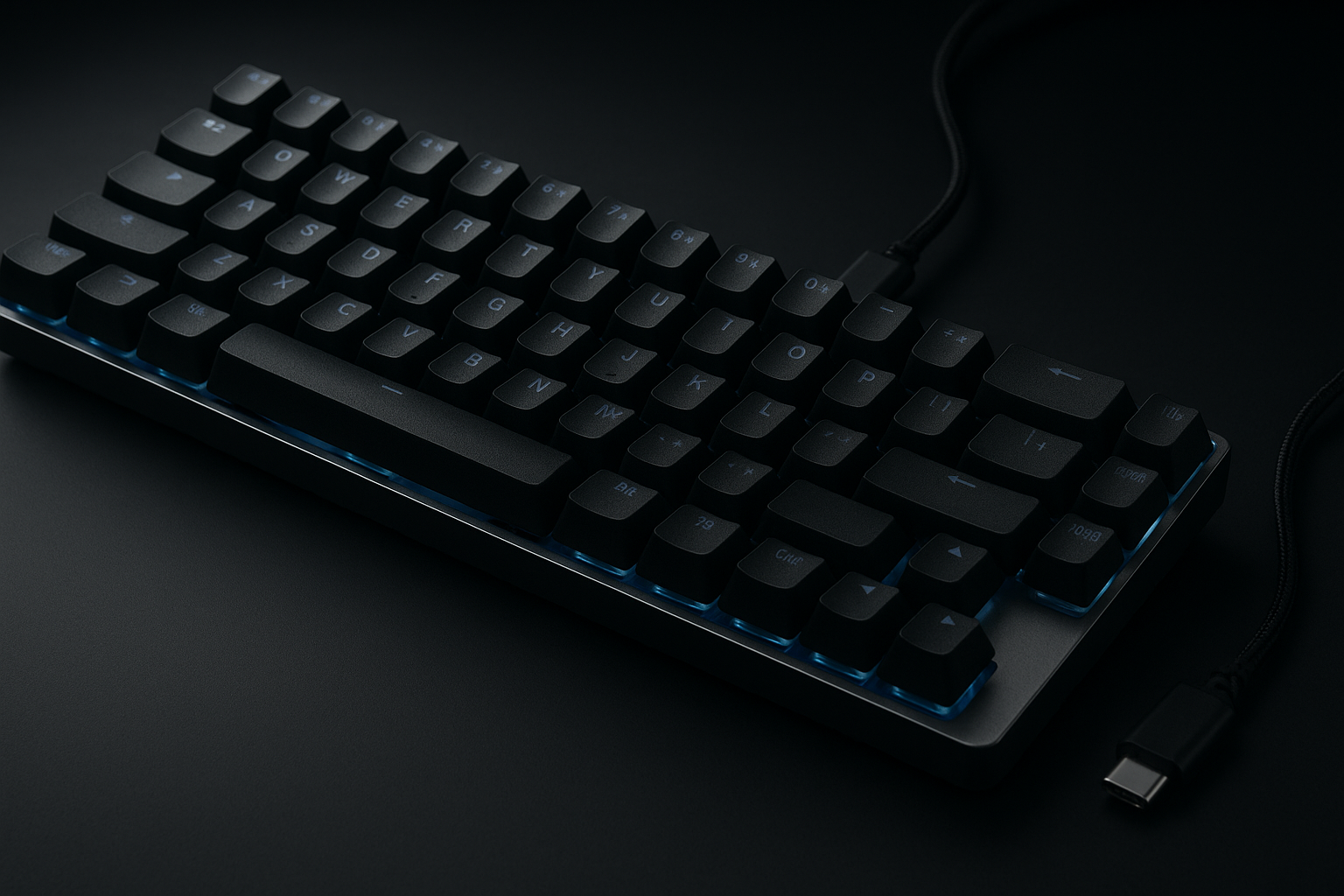
GEODMAER 65% Gaming Keyboard Review: What You Get for $16.97
A compact gaming keyboard usually asks you to compromise somewhere: give up the number pad, accept a crowded function layer, or pay more for mechanical switches. The GEODMAER 65% Gaming Keyboard takes a simpler route. For a listed price of $16.97, it combines a 65% layout with separate arrow keys, membrane switches, backlighting, and a detachable USB Type-C cable.
That makes the central question fairly clear: can a $16.97 wired keyboard provide genuinely useful gaming features without the price of a mechanical model? It can, provided your priorities are a small footprint, quiet operation, and straightforward Windows use rather than enthusiast-level switch feel or wireless freedom.
The keyboard is currently shown as in stock, although both price and availability can change. Its black-and-silver-gray design also gives it a more distinctive appearance than a plain all-black office board. In 2026, when even inexpensive gaming peripherals are expected to offer lighting and shortcut controls, the GEODMAER looks sensibly equipped on paper. The trade-off is that the supplied information confirms a membrane design, limited documented compatibility, and no number pad.

Product Overview and Key Specifications
The 65% format keeps the familiar central typing area and a dedicated arrow-key cluster while removing the number pad. In practical use, that means you retain conventional navigation for games, documents, and web pages without giving the keyboard the full width of a standard desktop model.
| Feature | Supplied specification |
|---|---|
| Layout | 65%, keys, no number pad |
| Switch construction | Membrane |
| Connection | Wired, detachable Type-C cable |
| Anti-ghosting | 26-key no-conflict support |
| Media controls | 11 media buttons |
| Lighting | Backlighting with always-on and breathing modes described |
| Stated lifespan | More than 10,000,000 keystrokes per key, according to the manufacturer |
The description calls it both compact and fully functional, but those phrases need some interpretation. The media buttons appear to be function-layer controls rather than a bank of separately identified physical media keys, and the supplied details do not name each control.
Transparent illuminated legends are confirmed, but RGB lighting is not. You should not assume per-key colours, desktop software, or extensive effect selection. The intended use is Windows PC and laptop gaming; console and alternative operating-system support is not documented here, so verify it on the current listing if that matters to you.
GEODMAER 65% Gaming Keyboard Layout and Desk Use
Removing the number pad can change how your desk feels more than you might expect. The mouse sits closer to the typing area, leaving more lateral room for broad, low-sensitivity movements in shooters and making the keyboard less intrusive on a narrow desk. If you work in a dorm room, share a table, or regularly move between spaces, that reduction is practical rather than cosmetic.
The separate arrow keys are a meaningful choice. Some compact boards hide navigation behind a function layer, which is manageable for occasional use but irritating when you edit documents or play games that depend on directional input. Here, the arrows remain immediately available, while the absence of the number pad keeps the overall shape restrained.
Portability is another clear use case. The product description says the keyboard can fit into a backpack, making it suitable for travel, LAN events, student rooms, or a shared workspace. Before you order, use this fit check:
- Measure the section of desk where the keyboard will sit, including room for your mouse.
- Ask whether you use a number pad for work, accounting, spreadsheets, or frequent code entry.
- Picture your hands on separate arrow keys and confirm that this arrangement matches your normal navigation habits.
The GEODMAER 65% Gaming Keyboard is therefore best viewed as a deliberate space-saving layout, not simply a smaller full-size board. Its usefulness depends on what you do after the number pad disappears.
Typing Feel, Membrane Construction, and Ergonomics
Membrane construction generally keeps a keyboard quieter and less expensive than a true mechanical model. That may be welcome in a bedroom, office, or shared room, where sharp switch clicks can become distracting. The compromise is a less distinctive tactile response and typically less consistency from key to key than you would expect from a well-made mechanical board.
GEODMAER describes the key feel as mechanical, but the product data also clearly identifies the keyboard as membrane. Read that claim as imitation mechanical feel, not as evidence of mechanical switches. If you enjoy the crisp bump, audible feedback, or replaceable-switch ecosystem associated with mechanical keyboards, this is unlikely to satisfy that particular preference.
The stated ergonomic design and keycap height are intended to support longer sessions. They do not, however, establish the inclusion of a wrist rest or adjustable feet, so those features should not be presumed. Comfort will depend on your desk height, hand position, and preferred keyboard angle.
After setup, test it rather than deciding from photographs. Place it flat or at the angle you normally use, keep your wrists neutral, type continuously for several minutes, and then play a game requiring repeated movement and modifier presses. The listed lifespan of more than 10,000,000 keystrokes is a manufacturer claim; it should not be treated as proof that every unit will last that long in every environment.
Wired Connection, Detachable Type-C Cable, and Anti-Ghosting
A wired connection removes two routine annoyances: there is no battery to charge and no wireless pairing process to troubleshoot. For a desktop or laptop that stays in one place, the constant connection is uncomplicated. The description also claims ultra-low input latency, although no polling rate or measured response-time figure is supplied, so you should not turn that marketing statement into a precise performance expectation.
The detachable Type-C cable is useful when packing the keyboard or replacing a damaged lead. The supplied information does not state the cable length, the connector used at the computer end, or whether a spare cable is included. If the keyboard will sit far from your laptop, check the current listing before assuming the included lead will reach comfortably.
Its 26-key no-conflict specification means the design is intended to recognize simultaneous input for up to keys in the stated test or design context. That is valuable for combinations of movement, modifiers, and actions, but it is not unlimited anti-ghosting across every conceivable combination.
The Fn+Win shortcut locks the Windows key. During a game, that can prevent an accidental Windows-key press from switching you to the desktop. Use this setup sequence before relying on it:
- Connect the cable and type in a text field.
- Press several game controls together, including movement and modifier keys.
- Activate the Windows-key lock and test the key outside a match.
Backlighting and Media Controls in Daily Use
The two-colour injection-molded keycaps use transparent legends so characters remain visible in a dim room. That is a practical benefit when you are learning the layout or working without a desk lamp, though visibility will still depend on brightness, viewing angle, and the surrounding light.
The supplied lighting controls are:
- Light key: turns the backlight on or off.
- Fn + light key: switches the listed lighting modes.
- Fn + Up/Down: raises or lowers brightness.
- Fn + Left/Right: slows or speeds the breathing effect.
The description names an always-on mode and a breathing mode. It does not confirm RGB colour selection, per-key lighting, software control, or a large effect library, so buyers seeking custom desktop profiles should moderate their expectations.
Eleven media buttons add shortcuts for common playback or system functions without forcing you to leave a document or game. The listing does not identify each button, however, and function-layer behavior can vary by firmware, Windows settings, and media application. Test your preferred music or video app before assuming every shortcut will behave exactly as expected.

What Customers Are Saying
The supplied product data does not include a customer rating, review count, or a visible review extract, so there is no responsible basis for claiming that buyers repeatedly praise its sound, brightness, cable, or durability. I also can’t report a genuine frequency of complaints about wobble, key feel, or Fn shortcuts without the live review record. Treat that absence as a limit on this review, not as evidence that all owners have had the same experience.
There are still useful questions to ask when you inspect the listing yourself. Look for comments confirming whether the compact footprint leaves enough mouse room, whether the separate arrows feel natural, whether the membrane action is quiet, and whether the black-and-silver-gray keycaps resemble the images. Pay attention to disagreements: one buyer may appreciate quiet keys while another may have expected a genuine mechanical response.
For a more reliable picture, read the newest critical reviews first, then compare them with older comments about layout and durability. Separate first-day reactions from reports after several weeks or months. A comment that says “works out of the box” tells you little about long-term key consistency, while a dated ownership report is more useful for that question.
At this price, praise for value, portability, easy wired setup, and basic gaming convenience would be meaningful, but it should not be confused with proof of premium construction. The current listing should be checked immediately before purchase because review history, stock, and pricing can change.
GEODMAER 65% Gaming Keyboard for Gaming and Office Work
For gaming, the feature set is sensible: wired operation, the stated 26-key no-conflict support, a Windows-key lock, separate arrow keys, and backlighting. Games that combine movement with modifiers and action inputs are the clearest match. That includes many shooters, action games, strategy titles, and role-playing games, although the supplied details do not provide a polling rate or measured response time.
The compact form also leaves more room for a mouse, while the membrane construction should be more workplace-friendly than a loud mechanical board. Separate arrows help when you move between games and ordinary navigation, so the keyboard does not force you into a gaming-only routine.
Office work exposes the layout’s limits. If you enter figures frequently, the missing number pad may slow you down or require a separate accessory. You should also confirm that the media shortcuts match your workflow rather than assuming all controls will map perfectly to every application.
Give it a two-day trial if you can. On the first day, use it for ordinary typing and spreadsheet navigation; on the second, play a full gaming session and test the backlight in low light. Notice whether your wrists remain neutral, whether the arrow position feels natural, and whether the shortcuts are accessible without interrupting your work.
GEODMAER 65% Gaming Keyboard Compared With Alternatives
The Redragon K630 Draconic and RK ROYAL KLUDGE RK68 are sensible names to investigate if you are comparing compact keyboards, but the supplied product data does not include their current listings. I therefore can’t honestly state their live prices, ratings, review counts, warranties, included cables, switch options, or confirmed lighting controls. Those details should be checked side by side rather than guessed from the model names.
Use the same comparison grid for all three products:
| Criterion | What to verify |
|---|---|
| Layout | Whether arrows remain separate and whether a number pad is absent |
| Switches | Membrane versus mechanical, plus the exact switch type |
| Connection | Wired only or wireless as well, and whether the cable is detachable |
| Gaming input | The exact anti-ghosting or rollover claim |
| Lighting | Basic backlight, RGB, software, and onboard controls |
| Ownership | Warranty, current customer rating, review count, and price |
The GEODMAER is most compelling when you want quiet membrane operation, a detachable cable, and a small wired footprint at the lowest practical cost. A mechanical or wireless alternative may be better if switch feel, hot-swapping, or cable-free use matters more. The right choice depends on the feature you will use every day, not the longest specification list.
Who Should Buy This Keyboard—and Who Should Look Elsewhere
This keyboard makes the most sense for a budget-conscious PC gamer who wants a smaller desk setup without learning an unfamiliar navigation layout. Students, travellers, small-desk users, first-time gaming-keyboard buyers, and people who prefer quieter membrane keys are all plausible matches. The low listed price also makes it easier to justify as a replacement, dorm-room accessory, secondary board, or inexpensive starter peripheral.
You should look elsewhere if genuine mechanical switches are non-negotiable. The same is true if you rely heavily on a number pad, need wireless operation, or expect software-based RGB profiles and advanced customization. Those are not minor omissions when they define how you work or play.
Your decision can be straightforward:
- Choose it if a wired 65% layout, separate arrows, basic backlighting, and quieter membrane feel cover your priority list.
- Skip it if mechanical switch behavior, wireless freedom, numeric entry, or programmable lighting is essential.
Before ordering, confirm the current price and stock status, check compatibility with your operating system or device, and read the latest critical customer comments. That final check matters because the supplied information establishes intended Windows use but does not establish console support, alternative-platform behavior, or a warranty.
Value Assessment at $16.97
At the listed $16.97, the value comes from the combination rather than from any single premium component. You receive a compact 68-key layout, separate arrows, a detachable Type-C cable, backlighting, media buttons, a Windows-key lock, and stated 26-key no-conflict support. The manufacturer also claims more than 10,000,000 keystrokes per key and UV treatment intended to reduce fading.
That price does not establish mechanical switches, RGB software, premium stabilizers, wireless connectivity, a particular cable length, or a long warranty. None of those should be assumed unless they appear on the current listing. The claimed lifespan is also best understood as a manufacturer specification, not an independent durability certification.
Use a cost-versus-priority test. If your main goals are saving desk space, keeping noise down, and having a dependable wired board for Windows gaming, the feature bundle is attractive for the money. If you are trying to recreate the feel of an enthusiast mechanical keyboard, paying more for a verified mechanical alternative may produce better value even though the initial cost is higher.
Check that the price is still $16.97 and that the product remains in stock before deciding. If the amount rises substantially, reassess whether basic backlighting and membrane construction still justify the purchase. At the current listed price, the GEODMAER 65% Gaming Keyboard is a practical low-cost option, with its strongest case resting on compactness, quiet use, and uncomplicated wired gaming rather than premium customization.
Pros and Cons
Pros
- Low listed price of $16.97 for a compact wired gaming keyboard.
- Separate arrow keys make navigation easier than on many smaller layouts.
- Detachable Type-C cable is practical for storage and replacement.
- Backlighting, a Windows-key lock, 26-key no-conflict support, and media buttons provide useful everyday extras.
- Membrane construction should be quieter and less expensive than a true mechanical design.
Cons
- Membrane switches will not match the consistency or tactile character of a true mechanical keyboard.
- There is no number pad, which limits spreadsheet work and frequent number entry.
- The supplied information does not confirm RGB customization, software support, wireless operation, cable length, or console compatibility.
- The 26-key anti-ghosting claim is useful but does not mean every possible key combination is recognized simultaneously.
Final Verdict
Key Takeaways
- The keyboard offers a small wired footprint, separate arrow keys, backlighting, a detachable Type-C cable, and basic gaming-oriented shortcuts at a low listed price.
- Its membrane construction should appeal to people who prefer quieter typing, but it will not provide the genuine switch feel or customization of many mechanical alternatives.
- The lack of a number pad is helpful for desk space and mouse movement but inconvenient for frequent spreadsheet or numeric work.
- The supplied product information does not include a rating, review count, cable length, warranty, polling rate, or confirmed compatibility beyond Windows PCs and laptops.
- It is most convincing as an inexpensive starter, replacement, travel, or secondary keyboard rather than an enthusiast upgrade.
Frequently Asked Questions
What type of keyboard is the GEODMAER 65% Gaming Keyboard?
It is a 65% wired membrane keyboard with keys, separate arrow keys, backlighting, a detachable USB Type-C cable, 26-key no-conflict support, and media buttons. It has no number pad.
Is it compatible with consoles or non-Windows devices?
The product description identifies Windows PCs and laptops as its intended platforms. Compatibility with consoles, macOS, Linux, tablets, and other devices is not established by the supplied information, so check the current listing before ordering.
Does it have mechanical switches?
No. The description says it offers an imitation mechanical feel, but the keyboard uses membrane construction. You should expect a quieter, lower-cost typing experience rather than the switch behavior of a mechanical model.
Can you customize the backlighting?
The listed controls are the light key for on/off, Fn plus the light key for lighting modes, Fn plus Up or Down for brightness, and Fn plus Left or Right for breathing speed. The supplied details do not confirm RGB, per-key control, or software customization.
How durable is the keyboard?
The listing claims more than 10,000,000 keystrokes per key. That is a manufacturer claim, not an independently verified durability result, so treat it as a stated design target rather than a guarantee.
Disclosure: As an Amazon Associate, I earn from qualifying purchases.
