

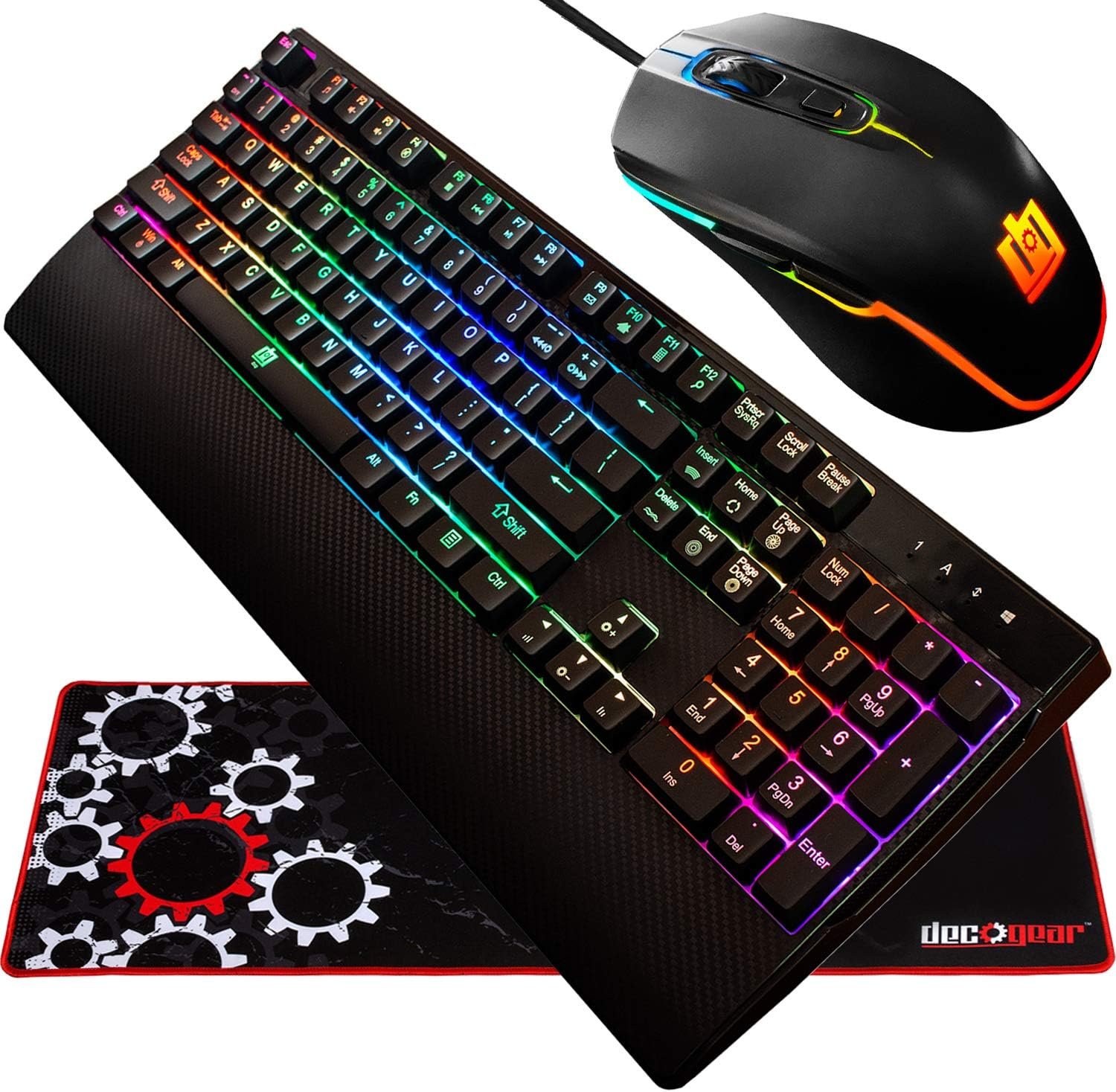
Deco Gear Gaming Accessory Bundle – Mechanical 18-Mode Key RGB Keyboard with 11-Mode RGB Gaming Mouse and 32" x 12" Extended Mouse Pad
A complete desk upgrade doesn’t have to begin with three separate product searches. The Deco Gear gaming bundle puts a mechanical keyboard, RGB mouse, and extended pad together for $89.98, which gives first-time PC gamers and students a straightforward way to replace basic office peripherals.
The appeal is practical rather than extravagant. You get lighting, a clicky mechanical feel, anti-ghosting, adjustable mouse DPI, six mouse buttons, and a surface intended to keep the keyboard and mouse visually and physically together. You don’t get the assurances normally associated with more expensive enthusiast equipment: wireless connectivity, a documented software ecosystem, or detailed sensor specifications are not established by the supplied listing.
That makes this an entry-level desktop upgrade for 2026. If you need the whole setup and enjoy the classic click-clack of Blue switches, the price is easy to understand. If you already own a capable keyboard or mouse, however, the bundle’s value becomes less compelling because one unused component still forms part of the purchase.
The products are listed as in stock. The sections below examine what is included, how the controls should work in everyday use, what the available review record can—and cannot—tell you, and whether the combined hardware earns consideration at this price.

Product overview: what comes in the Deco Gear gaming bundle
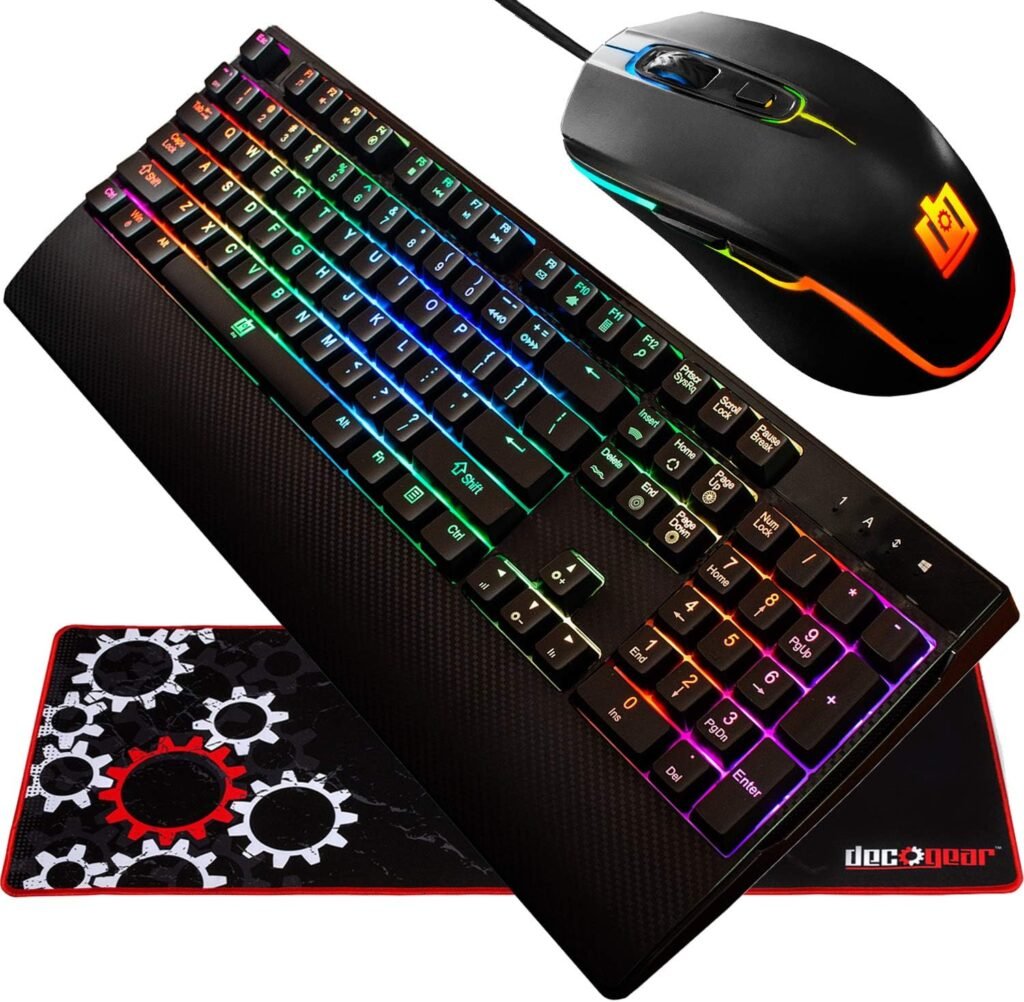
The Deco Gear gaming bundle contains three coordinated accessories: a 104-key mechanical RGB keyboard, an RGB optical gaming mouse, and a 32-inch by 12-inch extended water-resistant gaming pad. The keyboard’s full-size format is useful beyond gaming because it includes a number pad and the dedicated navigation area many people expect for spreadsheets, schoolwork, and office tasks.
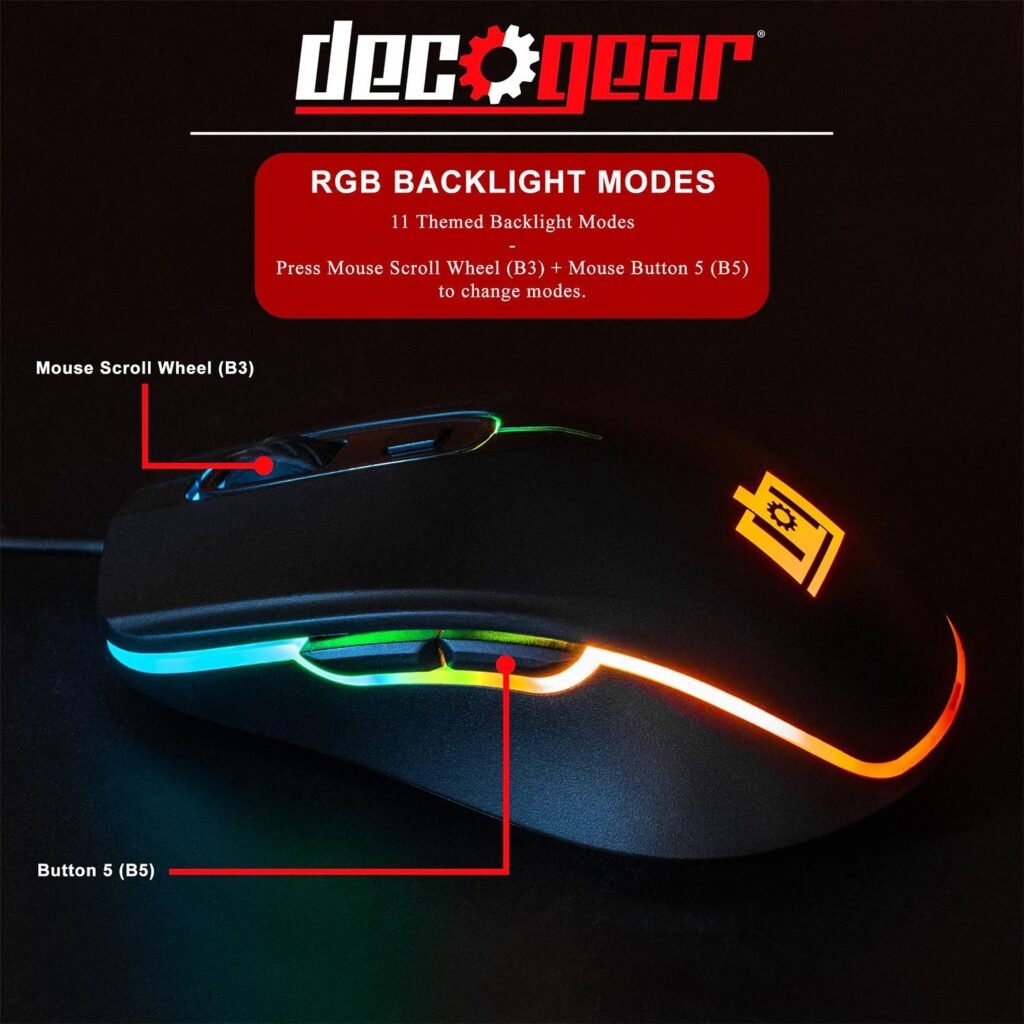
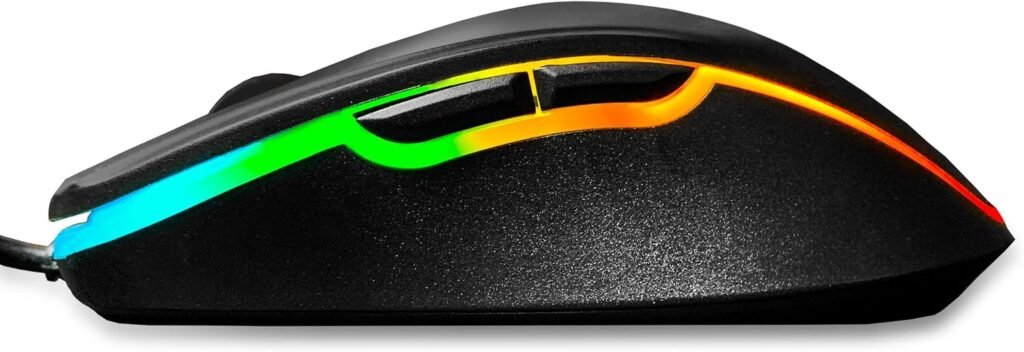
Lighting is handled through pre-programmed controls rather than a confirmed desktop software platform. The keyboard offers 18 RGB modes, while the mouse offers 11 lighting modes. Treat these as appearance options, not processing or response improvements; their main benefit is letting you coordinate the desk without buying lighting accessories separately.
The supplied information describes a desktop-oriented setup but does not confirm cable length, included software, operating-system support, or console compatibility. Those omissions matter if your computer is positioned far from the desk, or if you expect to save custom profiles. Check the current listing and packaging details before ordering.
| Feature | Specification |
|---|---|
| Listed price | $89.98 |
| Availability | In stock |
| Keyboard | 104-key full-size mechanical layout |
| Switch type | Outemu Blue |
| Keyboard lighting | 18 RGB modes |
| Mouse lighting | 11 RGB modes |
| Mouse controls | Six buttons; adjustable DPI stated |
| Mouse pad | 32″ x 12″, water-resistant surface |
| Pad construction | Non-slip backing and stitched edges |
Keyboard performance and 18-mode RGB lighting
The keyboard’s defining choice is its Outemu Blue switch. Each press is designed to provide tactile feedback and a noticeable click, which can make typing feel deliberate and satisfying. For a player who likes to feel a key activate, that character may be more appealing than the muted, soft response of a membrane board.
There is a cost, and it is audible. The click-clack can carry across a shared room, disturb someone working nearby, or become irritating during late-night play. Before choosing this keyboard, ask yourself a simple question: will the sound feel reassuring after an hour, or merely loud? Your answer matters more than the lighting count.
The 104-key arrangement gives you the familiar number pad, navigation cluster, function row, and standard gaming keys. It is versatile, but it also takes more horizontal desk space than a tenkeyless or compact keyboard. The listing does not provide exact keyboard dimensions, so shoppers with a narrow desk should confirm the physical measurements before purchase.
Anti-ghosting is a useful inclusion for games that require several keys to be held or pressed together. It helps reduce the risk of a key input being missed, but it is not the same as a stated polling rate, measured switch latency, or a premium rollover specification. The product data does not supply those performance figures.
The RGB modes are best viewed as a quick visual customization system. After setup, connect the keyboard, open a text field, and test every key. Then cycle through the lighting modes, check brightness in your room, and try several simultaneous inputs in the games you actually play. That short test tells you more than the number of presets does.

Mouse control, ergonomics, and six-button layout
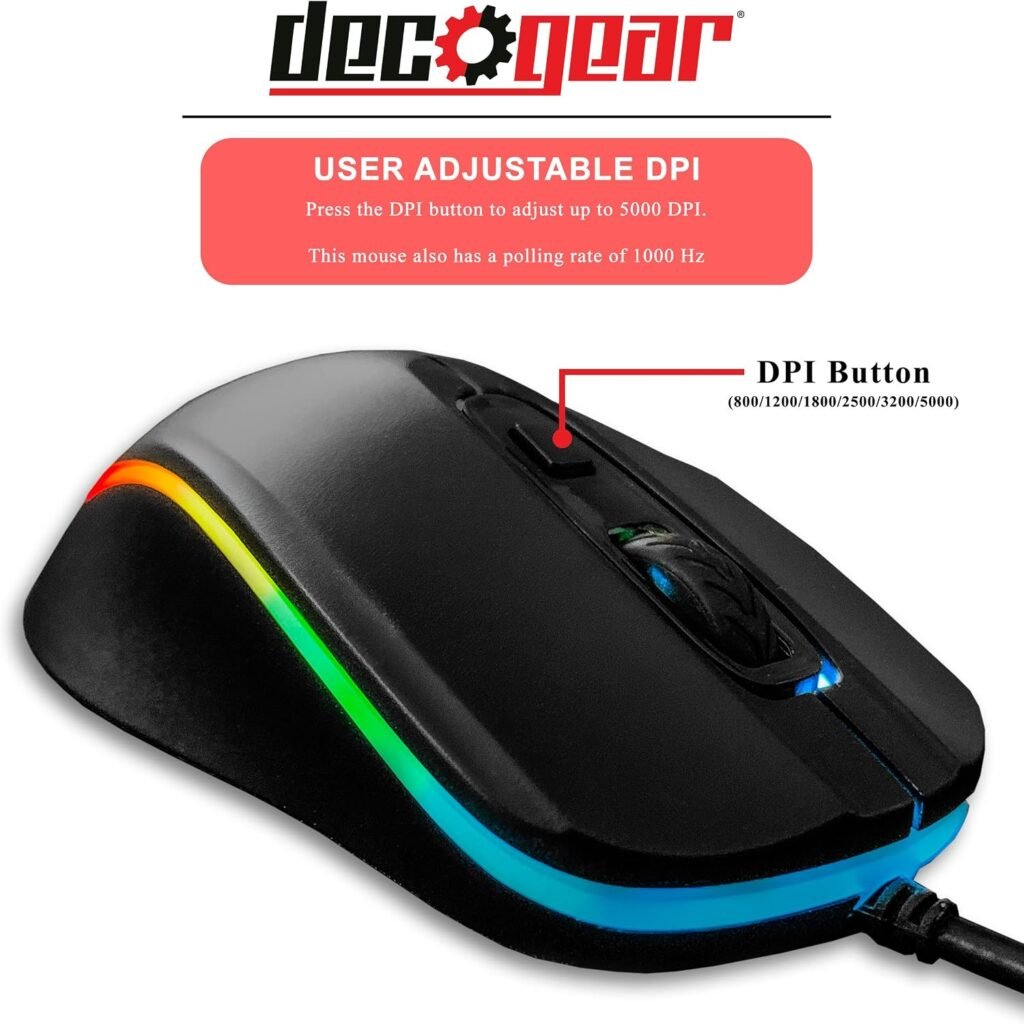
The mouse is aimed at players who want more control than a basic two-button office model. Its listing identifies adjustable DPI, a high polling-rate claim, six buttons, RGB lighting, and an optical sensor. Adjustable DPI lets you tune pointer speed or aim sensitivity, although the supplied product information does not state the exact DPI range or the numerical polling-rate figure.
That missing information is not automatically a flaw, but it limits a precise performance assessment. If you care about a particular sensitivity range or polling standard, verify those numbers on the current listing or packaging rather than assuming that “high” means a specific figure.
Six buttons can be useful in several ways. You might assign reload, melee, push-to-talk, or browser controls, reducing the need to move your hand to the keyboard. The listing says you can map the controls, but the supplied data does not confirm whether remapping requires software, onboard memory, or a particular operating system.
The endurance figures are presented as 3 million, million, and million clicks. These should be understood as component or button durability claims, not a promise that every mouse will deliver an identical lifespan under every grip, environment, and clicking habit.
Ergonomics will depend on your hand size and grip, neither of which can be inferred safely from the listing. Start with moderate DPI, change in-game sensitivity gradually, and use all six buttons during both play and browsing. Watch for button reach problems, accidental clicks, or cable movement that becomes distracting after several sessions.
The extended mouse pad in daily use
The pad is intended to create one continuous working area for your keyboard and mouse. Its 32-inch by 12-inch footprint can cover much of a typical gaming desk, depending on desk depth, monitor stands, speakers, and other equipment. Before ordering, clear a similar area with paper or a towel; this gives you a quick, physical check that the setup will fit.
The water-resistant surface should be interpreted sensibly. It may give you extra time to wipe up a small spill, but it isn’t the same as waterproof construction. Unless the care instructions specifically permit it, don’t machine-wash the pad or use harsh cleaners.
The non-slip rubber backing may affect daily use more than the RGB appearance. A pad that shifts can interrupt low-sensitivity aiming and make ordinary cursor work feel imprecise. The stitched edges are designed to resist wear, crimping, deformation, and degumming, but those are manufacturer durability claims rather than evidence of years of identical customer use.
For the best first setup, unroll the pad on a clean, dry surface, flatten any curled edges, and make sure the entire rubber base rests on the desk. Wipe spills promptly with a mild damp cloth, avoid aggressive scrubbing, and don’t trap debris beneath the backing. These steps are simple, but they prevent small surface problems from becoming a daily annoyance.
What Customers Are Saying about the Deco Gear gaming bundle
No star rating or review count was supplied with the product information available for this review, so it would be misleading to claim that buyers rate the bundle at a particular score or to invent recurring customer experiences. The listing supports an assessment of the design and stated features; it does not provide enough of a customer-review record to confirm long-term failure rates, pad curling, lighting consistency, or mouse comfort.
That distinction is especially important with a three-piece product. A shopper may praise the convenience of receiving a keyboard, mouse, and pad for one price while still finding that the switches are too loud or the mouse does not suit their hand. A positive bundle impression isn’t proof that every component performs equally well.
When the review record is visible, evaluate it by theme rather than by isolated enthusiasm. Look for repeated comments about the click volume and feel of the mechanical switches, the appearance and control of the lighting, mouse button response, comfort, pad grip, setup difficulty, and performance after several weeks or months. One report of a failed key is worth recording, but a pattern across multiple recent reviews carries more weight.
Your own review reading should follow this method:
- Sort by the most recent reviews, then inspect critical reviews separately.
- Study photo reviews for pad curling, edge stitching, and visible construction details.
- Look for comments describing use after weeks or months rather than only first impressions.
- Separate issues caused by hand size, game genre, sensitivity preference, or a cramped desk from genuine product faults.
Until those customer figures and patterns are available, treat durability and comfort as unresolved buying risks rather than established weaknesses.
Deco Gear gaming bundle compared with alternatives
The most useful comparison is not simply which package has more lights. It is whether you prefer a clicky mechanical keyboard, a quieter membrane-style experience, or a more documented software ecosystem. Competitor pricing changes frequently, and current prices for the named alternatives were not supplied here, so verify each listing before publication or checkout.
| Product | Included components | Keyboard technology | Lighting and mouse controls | Pad | Likely buyer | Listed price |
|---|---|---|---|---|---|---|
| Deco Gear gaming bundle | Keyboard, mouse, extended pad | 104-key mechanical, Outemu Blue | 18 keyboard modes; mouse modes; six buttons | Included | Buyer needing a complete clicky RGB setup | $89.98 |
| Redragon S101 Gaming Keyboard and Mouse Combo | Keyboard and mouse | Verify current listing; commonly positioned as a starter combo | Verify current listing | Not assumed included | Lower-cost starter shoppers | Verify current price |
| SteelSeries Apex RGB Gaming Keyboard and Rival Mouse Bundle | Keyboard and mouse, if the specific bundle listing is available | Verify bundle listing and switch details | Potential ecosystem and software advantage; verify configuration | Not assumed included | Buyer prioritizing established brand support | Verify current price |
Compared with the Redragon S101, Deco Gear’s clearest distinction is the mechanical keyboard and included pad. If the Redragon package costs substantially less and you prefer quieter, simpler typing, the savings may matter more than the extra surface area. If you want tactile switches and need a pad as well, the Deco Gear package may reduce the cost and effort of assembling a desk.
The SteelSeries option may appeal to buyers who value a more established brand ecosystem, software support, or clearer documentation, depending on the exact listing. In return, you may pay more and still need to purchase a large pad separately. Neither alternative is universally better: choose around noise, desk space, remapping needs, software expectations, and whether the three-piece format is genuinely useful.
Who should buy the Deco Gear gaming bundle?
The Deco Gear gaming bundle is a sensible candidate for a first PC gaming setup, especially when you need a keyboard, mouse, and pad at the same time. It also suits students replacing a basic office arrangement, gift buyers who want coordinated RGB accessories, and anyone who would rather make one considered purchase than research three unrelated products.
The full-size layout and Outemu Blue switches broaden its appeal to frequent typists who enjoy a tactile, audible response. The mouse’s six buttons and adjustable DPI should interest players who want shortcuts and sensitivity control without moving to a highly specialized peripheral. The lighting presets add visual coordination with minimal setup, though they don’t replace software-based customization.
You should look elsewhere if your priorities are quiet operation, a compact or tenkeyless keyboard, wireless connectivity, or a documented software suite. The missing exact DPI range and polling-rate figure also matter if you choose hardware by sensor specifications rather than general feature descriptions.
Use this decision path:
- Choose the bundle if you need all three components and genuinely like clicky switches.
- Compare separate purchases if you already own a good keyboard or mouse.
- Choose another format if your desk is small or you need wireless peripherals.
- Look for a better-documented model if software, sensor data, or warranty coverage is central to your decision.
Value assessment at $89.98
At $89.98, the right question is not whether the keyboard alone beats every standalone mechanical model. You are paying for a coordinated three-piece desktop setup: mechanical key feel, RGB lighting, six-button mouse control, a broad pad surface, and less time spent matching separate products.
Give each benefit a priority before checkout. If mechanical feedback is your top requirement and the mouse and pad are also needed, the package has a coherent value case. If RGB is merely decorative, don’t allow the and mode counts to outweigh comfort, noise, or missing technical details. The keyboard and mouse affect every interaction; the lighting is secondary.
Confirm the current price, return terms, and warranty information before ordering. Also verify the exact DPI range, polling-rate figure, any software or onboard controls, cable details, and compatibility with the computer or console you intend to use. Those checks address the main information gaps in the supplied listing.
Bundles carry a particular risk: one weak component can reduce the usefulness of the entire purchase. For that reason, prioritize the keyboard’s sound and feel and the mouse’s fit before judging the visual appeal. The Deco Gear package is most convincing when you need a complete wired-style RGB desk setup and already know that clicky mechanical switches are what you want.
Setup and first-week testing plan
A short first-week test can expose most fit and function problems while returning the product is still straightforward. Don’t wait for a dramatic failure; small annoyances tend to become the features you notice every day.
- Clear the desk and place the pad on a clean, dry surface.
- Connect the keyboard and mouse, then check that both are recognized by your computer.
- Open a text field and test every keyboard key, including the number pad and navigation controls.
- Cycle through the keyboard and mouse lighting modes, then select the brightness and pattern you can comfortably live with.
- Set a moderate mouse DPI and adjust game sensitivity in small increments.
- Try each of the six mouse buttons in a game and during browsing, if the available controls support those actions.
Test the setup in three contexts: complete a normal typing session, play a fast-action game, and browse the web. Typing reveals sound and fatigue; gaming reveals missed or accidental inputs; browsing reveals whether the button placement becomes irritating outside play.
Keep a brief note of dead keys, missed clicks, inconsistent lighting, tracking problems, or movement during the return window. To reduce common annoyances, lower the lighting brightness, use a static pattern, change sensitivity gradually, and keep the desk surface clean and dry. A methodical first week gives you a much better basis for keeping the bundle than a few minutes of initial RGB adjustment.
Pros and Cons
Pros
- Three coordinated gaming accessories are included for $89.98.
- The 104-key mechanical keyboard provides Outemu Blue tactile, clicky switches and anti-ghosting.
- The mouse offers adjustable DPI, six buttons, RGB lighting, and stated high-polling-rate support.
- The extended pad has a non-slip rubber backing, water-resistant surface, and stitched edges.
- The products are listed as in stock at the time of writing.
Cons
- Outemu Blue switches produce a distinctly loud click that may be unsuitable for shared rooms or quiet offices.
- The supplied product information does not confirm an exact DPI range, polling-rate figure, software suite, cable length, or operating-system support.
- A full-size keyboard and extended pad require more desk space than a compact setup.
- Durability statements are manufacturer claims, and no customer rating or review count was supplied to independently confirm long-term reliability.
Final Verdict
Key Takeaways
- The bundle combines a 104-key Outemu Blue mechanical keyboard, RGB optical mouse, and extended water-resistant pad for $89.98.
- Its strongest appeal is convenience: you get a coordinated desktop setup with lighting, six mouse buttons, anti-ghosting, and a broad work surface in one purchase.
- The loud clicky switches, unconfirmed software support, and missing exact DPI and polling-rate figures limit its appeal for quiet or specification-focused buyers.
- At $89.98, it makes the most sense when you genuinely need all three pieces and prefer tactile mechanical feedback over quiet operation.
Frequently Asked Questions
What is included with the Deco Gear gaming bundle?
It is a three-piece wired-style desktop bundle containing a full-size mechanical RGB keyboard, an RGB optical gaming mouse, and an extended gaming mouse pad. The product information supplied does not confirm cable length, software, or compatibility with a particular console or operating system, so check the listing before ordering.
Is the Deco Gear keyboard quiet?
The keyboard uses Outemu Blue switches, which are tactile and clicky. That can feel responsive for typing and gaming, but the sound may bother other people in a shared room or office.
What DPI and polling rate does the mouse support?
The listing describes adjustable DPI, a high polling rate, six mouse buttons, and RGB lighting, but it does not provide the exact DPI range or polling-rate figure in the supplied information. Verify those details before checkout if sensor performance is a priority.
Is this bundle suitable for a first gaming setup?
The bundle is most suitable when you need all three accessories and prefer a clicky mechanical keyboard. If you already own a good mouse, need wireless peripherals, or want a quiet tenkeyless keyboard with documented software support, buying components separately may be wiser.
Disclosure: As an Amazon Associate, I earn from qualifying purchases.
