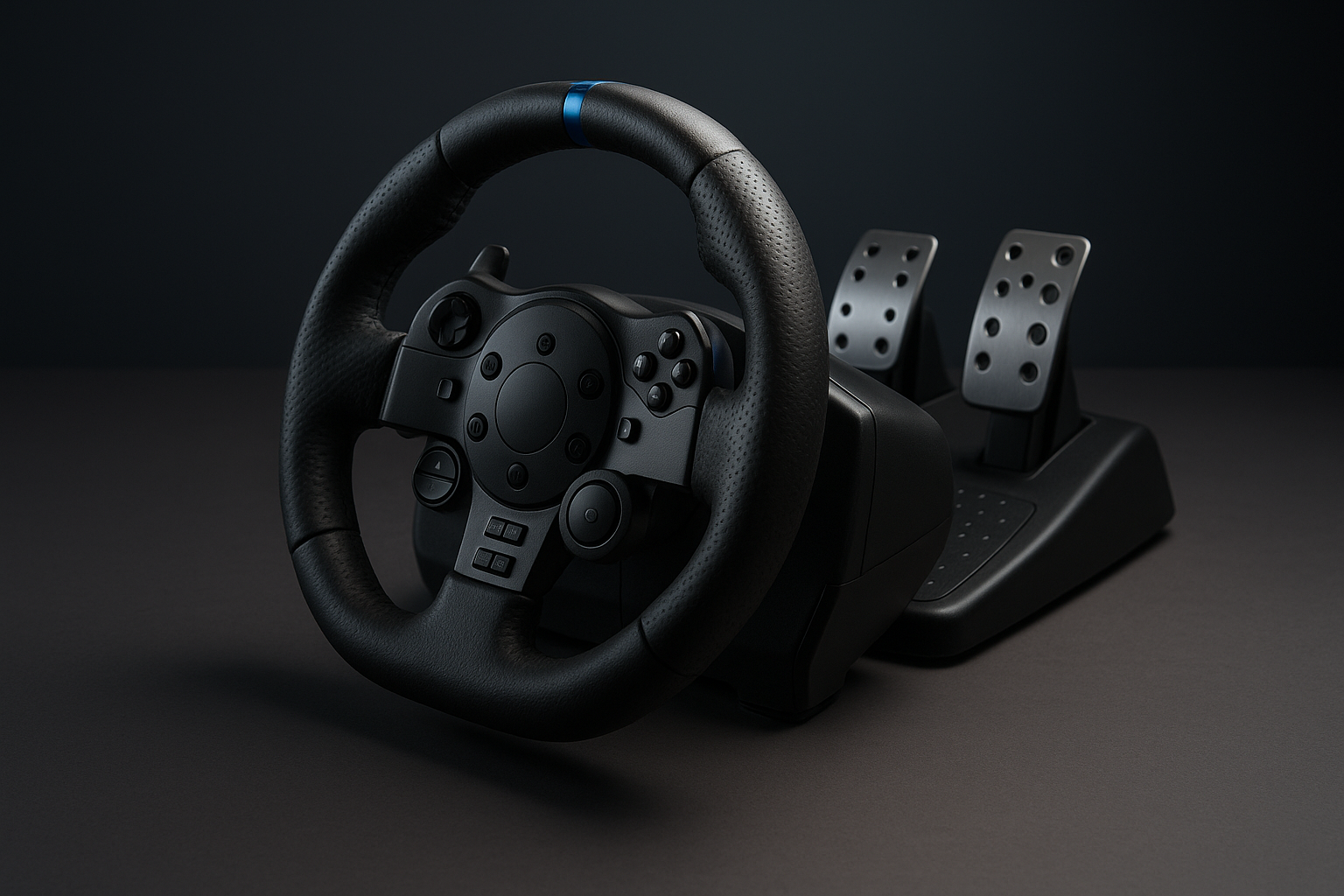
Product Overview: DOYO Gaming Steering Wheel
A more engaging racing setup usually becomes expensive the moment you add a wheel, pedals, mounting hardware, and a cockpit. The DOYO Gaming Steering Wheel takes the opposite approach: it puts those basic controls into one entry-level accessory listed at $65.89 and currently shown as In Stock.
The central question for shoppers is not whether it can replace a premium racing system. The better question is whether its stated multi-platform support, pedal unit, adjustable positioning, and dual-motor drive give you enough involvement to justify the cost. For casual racing, that combination is promising; for serious simulation, the missing technical details deserve caution.
This review treats the product as a compact, desk-based wheel for new or occasional users. Confirmed specifications are separated from conclusions based on the available product description, and the customer-feedback section explains where the supplied record does not support a reliable rating-based judgment.

DOYO Gaming Steering Wheel Specifications at a Glance
| Specification | Confirmed detail |
|---|---|
| Supported platforms | PS4, PC, PS3, Nintendo Switch, Android |
| Wheel rotation | 180 degrees |
| Adjustments | Sensitivity, height, tilt |
| Controls | Programmable buttons and sequential paddle shifters |
| Drive system | Built-in dual-motor drive |
| Pedals | Included pedal unit |
| Paddle height | 3.5 inches / centimetres |
| Surface fixation | Four bottom suction cups |
The specification sheet gives you the broad outline of the DOYO Gaming Steering Wheel, but it is not a complete engineering specification. It does not confirm the wheel diameter, USB cable length, pedal spacing, warranty duration, force-feedback strength, or a supported racing-game list.
Those omissions matter differently depending on your setup. A desk user needs to know whether the mounting footprint suits the surface; a mobile gamer needs a clear connection method; and a console owner needs confidence that the particular racing title recognises wheel input. Check those points against the current listing and your game’s settings before purchase.
Setup, Compatibility, and Everyday Usability
The product is described as plug and play, with universal connectivity and no need to boot the wheel before use. In practical terms, that suggests a straightforward accessory rather than a device requiring a separate startup routine, but the supplied information does not explain the precise cable, adapter, or platform-mode procedure.
Platform coverage is stated for PS4, PC, PS3, Nintendo Switch, and Android. That breadth is useful if your household moves between a console in the living room, a computer at a desk, and an Android device, although platform support should not be confused with guaranteed support in every game.
- Put the wheel on a clean, flat playing surface.
- Connect the pedal unit to the wheel.
- Attach the wheel to your chosen platform using the supplied connection arrangement.
- Open the game’s controller settings and select its wheel or remapping profile if available.
- Test steering, acceleration, braking, paddles, and programmable buttons before starting a race.
Console and Android games vary considerably in how they handle non-standard controllers. If the DOYO Gaming Steering Wheel is not recognised immediately, inspect the game’s input menu rather than assuming the hardware is defective. Test one title on your main platform first, then try the other devices you actually plan to use.
DOYO Gaming Steering Wheel: Rotation, Sensitivity, and Drive
A 180-degree wheel turns degrees to either side of centre. That makes the DOYO Gaming Steering Wheel naturally suited to quick corrections and arcade-style racing, where a small hand movement can produce a noticeable change in direction. It is a different feel from a wider-range wheel designed to mimic the steering arc of a road car.
The built-in dual-motor drive is intended to add physical response and immersion. However, the product information does not call it true force feedback, describe the motor technology, or state torque output. You should therefore avoid buying it on the assumption that it will reproduce detailed kerbs, tyre loads, or changing road surfaces.
Sensitivity adjustment can still be useful. Start in the middle of the available range, drive in a straight line, and make several ordinary corners. If the car feels slow to respond, raise sensitivity slightly; if it feels twitchy, reduce it. Change one setting at a time so you can tell whether the adjustment actually helps.
Programmable buttons add another practical layer when a game permits remapping. You could assign commonly used actions such as handbrake, camera view, nitrous, or gear commands, then test each assignment in a safe practice session. The value is convenience, not a guarantee that every game will accept every custom input.
Pedals, Paddle Shifters, and Driving Controls
The included pedal unit is one of the strongest reasons to consider this wheel instead of continuing with a standard controller. You can manage acceleration and braking with your feet while keeping both hands on the wheel, which changes the rhythm of racing even when the surrounding hardware remains basic.
The description does not state how the pedals are built. There is no confirmed information about their travel distance, resistance, independent calibration, spacing, or whether the unit includes a clutch. That means you should regard them as supplied driving controls, not as evidence of a fully realistic three-pedal arrangement.
Wheel-mounted sequential paddles keep gear changes close to your fingers. Their stated height is 3.5 inches, or centimetres, giving them a substantial physical presence compared with tiny buttons. Players who prefer compact desks may appreciate paddles more than a separate shifter because they require no additional accessory or mounting position.
Before racing seriously, map one paddle to upshift and the other to downshift. Confirm that the game sees each input separately, then check that the pedal commands and paddle commands do not conflict with existing controller assignments. This short test can prevent a frustrating discovery halfway through a race.
Adjustable Height, Tilt, and Four-Cup Surface Fixation
The height mechanism uses a rotating knob so you can extend or retract the wheel position. The stated purpose is to accommodate different seated heights and even some standing play, which makes the design more flexible than a fixed desktop unit. Tilt adjustment then lets you angle the controls toward your hands rather than forcing your wrists into a sharp upward or downward bend.
Underneath, four large suction cups are intended to keep the unit in place while you steer. They are most likely to work well on a smooth, non-porous surface. Dust, fabric, textured laminate, and uneven tables can reduce the seal, so the cups should not be treated as a substitute for a rigid cockpit mount.
Use this positioning routine:
- Clean and dry the desk surface.
- Press each suction cup firmly into place.
- Set the wheel height for your seated position.
- Tilt the wheel toward your torso so your forearms remain relaxed.
- Place the pedals where both feet reach comfortably.
- Apply gentle steering pressure before beginning a race and reposition the unit if it shifts.
This arrangement should suit temporary gaming stations, bedrooms, shared rooms, and desks that cannot accommodate permanent hardware. If your surface is porous or heavily textured, expect the fixation to be less dependable.

What Customers Are Saying
The supplied product information does not include a verified star rating, review count, or publication date range. Because those figures are absent, it would be misleading to claim that buyers rate this wheel at a particular level or to describe an unverified number of recurring complaints.
There is also no review record here that allows the frequency of setup success, platform recognition, steering response, pedal performance, suction-cup grip, durability, or value comments to be calculated. Customer reviews may eventually clarify whether PS4, PC, PS3, Switch, and Android users get immediate recognition or need to alter game settings, but that evidence should be checked on the current listing before ordering.
When you inspect the live reviews, look for repeated details rather than one dramatic anecdote. Pay particular attention to reports of:
- Drift, dead zones, or difficult calibration.
- Loose pedals, noisy motors, or unreliable surface grip.
- Limited support in specific racing games.
- Early wear, broken controls, or inconsistent button programming.
- Photos showing how the unit fits on an actual desk.
Recent reviews can show whether an issue is still appearing, while photo reviews may reveal practical fit better than a short star rating. Until a current, verifiable review sample is available, the customer-feedback evidence cannot support a firm satisfaction conclusion.
Who Should Buy the DOYO Gaming Steering Wheel?
The strongest audience is the casual racing player who wants more physical involvement without committing to a permanent rig. A new wheel user, a younger player, or a household that alternates between console, computer, and Android gaming may find the all-in-one format particularly attractive.
The DOYO Gaming Steering Wheel makes most sense when you value broad stated compatibility and a low entry cost more than advanced simulation detail. It is also suited to desk-based play and temporary setups, especially where a full cockpit would take up too much room or be difficult to leave assembled.
You should look elsewhere if your priority is a wide steering range, clearly specified and strong force feedback, a clutch, a dedicated gear shifter, or a rigid cockpit mount. Those requirements point toward a different product category, even if the upfront cost is higher.
A simple decision rule helps: choose this model when one compact accessory for several devices matters most; compare specialist wheels when detailed feedback, long sessions, and a longer upgrade path matter more. The adjustable mounting position may accommodate varied seating arrangements, but it cannot resolve the missing information about game support or motor performance.
How It Compares With Amazon Alternatives
The DOYO Gaming Steering Wheel sits in the accessible entry-level category. The Logitech G29 Driving Force belongs to a more established dedicated racing-wheel ecosystem and should be considered when software support, system-specific compatibility, and a more serious long-term setup matter more than the DOYO’s lower listed price. The current price and exact availability of that alternative must be checked at publication.
| Model | Listed price | Platforms | Rotation | Feedback description | Pedals | Mounting | Best suited user |
|---|---|---|---|---|---|---|---|
| DOYO Gaming Steering Wheel | $65.89 | PS4, PC, PS3, Switch, Android | 180 degrees | Dual-motor drive; type and torque not specified | Included; details not specified | Four suction cups | Casual, multi-platform, desk-based users |
| Logitech G29 Driving Force | Verify current price | Verify current platform listing | Verify current specification | Dedicated wheel system; verify current details | Verify included configuration | Verify current mounting arrangement | Users prioritising an established ecosystem |
| PXN V3 Pro Racing Wheel | Verify current price | Verify current platform listing | Verify current specification | Compare current customer feedback | Verify included configuration | Verify current mounting arrangement | Shoppers comparing entry-level alternatives |
PXN V3 Pro Racing Wheel is the closer comparison because it also targets buyers entering wheel-based racing. Compare its current platform coverage, pedals, rotation range, mounting approach, customer comments, and price directly on the live listing rather than relying on old product pages.
The trade-off is clear. The DOYO’s argument is flexibility and accessibility; an alternative may be preferable if you prioritise a particular console ecosystem, stronger software support, or a more established hardware family. Prices and stock change, so record the figures when you publish or purchase.
Price, Value, and Ownership Considerations
At $65.89 and shown as In Stock, the package gives you more than a wheel alone: it includes the pedal unit, dual-motor drive, programmable controls, sequential paddles, height and tilt hardware, and four suction cups. Considering the included components rather than claiming a fixed saving against alternatives, that is a reasonable starting point for someone upgrading from a controller.
The cost risk is the uncertainty. The listing does not specify force-feedback strength, game-by-game compatibility, pedal construction, or long-term durability. Those gaps may not matter for occasional arcade racing, but they matter a great deal if you expect years of frequent simulation use.
Before ordering, work through this checklist:
- Confirm that your main racing game accepts wheel input.
- Verify the relevant platform mode and connection process.
- Check the available desk and pedal area.
- Read the latest review themes, especially repeated complaints.
- Review the current return policy and warranty details.
This wheel represents better value for occasional racing, multi-device households, compact desks, and first-time users. Paying more may be sensible if you need advanced calibration, stronger feedback, wider steering, or replaceable components that can support a more serious setup.
Final Buying Considerations Before Ordering
Before you place an order, separate what is confirmed from what remains unknown. Confirmed strengths include support for five named platforms, 180-degree steering, sensitivity adjustment, programmable buttons, pedals, large sequential paddles, ergonomic adjustment, and four-cup surface fixation. Those features make the DOYO Gaming Steering Wheel a credible entry-level option on paper.
The unresolved questions are just as relevant: the exact connection process for each platform, support for your specific games, the motor type and strength, pedal construction and calibration, dimensions beyond the stated paddle measurement, warranty coverage, and long-term durability. None should be filled in with assumptions.
Use this three-step decision process:
- Identify your main gaming platform and the racing titles you actually play.
- Decide whether basic physical controls and compact mounting are sufficient.
- Compare the current $65.89 price with the cost of a more specialised wheel whose feedback and upgrade options are clearly documented.
If you want a first wheel for casual use and several devices, the DOYO Gaming Steering Wheel is worth considering. If your goal is detailed simulation, heavy weekly use, or a permanent cockpit, the missing specifications are a reason to investigate a higher-tier alternative before committing.
Pros and Cons
Pros
- Broad stated compatibility with PS4, PC, PS3, Nintendo Switch, and Android.
- Includes pedals, programmable buttons, sequential paddles, sensitivity adjustment, and dual-motor drive.
- Adjustable height and tilt support different desk and seating positions.
- Four bottom suction cups are designed to hold the wheel on a flat surface.
- Listed at $65.89 and shown as In Stock, making it accessible as a first wheel.
Cons
- The 180-degree rotation is narrower than the range offered by more advanced sim-racing wheels.
- The product description does not confirm true force feedback, torque strength, pedal construction, clutch support, or independent pedal calibration.
- Game-by-game compatibility, connection methods, warranty duration, and long-term durability are not specified.
- Suction-cup stability may be less reliable on textured, dusty, fabric-covered, or uneven surfaces.
- The supplied product information does not provide a confirmed customer rating or review count to support a firm satisfaction conclusion.
Final Verdict
Key Takeaways
- The $65.89 DOYO Gaming Steering Wheel combines a pedal unit, programmable controls, 180-degree steering, adjustable positioning, and four suction cups in one entry-level package.
- Its stated support for PS4, PC, PS3, Nintendo Switch, and Android makes it appealing for households that use several gaming devices.
- The product description leaves important questions unanswered, including true force-feedback capability, pedal specifications, game support, connection methods, warranty, and durability.
- Choose it for casual or occasional racing when accessibility matters most; compare a specialist wheel if you want detailed simulation feedback or a long-term upgrade path.
Frequently Asked Questions
Which platforms does the DOYO Gaming Steering Wheel support?
The listed product information confirms support for PS4, PC, PS3, Nintendo Switch, and Android. It does not provide a complete game-by-game compatibility list, so you should check the target game’s controller settings before ordering.
Is 180-degree rotation enough for sim racing?
It has a stated 180-degree rotation range, meaning degrees to either side of centre. That suits quick arcade-style steering, but it is less extensive than the rotation range found on many dedicated simulation wheels.
Does this wheel have true force feedback?
The description confirms a dual-motor drive but does not identify it as true force feedback or provide a torque rating. Treat the motors as a source of physical response rather than assuming they deliver detailed road-surface feedback.
Does the package include a clutch or detailed pedal controls?
The package includes a pedal unit and wheel-mounted sequential paddles. The available specifications do not confirm whether a clutch is included or provide pedal resistance, travel, spacing, or calibration details.
Who is this steering wheel best suited to?
It can be a sensible first wheel for casual racing, shared households, and desk-based play if broad platform support matters more to you than advanced simulation features. Serious sim racers should compare products with clearly specified force feedback, wider rotation, stronger mounting, and upgradeable components.
Disclosure: As an Amazon Associate, I earn from qualifying purchases.