

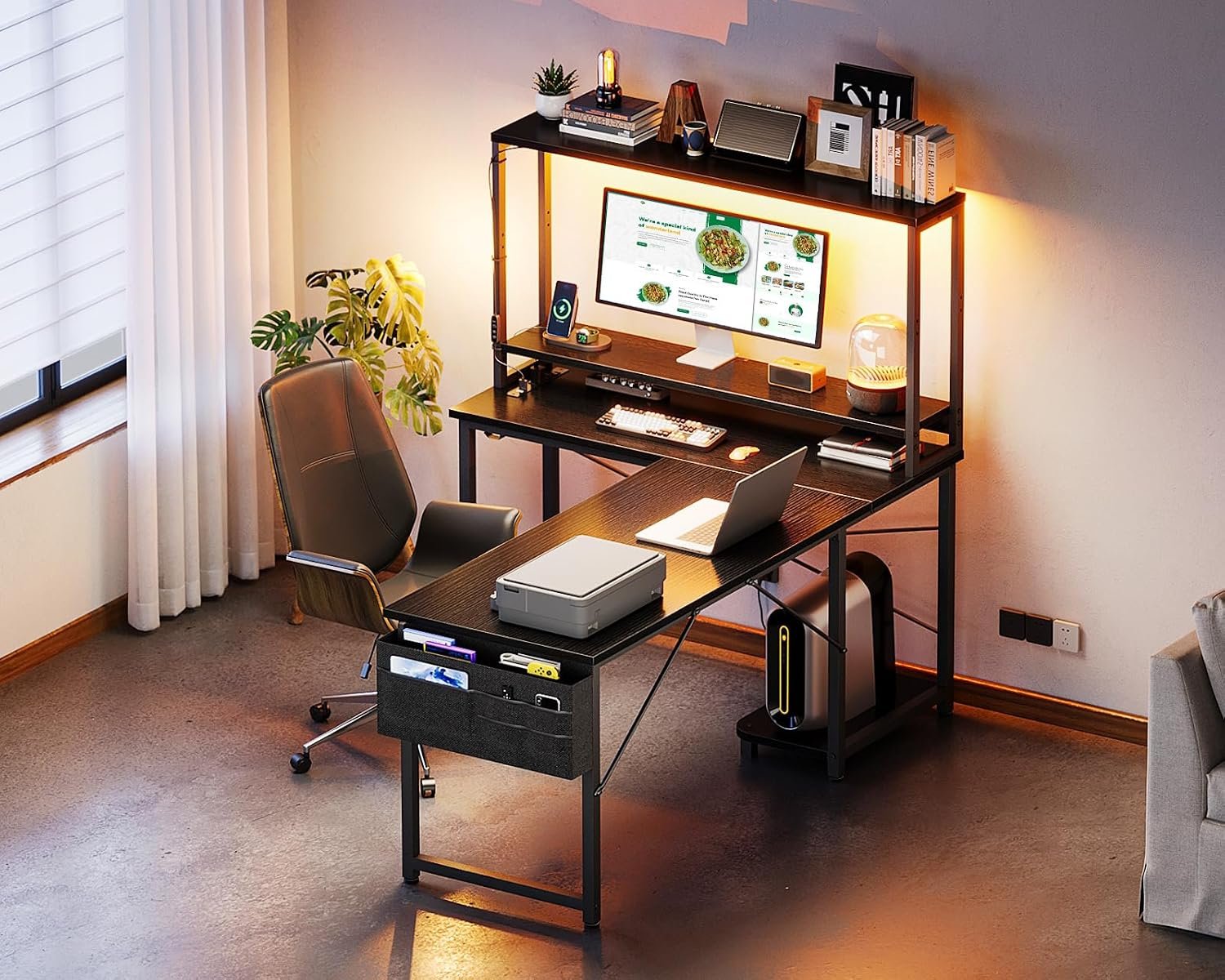
ODK 53" L Shaped Gaming Desk with Shelves, LED & Outlets, Black
Can a compact $89.99 L-shaped desk really provide enough workspace, storage, lighting, and charging access for a gaming or home-office setup? The ODK gaming desk makes a persuasive case, but it does so by packing features into a relatively modest workstation rather than offering the expansive surface of a premium desk.
The black ODK model has a 53-inch reversible layout, integrated shelves, RGB lighting, three AC outlets, and two USB ports. In the supplied product data, it is listed at $89.99, reduced from $105.99, and shown as in stock.
That combination should appeal to you if you want one tidy workstation for a bedroom, study room, console corner, or multipurpose living space. It is less convincing if you need a deep, heavy-duty surface for a large tower and substantial monitor hardware. At this price, the ODK gaming desk is worth considering for convenience, provided you verify the missing capacity and electrical details before ordering.
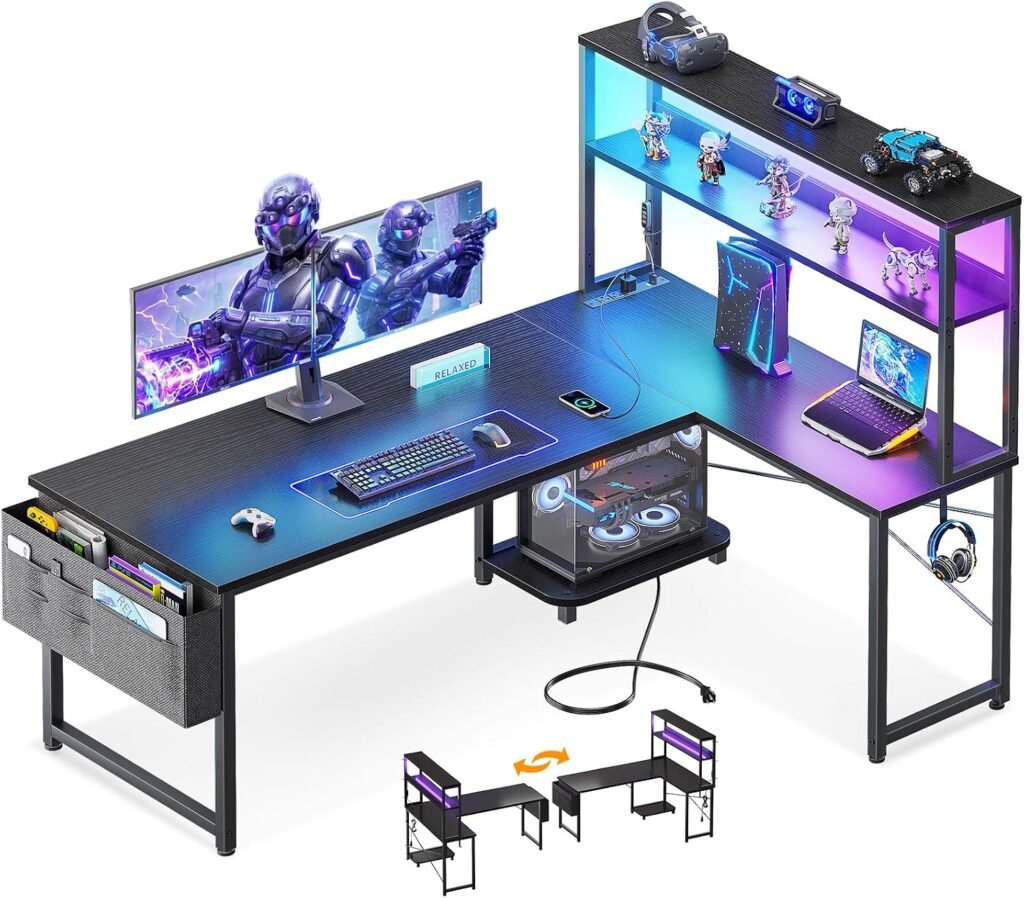

ODK Gaming Desk at a Glance: Size, Layout, and Included Features
The core measurements explain both the desk’s appeal and its limits. The published specification lists a height of 29.8 inches, a width of inches, and a depth of 18.9 inches. It has a black finish, an L-shaped design, reversible side modules, and a listed price of $89.99.
| Specification | Published detail |
|---|---|
| Height | 29.8 inches |
| Width | 53 inches |
| Depth | 18.9 inches |
| Finish | Black |
| Layout | Reversible L-shaped workstation |
| Listed price | $89.99 |
This footprint may suit a bedroom, study room, living room, or shared multipurpose space. The listing presents the surface as suitable for dual monitors, although your monitor stands and accessories will determine how comfortable that arrangement feels.
Storage consists of two shelves, a CPU stand, an accessory hook, and a tool bag. The manufacturer also highlights pre-labeled parts and matching installation tools. Those details may reduce confusion, but this remains a home-assembly product.
The published information does not establish desktop weight capacity, shelf capacity, material thickness, or outlet wattage. If you plan to use a heavy desktop tower, multiple large displays, or substantial studio equipment, confirm those figures in the current listing before purchase.
Key Features of the ODK Gaming Desk: What You Actually Get
The ODK gaming desk is more than a plain tabletop with an L-shaped frame. Its practical value comes from consolidation: storage, charging access, lighting, and cable routing are built into one relatively small workstation. That can matter when you are trying to turn a corner of a bedroom into a usable gaming or study area without adding a separate shelf and power strip.
For gaming, the feature bundle supports a monitor-and-keyboard arrangement, keeps controllers and headphones close, and adds colored background light. For studying or home working, the shelves can separate books and accessories from the main writing area, while the power section can serve a laptop, phone, monitor, or speakers.
Still, confirmed specifications should not be confused with guaranteed performance. The listing confirms the number of outlets, USB ports, lighting controls, shelves, and frame design; it does not confirm charging speed, electrical protection, maximum loads, or resistance to long-term wear. Those are the points customer reviews should help clarify.
Before buying, make a short equipment inventory: monitor count, stand dimensions, computer-case footprint, speakers, notebooks, and items that must remain on the surface. Then compare that list with the layout rather than assuming the word “spacious” means spacious for every setup.

Reversible ODK Gaming Desk Workspace for Monitors and Small Rooms
The interchangeable side modules are one of the desk’s most useful design choices. You can configure the L on the left or right, which helps when the desk must sit beside a bed, meet a particular wall, or share a corner with a door, dresser, or window. A fixed orientation would make that decision for you; this one gives you some control.
The 53-inch-wide by 18.9-inch-deep workstation is presented as suitable for dual monitors. In practice, two displays may fit if their stands are compact and your keyboard, mouse, speakers, and notebook do not all need generous space directly in front of you. The shallower surface conserves floor area, but it can feel tight with deep monitor bases, large speakers, or users who like a broad armrest zone.
Use masking tape to mark the intended desktop footprint on the floor. Place the monitor stand widths inside that outline, mark the computer’s position, and leave enough room for the chair to roll and turn. Try both L orientations with the tape before ordering; this simple test can reveal a blocked doorway or an awkward cable route that a product photograph will not show.
ODK Gaming Desk Storage: Shelves, CPU Stand, Hook, and Tool Bag
Two shelves provide a home for controllers, books, small speakers, game cases, or accessories that would otherwise occupy the working surface. The CPU stand can lift your computer tower away from the desktop and reduce the temptation to leave it directly on the floor, although the available data does not provide its load rating or prove that it will fit every case.
The accessory hook is a convenient place for headphones, a controller, or a cable pouch. A supplied tool bag is less glamorous, but it may keep the assembly hardware and small tools together while you build the desk. These are modest additions, yet they can make a compact setup feel less cluttered.
Integrated storage has a trade-off. The shelves and CPU area occupy space that might otherwise be open legroom, and unusually large towers or oversized peripherals may not fit comfortably. Before assembly, compare your case measurements with the final listing’s shelf and stand dimensions. Do not rely on a generic “CPU stand” label as proof of compatibility.
ODK Gaming Desk Power: Three AC Outlets and Two USB Ports
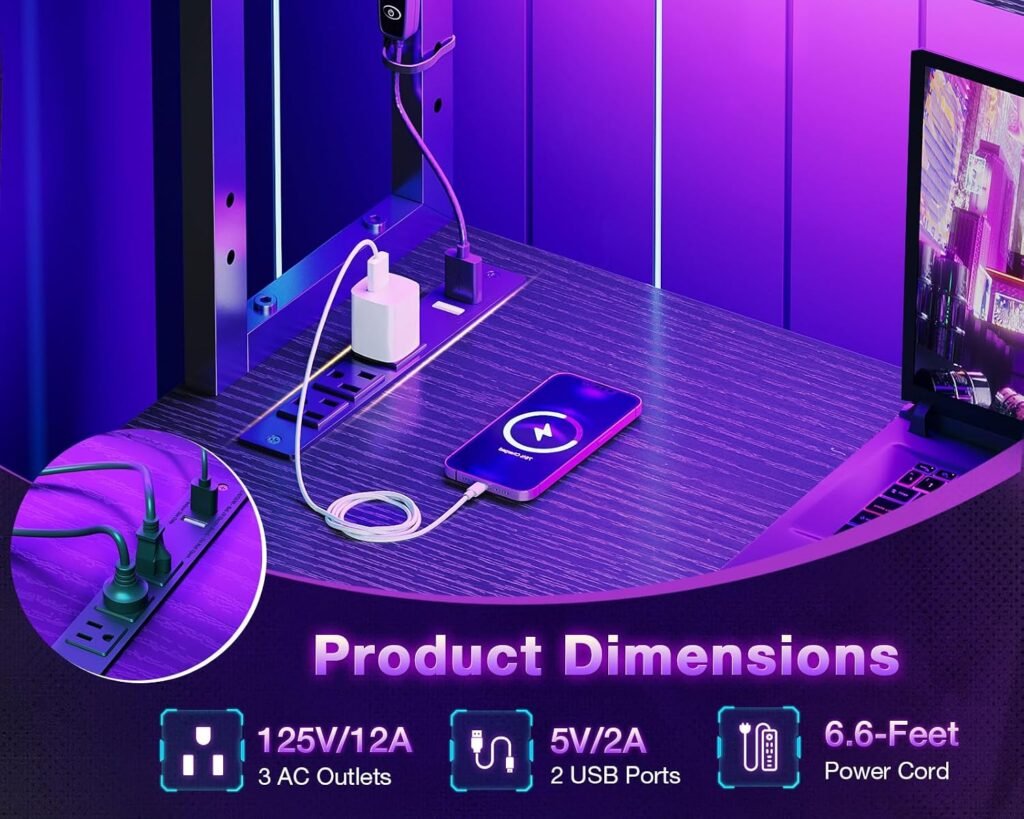
Three AC outlets and two USB ports place charging access within the workstation instead of requiring every cable to run to a wall socket. That could serve a monitor, speakers, console, phone, controller, or other lower-power accessories, depending on the electrical rating. For a gaming setup, centralized access is especially helpful when the wall outlet sits behind furniture.
The product description also mentions cable-management channels. Their intended purpose is clear: route wiring away from the visible work area and reduce loose cables crossing the floor. Whether the channels accommodate your particular cable thickness and plug arrangement is something to inspect in buyer photographs and comments.
Several important electrical details are absent from the supplied specifications. There is no stated USB charging speed, total wattage, surge protection, cord length, or electrical certification information. Use only equipment within the outlet rating, never daisy-chain power strips, and keep cables away from chair wheels. If your equipment needs surge protection, use a properly rated separate protector rather than assuming the desk provides it.
RGB LED Lighting: Presets, Brightness, Modes, and Memory
The RGB strip has color presets, eight brightness grades, dynamic modes, switching controls, and a memory function. That gives you more choice than a single-color strip: a static low-brightness setting can provide background ambience, while a dynamic mode can make a gaming corner feel more theatrical.
For studying or office work, restrained brightness and a static color are likely to be more comfortable than constantly changing effects. The strip remains decorative lighting, however. For reading, paperwork, or detailed tasks, add a separate neutral-white task lamp so your eyes are not relying on colored illumination.
When reviewing the latest buyer comments, look specifically for reports about adhesive strength, controller placement, cable length, actual brightness, and memory behavior after power loss. The feature list confirms the controls, but it cannot establish how well the strip stays attached or whether the last setting reliably returns after the desk is unplugged.
ODK Gaming Desk Stability and Construction: Frame and Feet
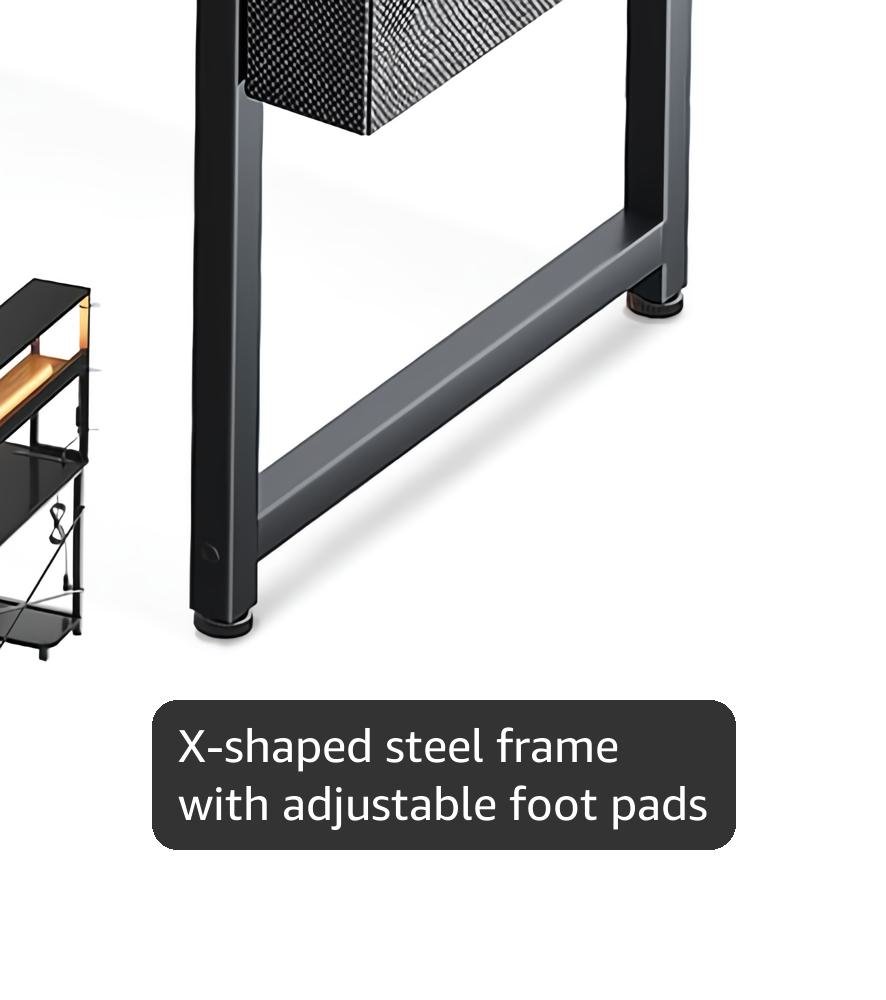
The X-shaped steel frame is intended to provide a firmer base when the surface carries multiple displays and accessories. Adjustable foot pads are another practical inclusion, particularly if your bedroom or older home has an uneven floor. Small adjustments can make the difference between a desk that rocks and one that sits properly.
Those are design intentions, not independent proof of heavy-duty stability. The supplied product data does not state the frame gauge, desktop material, maximum load, or anti-scratch treatment. A desk can look sturdy in a photograph and still develop movement if hardware is unevenly tightened or if its surface is overloaded.
During assembly, loosely fit the frame first rather than tightening every bolt immediately. Square the desktop, tighten the hardware evenly, adjust each foot against the floor, and then recheck for movement after loading the desk. If it wobbles, remove the equipment before making adjustments; correcting a loaded frame puts unnecessary stress on the joints.
ODK Gaming Desk Assembly Experience and Customer Support
Pre-labeled parts and matching installation tools are meant to reduce the usual frustration of sorting identical-looking hardware. They may help you follow the sequence, but they do not guarantee that every screw hole will align perfectly or that one person will finish quickly. Assembly reports should be judged by recurring patterns rather than by one unusually easy or difficult experience.
When checking current reviews, look for comments about instruction clarity, assembly time, screw-hole alignment, missing hardware, damaged panels, and whether a second person was needed. A missing washer is an inconvenience; a damaged desktop or persistently misaligned frame affects whether the desk can be assembled safely and squarely.
The seller states that missing or broken parts will be addressed within hours after contact. That is a stated support promise, not evidence that every replacement arrives promptly or matches the original part. Keep communication records and inspect replacement pieces before continuing the build.
- Unpack near the final location and photograph damaged packaging.
- Sort hardware by label before starting.
- Keep the frame loosely assembled until the desktop is aligned.
- Retain the instructions until the desk is stable and complete.
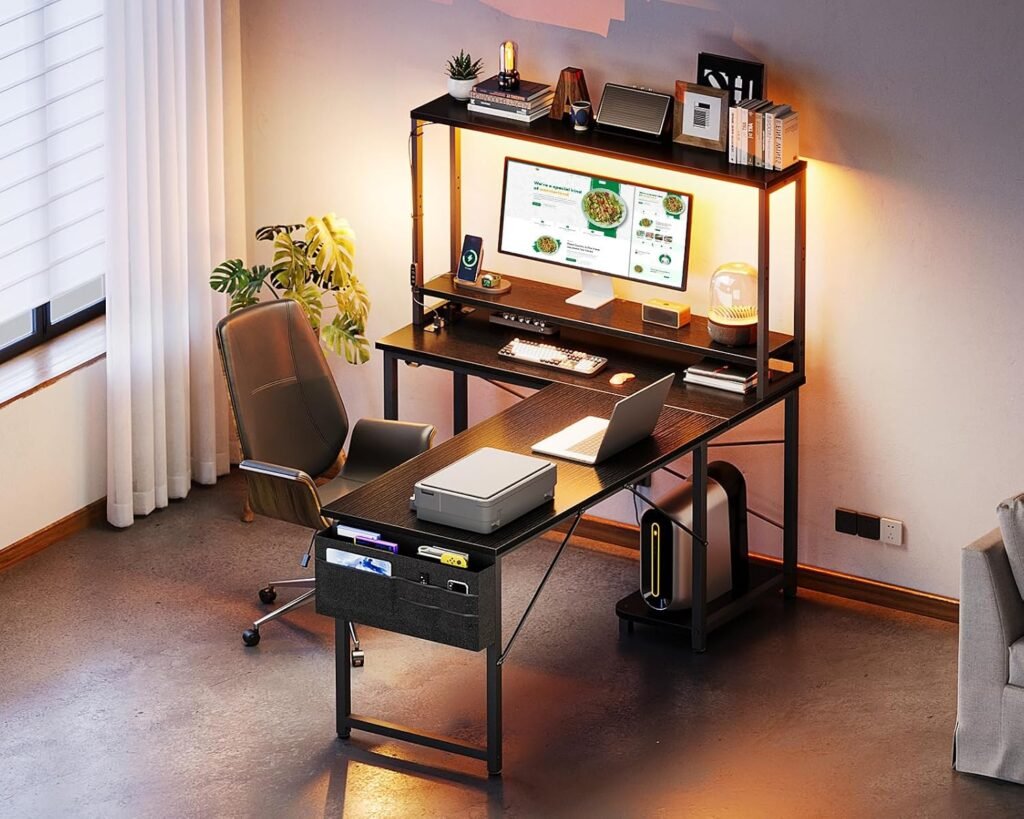
What Customers Are Saying About the ODK Gaming Desk
The supplied product information does not include the current star rating, review count, or dated written-review sample. I therefore cannot responsibly state that the desk has a particular rating or claim that buyers repeatedly report a specific fault. The evidence should be checked on the live listing on the publication date in 2026, with the date recorded so readers know how current the assessment is.
There are clear review themes worth testing. Positive comments would be most useful if they come from buyers describing compact-room placement, teenage study use, laptop work, console setups, or dual-monitor gaming. Look for photographs that show the actual shelf arrangement, cable routing, outlet position, and how much equipment remains on the desktop.
Critical comments need context. One report of a missing screw is a setup inconvenience; repeated reports of damaged panels or badly aligned holes suggest a quality-control concern. Complaints about limited depth may be a genuine fit issue rather than a defect, while reports of heat, sparks, or failed outlets should be treated as safety matters and investigated before use.
Before ordering, sort reviews by recent and critical ratings, inspect buyer photographs, and search for reviewers with equipment similar to yours. Also confirm the current return and replacement process, since neither the product description nor an isolated review can guarantee how a disputed problem will be handled.
How the ODK Gaming Desk Performs for Different Setups
As a compact gaming station, the ODK gaming desk offers a coherent bundle: space for a monitor arrangement, storage for controllers and headsets, RGB ambience, and built-in access to power. The main question is not whether it has gaming-oriented features—it does—but whether your equipment fits comfortably without turning the surface into a crowded shelf.
For laptop work or studying, the L shape can create separate zones: one side for the computer and charging devices, the other for a notebook, textbook, or paperwork. The shelves may matter more here than the lighting. Teenagers and users furnishing multipurpose rooms may also value the reversible orientation because furniture often has to adapt to a changing room layout.
Be cautious if you use a very large tower, an ultrawide monitor on a deep stand, heavy audio equipment, or anything that requires extensive legroom. The desk’s published capacity figures are incomplete, so commercial-grade expectations would be misplaced.
To test fit, compare your equipment dimensions with the listing, mark the intended L orientation, identify the nearest wall outlet, check chair movement, and confirm that the furniture leaves walking space. If any one of those checks fails, extra features will not compensate for an uncomfortable setup.
ODK Gaming Desk Compared With Amazon Alternatives
A fair comparison requires current competitor listings, and those details were not included in the supplied product data. Because prices, dimensions, ratings, review counts, warranties, and included accessories change, I will not invent figures for the Tribesigns L-Shaped Gaming Desk or the CubiCubi L-Shaped Computer Desk. Check each live listing immediately before publication or purchase.
| Buying factor | ODK model | Tribesigns alternative | CubiCubi alternative |
|---|---|---|---|
| Listed price | $89.99 supplied | Verify current listing | Verify current listing |
| Dimensions | 53 inches wide, 18.9 inches deep, 29.8 inches high | Verify current listing | Verify current listing |
| Power features | Three AC outlets and two USB ports | Verify current listing | Verify current listing |
| Lighting | RGB strip with listed controls | Verify current listing | Verify current listing |
| Storage and orientation | Two shelves, CPU stand, hook, reversible modules | Verify current listing | Verify current listing |
| Ratings and review count | Not supplied | Verify current listing | Verify current listing |
The meaningful choice should come down to priorities. The ODK is most compelling when integrated outlets, USB access, RGB lighting, and reversible storage matter more than a deeper or larger work surface. Tribesigns may suit you if its current model offers a larger desktop or heavier construction; CubiCubi may be preferable if you want a simpler layout, lower current price, or a stronger review history. Those conclusions must be checked against the exact listings, not just the brand names.
Is the ODK Gaming Desk a Good Value at $89.99?
At the listed sale price of $89.99, the ODK gaming desk bundles a workstation with two shelves, a CPU stand, an accessory hook, RGB lighting, three AC outlets, two USB ports, and cable-management features. The stated original price is $105.99, making the advertised reduction $16.00 if both figures remain current.
Buying a basic desk and adding a separate LED strip, power strip, headphone hook, and storage unit could cost more and occupy more room. Separate accessories do have advantages: you can choose a higher-rated surge protector, replace the lighting independently, and upgrade storage without replacing the desk.
For a small-room gamer, consolidation may be the central value. For someone building a deep workstation around heavy equipment, the unspecified capacity and compact working area matter more than the accessory count. Price alone cannot settle that trade-off.
Check the listing price on the day you publish or order because promotions can change. At $89.99, the ODK gaming desk is a reasonable feature-led option for buyers who prioritize compact organization and integrated power. You should verify capacity, dimensions, electrical details, and recent review patterns first if your setup is large, heavy, or expensive.
What to Check Before Buying and Setting Up the ODK Gaming Desk
Start with the room rather than the feature list. Confirm the available floor area, decide whether the L should face left or right, and check that the chair can move without striking a bed, wall, or cabinet. Then compare the monitor stands, PC case, speakers, keyboard, and notebook with the available workstation.
Before placing the order, confirm the current listing for desktop and shelf weight limits, electrical ratings, included hardware, warranty terms, and return conditions. The supplied specifications do not fully answer those questions, and they become more important as the equipment gets heavier or more expensive.
Once delivered, inspect every panel, fastener, cable, outlet housing, and LED component before assembly. Photograph damage immediately. Build the frame on a protected surface, leave fasteners slightly loose while aligning it, and test the desk for wobble before adding equipment.
Test the outlets and USB ports first with low-risk devices. Keep power connections accessible rather than trapped behind the desk, do not overload shelves or electrical outlets, and route cords away from chair wheels. The ODK 53-inch L-shaped design offers unusually many convenience features for $89.99, but its compact depth and unspecified capacity mean you need to match it carefully to your equipment.
Pros and Cons
Pros
- Reversible 53-inch L-shaped layout can fit different room orientations.
- Integrated storage includes two shelves, a CPU stand, and an accessory hook.
- Three AC outlets and two USB ports provide convenient centralized access to power.
- RGB lighting offers colors, eight brightness grades, dynamic modes, and a memory function.
- Listed at $89.99, the desk combines several accessories that would otherwise need to be purchased separately.
Cons
- The 18.9-inch desktop depth may feel restrictive with deep monitor stands, large speakers, or a wide armrest area.
- Published specifications do not state the desktop, shelf, or CPU-stand weight limits, outlet wattage, USB charging speed, or electrical certification details.
- Assembly quality, alignment, missing parts, wobble, and long-term LED reliability require careful checking in the latest customer reviews.
- Integrated shelves may reduce legroom and may not suit unusually large computer towers or oversized peripherals.
Final Verdict
Key Takeaways
- The ODK gaming desk combines a reversible L-shaped workstation, storage, RGB lighting, three AC outlets, and two USB ports at a listed $89.99.
- Its space-saving format is better suited to bedrooms, teenage study areas, laptop work, and compact gaming setups than to heavy-duty equipment.
- The product data does not establish important limits such as desktop capacity, shelf capacity, outlet wattage, USB speed, or electrical certification.
- Check recent buyer reviews, equipment dimensions, room layout, and return terms before committing.
Frequently Asked Questions
What are the ODK gaming desk dimensions?
The ODK gaming desk measures inches wide, 29.8 inches high, and 18.9 inches deep. Its L-shaped layout and reversible side modules make it suitable for corners, bedrooms, study rooms, and other compact spaces.
What features come with the ODK gaming desk?
It includes three AC outlets, two USB ports, an RGB LED strip, two shelves, a CPU stand, an accessory hook, a tool bag, and cable-management channels. The listing does not specify USB charging speed, total electrical wattage, or surge protection.
Is the ODK gaming desk suitable for two monitors?
It can work for a dual-monitor setup if your monitor stands, tower, keyboard, and chair fit the available space. Users with deep stands, an ultrawide monitor, a large PC case, or a need for generous legroom should be more cautious.
How much does the ODK gaming desk cost?
The desk is listed at $89.99, reduced from $105.99, and shown as in stock in the supplied product data. Prices and availability can change, so check the listing immediately before ordering.
Disclosure: As an Amazon Associate, I earn from qualifying purchases.
