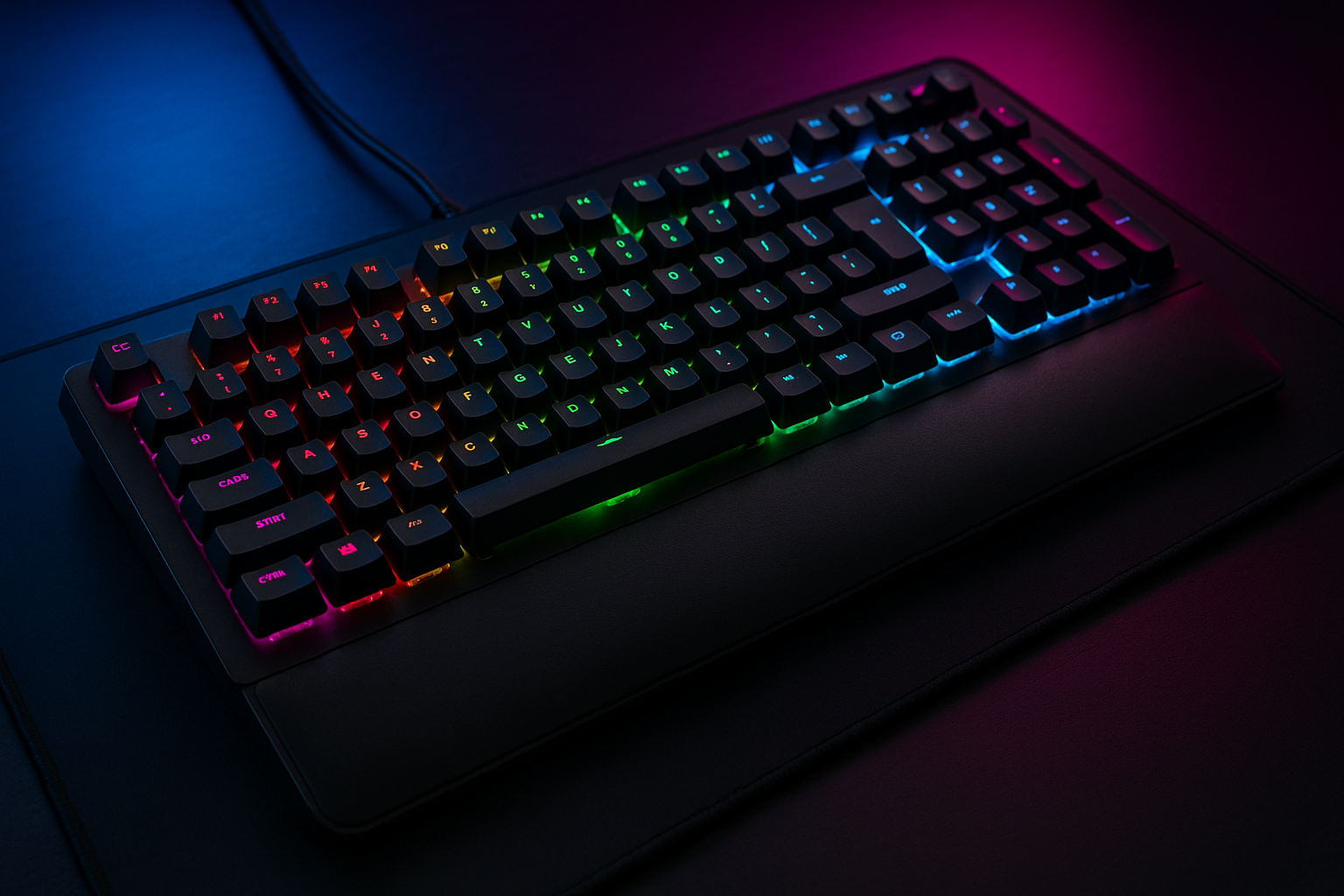
Deco Gear (Refurbished MECHBRD100 Mechanical Gaming Keyboard – RGB Back Lighting – Anti-Ghosting Black – (Renewed)
A refurbished mechanical keyboard priced at $56.99 has to answer a fairly specific question: can it provide the essentials for gaming without asking you to pay for the extras of a premium model? The Deco Gear mechanical keyboard is a manufacturer-refurbished wired gaming keyboard with mechanical switches, RGB backlighting, full anti-ghosting, an ergonomic palm rest, and a 90-day warranty.
Based on the supplied specifications alone, it is most compelling for a budget-conscious PC gamer who wants mechanical key feel and visible lighting but does not require documented latency figures, elaborate software, or per-key configuration. That is a reasonable proposition in 2026, though not a complete one. Several buying details remain unconfirmed, including the switch type, layout, connection specification, and software support.
This review separates what the listing confirms from what you should verify before ordering. The feature set looks practical rather than luxurious: the keyboard covers the functions many mainstream players actually use, while the renewed condition and shorter warranty create a little more responsibility for you after delivery.

Deco Gear Mechanical Keyboard: Product Overview and What Comes in the Box
The product is described as certified refurbished, meaning the manufacturer has tested the unit and says it shows limited, if any, wear while aiming to deliver like-new performance. That description is reassuring, but it should be read as a condition statement rather than a promise that every renewed keyboard will look exactly like one taken directly from a new-product box.
The package is listed as including the Deco Gear Mechanical Gaming Keyboard, all original accessories, and a 90-day warranty. The description does not identify those accessories individually, so you should compare the delivered contents with the current listing rather than assume that a particular cable, detachable part, or documentation is included.
At $56.99, you are paying for a gaming keyboard rather than a complete desk bundle. There is no supplied indication that a mouse, headset, mouse pad, or other peripheral comes with it. The saving may be worthwhile if your priority is a mechanical board with lighting and gaming-oriented input handling; it is less persuasive if you need a whole setup in one purchase.
The listing also leaves several practical questions open. Before ordering, check the switch model, key rollover count, connection type, layout, dimensions, operating-system compatibility, and software support. Those omissions do not prove a problem, but they make a direct comparison with better-documented models harder.
Key Features of the Deco Gear MECHBRD100
The central feature package is straightforward: mechanical switches, six RGB backlight modes, full anti-ghosting, an ergonomic palm rest, and switches rated for more than million keystrokes. For a player moving from a basic membrane keyboard, the mechanical design should provide a more distinct press, a more consistent sense of actuation, and a tactile experience that can also appeal during ordinary typing.
There is a qualification here that matters with renewed hardware. A rating above million keystrokes describes the tested switch design; it is not a complete durability guarantee for the keycaps, stabilizers, lighting, cable, housing, or every other component in a refurbished unit. The 90-day warranty is the actual defined protection stated in the listing.
At $56.99, the MECHBRD100 concentrates on basics rather than claiming a premium control system. The product information does not confirm per-key RGB, macro recording, dedicated media controls, companion software, or stored profiles. If you want to remap keys, build game-specific lighting scenes, or synchronize peripherals, treat those functions as questions to answer before checkout.
RGB Backlighting and Six Lighting Modes in Everyday Use
Six RGB backlight modes can be genuinely useful when you play or type in a dim room. They can make the keyboard easier to locate at night and help you find less frequently used keys without switching on a desk lamp. For someone whose desk already sits under strong lighting, the feature may be pleasant rather than essential.
Preset modes are not the same thing as full lighting customization. The supplied information does not confirm whether you can assign a different colour to each key, change brightness, create software profiles, or save settings. A six-mode claim tells you that several lighting behaviours exist, not how deeply you can control them.
When you inspect the live listing, look closely at photographs and the feature description. Check whether the legends remain readable under coloured illumination, whether the modes are changed with keyboard shortcuts, and whether the lighting appears even across the board. If the listing shows only broad colour effects, assume less control than you would get from a software-driven per-key system.
Anti-Ghosting, Mechanical Response, and Gaming Performance
Full anti-ghosting is intended to help the keyboard register several keys pressed at once instead of dropping an input or producing an unintended one. In a game, that could mean holding a movement direction while pressing sprint, crouch, jump, or an ability key. It addresses a real annoyance, although it cannot improve your reactions or make you a better player by itself.
The claim does not establish a polling rate, latency figure, esports qualification, or a particular rollover count. It also does not identify the switch model, actuation force, or travel distance. Those specifications matter if you are choosing a board around a very particular competitive feel.
After delivery, open a text editor or keyboard-testing tool and hold several intended combinations. Try movement keys alongside sprint and crouch, then repeat the test in a game you know well. If inputs disappear, repeat the test on different parts of the layout and record the result before contacting the seller.
Ergonomic Palm Rest and Long-Session Comfort
The ergonomic palm rest is meant to support your hands rather than leave them hovering over the desk throughout a long session. That can make the keyboard feel more inviting for gaming, study, or office work, but the word “ergonomic” does not tell you whether the rest is padded, detachable, fixed, or adjustable. None of those construction details is supplied.
Your setup still does most of the work. Position the keyboard so your forearms are roughly level, keep your shoulders relaxed, and avoid bending your wrists sharply upward. Take brief breaks during extended sessions; a palm rest can support a better position, but it cannot compensate for a desk that is too high or a chair that leaves you reaching forward.
Comfort and switch feel are separate decisions. The palm rest affects hand and wrist support, while the mechanical switches determine how much sound, resistance, and tactile feedback you experience with each press. If you are sensitive to noise or prefer a light switch, verify the unidentified switch type before buying.
What Customers Are Saying About the Refurbished Deco Gear Keyboard
No star rating, review count, or individual buyer quotations were included in the supplied product data, so it would be misleading to claim that customers broadly praise or criticise this keyboard. The description confirms manufacturer testing and a 90-day warranty; it does not establish current customer sentiment. Check the live listing for the latest evidence before placing an order.
When you read the reviews that are available, search for repeated patterns rather than treating one dramatic comment as decisive. Pay attention to whether renewed units arrive with the original accessories, whether the lighting modes work, and whether keys feel consistent across the board. Reports of dead keys, key chatter, uneven illumination, rattling stabilizers, or inconsistent switches deserve more weight than a small cosmetic mark on a refurbished product.
Separate delivery complaints from keyboard defects. A damaged box may reflect shipping, while a nonfunctional key points to the product itself. Also look for timing: a review describing failure after several weeks is more relevant to ownership risk than one written immediately after opening the package. Warranty-related comments are especially useful because they show how problems were handled, though those experiences should still be checked against the current seller terms.

Refurbished Condition, Warranty, and Ownership Expectations
The stated 90-day warranty gives you a defined period in which to identify functional problems, but it is not equivalent to multi-year coverage. That distinction matters because the switches are rated for more than million keystrokes, while the warranty window is measured in months. A long switch rating describes expected component endurance under testing; it does not remove the need to check a renewed unit promptly.
Use a simple delivery routine:
- Photograph the package and its condition before discarding anything.
- Confirm that the keyboard and listed original accessories are present.
- Connect the board and test every key, including keys you rarely use.
- Cycle through all six lighting modes and inspect the palm rest for damage.
- Save your order details, warranty information, and packaging until testing is complete.
If a key fails, the unit differs materially from the listing, or an accessory is missing, contact the seller or manufacturer promptly. Refurbishment can reduce the purchase price, but that saving is balanced by the possibility of minor wear and a shorter coverage period.
Deco Gear MECHBRD100 Compared With Alternatives
The Redragon K552 Kumara is a natural budget comparison because it is commonly considered alongside compact mechanical gaming keyboards. However, the supplied data does not provide a current price, switch specification, lighting-control detail, warranty term, or exact comfort package for either product. Check the live listings rather than assuming that the two keyboards use identical switches, rollover behaviour, or wrist support.
The Logitech G213 Prodigy represents a different kind of choice. It is a mainstream gaming alternative whose appeal may centre on brand support and software features, while the Deco Gear mechanical keyboard is a renewed product built around mechanical switches and a lower listed price. Do not treat “gaming” labels as proof of equal feel or performance; the G213’s technology and configuration options should be verified against its current listing.
| Product | Switch technology | Backlighting | Anti-ghosting or rollover | Comfort features | Condition | Warranty | Price |
|---|---|---|---|---|---|---|---|
| Deco Gear MECHBRD100 | Mechanical; switch type check listing | Six RGB modes | Full anti-ghosting claimed; count check listing | Ergonomic palm rest | Manufacturer-refurbished | 90 days | $56.99 |
| Redragon K552 Kumara | Check listing | Check listing | Check listing | Check listing | Check listing | Check listing | Check listing |
| Logitech G213 Prodigy | Check listing | Check listing | Check listing | Check listing | Check listing | Check listing | Check listing |
The trade-off is clear enough. The Deco Gear is strongest when its mechanical switches, lighting modes, palm rest, and $56.99 price matter more to you than premium software, documented latency information, or a longer warranty.
Who Should Buy the Deco Gear Mechanical Keyboard?
This keyboard is aimed at a particular kind of buyer: a PC gamer building a lower-cost setup, a student or home-office user who wants mechanical key feel, or anyone comfortable evaluating refurbished hardware during a defined warranty period. The combination of visible backlighting and simultaneous-input handling is sensible for a dark gaming space, especially if you routinely press movement and action keys together.
It is less convincing for a competitive player who needs documented switch characteristics, actuation measurements, polling-rate information, or configuration software. It also does not suit you if wireless operation is essential, since wireless capability is not confirmed. Buyers who already use a particular brand ecosystem may prefer the convenience of matching software and peripherals, even if that means paying more or accepting a different switch technology.
Make the decision in this order:
- Confirm the layout and connection requirements on the current listing.
- Read recent reviews for repeated hardware issues.
- Compare the complete checkout cost with the Redragon K552 Kumara and Logitech G213 Prodigy.
- Decide whether 90-day protection is enough for a renewed peripheral.
If those checks are comfortable, the Deco Gear mechanical keyboard has a coherent budget use case. If any one of them exposes a deal-breaking omission, a better-documented new model may be the calmer purchase.
Price and Value: Is $56.99 Reasonable in 2026?
At the listed $56.99, the package includes a manufacturer-refurbished mechanical keyboard, six RGB lighting modes, full anti-ghosting, an ergonomic palm rest, original accessories, and a 90-day warranty. That is a meaningful collection of everyday gaming features without moving into premium-keyboard pricing. You are paying for practical input and lighting functions, not for a complete peripheral ecosystem.
The value comes partly from restraint. Many casual and mainstream gamers do not need elaborate macros, per-key effects, or a large configuration suite. Mechanical switches rated above million keystrokes also give the product a durability story, provided you understand that the rating applies to the switches rather than every part of the refurbished unit.
Value becomes harder to judge when important comparison details are missing. The listing does not specify the switch type, software, connection information, layout, or rollover count. Add shipping and tax shown at checkout, then compare the final amount with current prices for the Redragon K552 Kumara and Logitech G213 Prodigy. Choose this model when its mechanical feel and included palm rest outweigh the alternatives’ potential advantages in condition, documentation, or software.
How to Check the Keyboard Before the Return or Warranty Window Ends
Use the first day to establish whether the renewed keyboard is fully functional, not merely whether it looks acceptable. Inspect the finish, photograph any cosmetic marks, confirm every listed original accessory, connect the board, and test each key in a text editor or keyboard-testing tool. Check that the palm rest sits or attaches securely in the manner shown by the current listing.
Move the keyboard into a dim room and cycle through all six RGB modes. Look for flickering, dark lighting zones, uneven illumination, or controls that fail to respond. Record a short video if you find a problem; that creates a clearer record than trying to describe an intermittent fault weeks later.
Next, test anti-ghosting both in a keyboard tester and in a familiar game. Press movement keys with sprint, crouch, jump, or ability inputs, and note any missed presses. During the first several weeks, pay attention to switch consistency, key chatter, stabilizer noise, comfort, and whether the layout and connection fit your setup.
Keep the packaging and order information until the keyboard has passed those checks. If something fails before the 90-day warranty expires, report it promptly rather than waiting to see whether the problem becomes permanent. That short inspection period is the practical condition of getting the refurbished price.
Pros and Cons
Pros
- Mechanical switches rated for more than million keystrokes.
- Six RGB backlight modes are useful in dim gaming rooms.
- Full anti-ghosting is designed to register simultaneous inputs more reliably.
- Includes an ergonomic palm rest and original accessories.
- Manufacturer-refurbished unit is described as fully tested with limited or no wear.
- $56.99 is potentially attractive for a feature-focused budget setup.
Cons
- The switch type, actuation force, travel distance, polling rate, and connection details are not specified.
- Six lighting modes do not confirm per-key RGB control, software profiles, or macro programming.
- The 90-day warranty is considerably shorter than the switches’ rated lifespan.
- Refurbished condition can involve minor cosmetic wear, and current customer ratings and review counts were not provided.
- There are no confirmed wireless, dedicated media-control, or advanced configuration features.
Final Verdict
Key Takeaways
- At $56.99, the refurbished Deco Gear mechanical keyboard offers the core features many budget PC gamers want: mechanical switches, six RGB modes, full anti-ghosting, and an ergonomic palm rest.
- The switches are rated for more than million keystrokes, but that figure is not the same as a guarantee covering every part of a renewed keyboard.
- The listing does not confirm the switch model, layout, connection type, software, polling rate, or rollover count, so competitive players should investigate before ordering.
- The 90-day warranty makes careful testing after delivery essential.
- Choose it when the mechanical feel and included comfort features matter more than a larger software ecosystem or longer coverage.
Frequently Asked Questions
Is the Deco Gear MECHBRD100 worth $56.99?
The listed price is $56.99. Whether it is a strong deal depends on the current prices of new alternatives and how much you value mechanical switches, RGB lighting, the palm rest, and the included warranty.
Does the keyboard support full key rollover?
The product description confirms full anti-ghosting, but it does not provide a rollover count or testing standard. You should verify simultaneous key registration with a keyboard tester after delivery.
What does refurbished mean for this keyboard?
The listing describes the unit as manufacturer-refurbished, fully tested, and showing limited or no wear. It includes original accessories and a 90-day warranty.
Can you customize each RGB key individually?
Six RGB backlight modes are confirmed, but per-key color selection, brightness adjustment, software control, and saved profiles are not. Check the current listing for those details.
Is the Deco Gear MECHBRD100 wireless?
The supplied information does not confirm wireless operation. Treat it as a wired keyboard only after verifying the connection details on the live listing.
Disclosure: As an Amazon Associate, I earn from qualifying purchases.