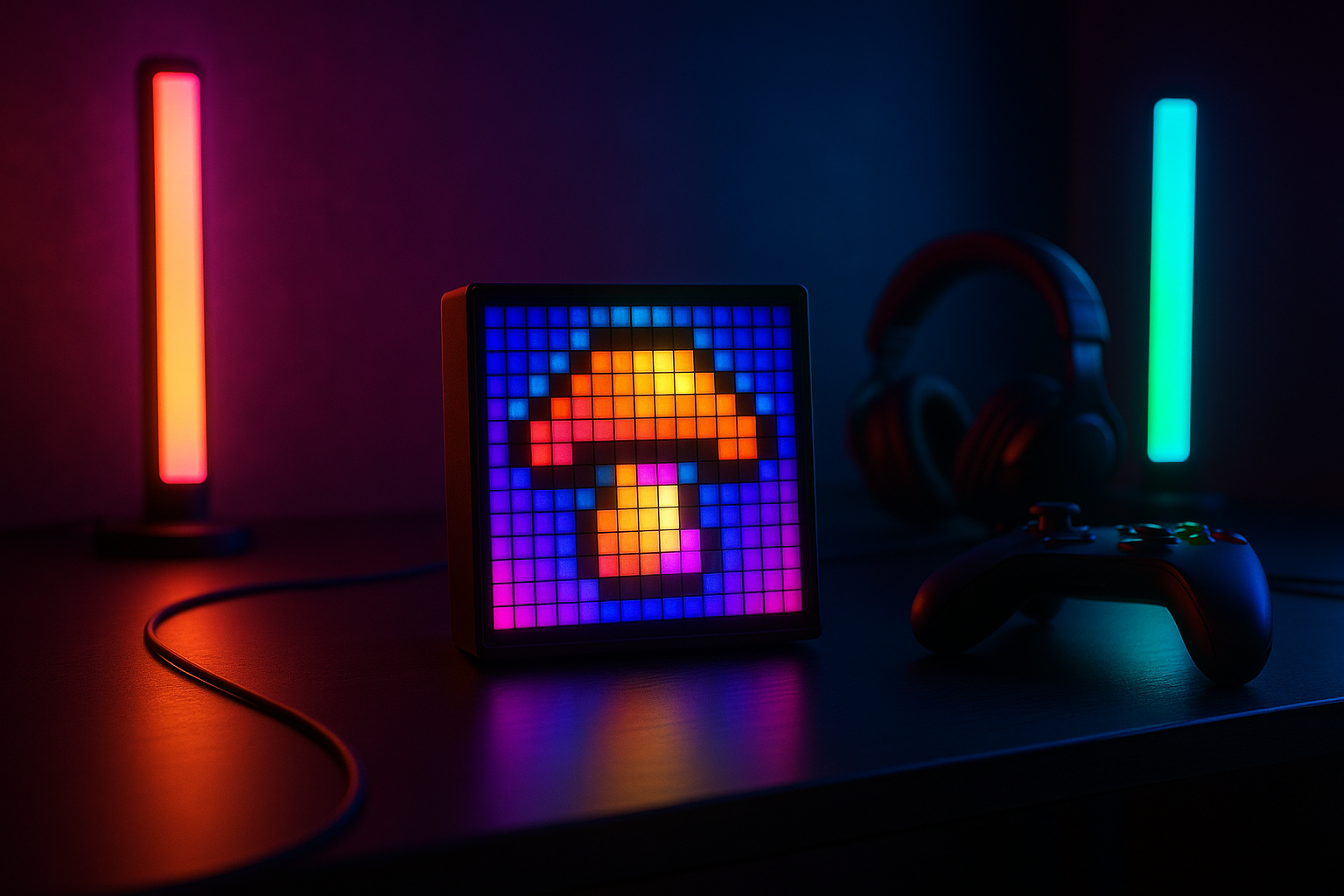
Divoom Pixoo LED Display: Product Overview
A compact panel can do something a desk lamp can’t: give your gaming space a tiny visual identity. The Divoom Pixoo LED Display is built around animated pixel art rather than ordinary color washing, and that distinction is the reason to consider it. At the time of this review in 2026, the listing shows a price of $53.99, reduced from $59.99, with the item listed as in stock.
The central question is simple: will a small pixel-art display add enough atmosphere to justify the cost? For a gamer, streamer, retro-game fan, or gift recipient who enjoys changing artwork, the answer is potentially yes. The product description presents it as a gaming-room accent for desks and shelves, with uses extending to movie sessions, music ambience, and colorful background décor.
That appeal has limits. This is not described as a monitor accessory that improves frame rates, input response, or visual performance, and it isn’t presented as a task lamp. The listing emphasizes decoration, customizable visuals, and RGB effects. Buyers seeking useful room illumination or a clearly documented smart-home product may find the proposition less convincing.
The supplied product information also leaves several practical questions open. It provides no star rating, review count, physical dimensions, power details, connectivity standard, or confirmed accessory list. Those gaps matter, so this review separates confirmed features from details you should verify before ordering.

What the Divoom Pixoo LED Display Does
The hardware’s defining feature is its 16×16 pixel layout. That creates a 256-position canvas for still images, color blocks, and animations. It is a deliberately limited format, but limitation is part of the charm: a ghost, spaceship, heart, game emblem, or weather symbol can read clearly when reduced to bold shapes.
The listing advertises 16 million colors, giving the panel more room than a simple single-color sign. In practical terms, you can work with vivid reds and blues, softer gradients, themed scenes, or a solid color when you want the display to recede. The panel’s value is not merely that it changes color; it puts recognizable artwork in the room.
Divoom describes the display as working with smart light bars. That suggests a useful division of labor: the panel can act as the visible focal point, while separate light bars provide a wider wash across a wall or desk area. The listing does not state that light bars are included, however, so treat them as compatible equipment unless the checkout page says otherwise.
Several core specifications remain unconfirmed. The product data does not state the screen’s physical dimensions, brightness range, refresh behavior, power input, mounting method, viewing angle, or connectivity standard. It also does not establish what arrives in the box. Confirm those details rather than assuming that a stand, wall hardware, power accessory, or additional RGB equipment is bundled.
Divoom Pixoo LED Display Features in Detail
The Divoom Pixoo LED Display makes the most sense when you think of it as a miniature animated sign. Its 16×16 grid can show a character, emblem, face, symbol, or short looping scene without demanding the visual complexity of a higher-resolution screen. That can be surprisingly effective beside a monitor, where a clear icon often looks better than a crowded message.
The retro styling is another part of the product’s identity. Pixel grids recall early games and low-resolution computer graphics, while app control and multicolor effects make the accessory feel current rather than like a static novelty sign. The combination will suit a room that already contains consoles, collectibles, mechanical keyboards, or other deliberately visible technology. It may feel out of place in neutral décor.
Placement is flexible in concept, but the listing does not confirm a stand, enclosure, wall mount, or mounting hardware. You can consider a desk, shelf, entertainment area, or streaming backdrop, then check the supplied hardware before planning the arrangement. The best location will be one where the artwork faces you rather than disappearing behind a monitor or reflecting glare.
There is also a maintenance question: will you keep using it after the first week? The app and gallery help by offering ready-made material, while the drawing board gives you a reason to personalize the display. Still, a buyer who only wants a fixed color may be paying for creative functions they won’t use.
Creating Pixel Art on the 16×16 Canvas
The advertised DIY drawing board is intended to make the small canvas approachable. A sensible first session would be to open the app, choose the drawing board, sketch a simple image, select colors, save the design, and send it to the panel. Start with a bold outline rather than trying to reproduce a detailed logo.
The benefit of a 16×16 format is accessibility: you can make a recognizable image quickly. The trade-off is equally clear. Portraits, intricate logos, and long messages may lose their identity when compressed into positions. The listing mentions more selectable colors and tools, but it does not specify brush types, layers, undo behavior, or export options.
Good starter subjects include a game-inspired emblem, animated heart, ghost, spaceship, weather icon, or one-word motif with very large lettering. If you want an intricate design, simplify it into its strongest silhouette first. That approach gives the limited grid a chance to work for you rather than against you.
App Control, Galleria, and Music Sync
The Divoom app is the product’s control center. According to the listing, it provides a DIY drawing board, access to Galleria, Music Sync, and a way to upload custom animations from the app gallery or add your own designs. That makes the panel more interesting than a light that only cycles through preset colors.
Galleria matters if you like the look of pixel art but don’t want to draw every image yourself. You can begin with ready-made material, identify the styles that work in your room, and then create a smaller personal collection. The product description presents the library as broad, but it does not provide a catalog size or promise how often new designs are added.
Music Sync could make the display more active during a gaming session, party, or music playback. The available information does not explain whether it uses a microphone, which audio sources work, how much delay to expect, or how accurately animations follow a beat. Consider it an ambience feature rather than a professional audio-visual synchronization system.
Before you commit to the app-based experience, use this checklist:
- Confirm that the Divoom app is available for your phone.
- Review the permissions it requests and whether an account is required.
- Pair the panel and test one Galleria animation.
- Create a very simple design and send it to the display.
- Check whether basic playback continues if the phone or internet connection is unavailable.
Also investigate update support, privacy permissions, and what happens if the app changes. Those details won’t matter equally to every owner, but they matter a great deal if you expect to customize the display every few days.
Gaming-Room and Retro Decor Performance
As gaming décor, the panel’s job is atmosphere. It won’t improve frame rates, reduce input delay, or make a competitive game easier to play. Its contribution is visual: a moving emblem or color scene can give the space a focal point behind or beside a monitor, particularly when broader RGB lighting is already present.
The retro-modern contrast is likely to be its strongest aesthetic quality. The pixel grid recalls old games, but app control and million advertised colors prevent it from looking entirely old-fashioned. In a compact desk setup, one focused artwork may create more character than several unrelated light effects.
It could also work on a bedroom shelf, in an entertainment area, or behind a streaming setup. For streaming, keep the artwork visible without placing it directly in the camera’s brightest or most reflective area. For movies, a restrained solid color or slow animation may be less distracting than a rapidly changing scene.
Position it where the pixels are easy to see, avoid direct monitor glare, and test the brightness at night before leaving it running for a long period. Because the listing supplies no brightness range, power details, dimensions, or viewing-angle specification, these real-room checks are more useful than guessing from the product name.
The poor fit is just as clear. If you want a neutral decorative object, strong room illumination, or lighting that remains useful when the artwork is switched off, this is the wrong category of product. A pixel display is an accent, not a substitute for a lamp.

What Customers Are Saying About the Divoom Pixoo LED Display
There is no verified customer rating, review count, or quoted buyer feedback in the supplied product data. That means a responsible assessment cannot turn manufacturer wording into customer experience, and it cannot honestly say that buyers praise or criticize the panel in large numbers.
The themes worth checking on the live product page are specific: pairing success, app crashes, saved designs disappearing, connection drops, confusing controls, brightness, viewing angles, playback reliability, Music Sync behavior, and what arrives in the box. Repeated reports would carry more weight than a single complaint, but confidence would still depend on the total review volume and how recently the reviews were posted.
For a frequent creator, app criticism would be central. If you plan to draw, upload, and rotate designs regularly, a frustrating control process could undermine the product’s main reason for existing. An occasional décor user may care more about stable playback, an attractive appearance, and whether the panel works without constant phone interaction.
At the current listed price of $53.99, review evidence would also help establish whether owners view the display as a satisfying desk accent or an expensive novelty. Since that evidence is not included here, check the current rating and review count immediately before purchase. Give extra attention to recent one- and three-star reviews, then compare those complaints with the positive comments rather than relying on an average score alone.
Divoom Pixoo LED Display Compared With Alternatives
The closest comparison depends on what you want to see. The Divoom Pixoo 64 belongs to the same general family but is associated with a larger, more detailed pixel-display format. Before publication or checkout, verify its current resolution, physical size, features, rating, review volume, and price on the live listing; those details are not supplied here.
The other useful comparison is the Govee RGBIC LED Strip Lights. Strip lighting serves a different purpose: it can spread indirect color around a desk, shelf, or room, whereas the Divoom Pixoo LED Display concentrates attention on visible artwork. Neither should automatically be called brighter, easier to use, or better value without current specifications and review evidence.
| Product | Display type | Customization style | Best placement | Likely buyer | Current listed price |
|---|---|---|---|---|---|
| Divoom Pixoo LED Display | 16×16 pixel-art panel | DIY art, gallery designs, animations, color effects | Desk, shelf, gaming or streaming setup | Retro-art and gaming décor fan | $53.99 |
| Divoom Pixoo 64 | Larger pixel-display format | More room for detailed artwork; verify current features | Room display or larger setup | Buyer willing to pay for more visual detail | Not verified |
| Govee RGBIC LED Strip Lights | Flexible strip lighting | Broad ambient color effects; verify model features | Behind desks, shelves, or along walls | Shopper prioritizing room coverage | Not verified |
Choose the Divoom for a visible pixel-art focal point and retro character. Choose strip lighting when indirect illumination across a wider area matters more. Consider the larger Divoom model if detailed artwork justifies its added cost and footprint.
Who Should Buy the Divoom Pixoo LED Display?
The strongest audience is easy to identify: gamers decorating a desk or shelf, retro-game fans, streamers who want a small background accent, and gift shoppers looking for a customizable tech accessory. For those people, the panel offers more personality than a generic color-changing light because the image itself becomes part of the room.
It may also work well as a gift because the recipient doesn’t have to begin with a blank canvas. Galleria can provide ready-made designs, while the drawing board offers a gradual route into customization. The $53.99 sale price is easier to justify for a birthday or holiday than the stated $59.99 original price, provided the recipient is comfortable using mobile-app controls.
Less suitable buyers include anyone who needs a primary lamp, dislikes companion apps, wants high-resolution artwork, or expects extensive smart-home integration. You should also be cautious if you are assuming that RGB light bars or mounting hardware are included; the supplied description doesn’t confirm those items.
Try this decision test: can you name three images, animations, or color scenes you would genuinely display? If you can picture a game emblem, a favorite character, and a rotating seasonal design, the customization may retain its appeal. If you can think only of leaving it on one color, a simpler ambient light may fit your needs better.
Price, Availability, and Overall Value
The confirmed price is $53.99, compared with a listed original price of $59.99. That is a $6.00 reduction, and the product is currently shown as in stock. Neither price nor availability should be treated as permanent, so check both again when you are ready to order.
You are paying for a dedicated pixel-art display, multicolor visual effects, app-based customization, access to gallery artwork, and Music Sync. That is a different purchase from a basic RGB lamp. The value rises if the panel remains visible every day and you expect to create designs or rotate animations rather than leaving it unused on a shelf.
For a décor-focused pixel-art enthusiast, the price looks potentially strong because the product combines display and personalization in one accessory. For a casual RGB shopper, value is conditional: you may prefer broader lighting coverage from a strip-light system. For someone seeking functional room lighting, the value is weak because the listing positions the panel as décor.
Missing specifications affect the calculation. Before checkout, confirm the included accessories, power requirements, physical dimensions, app compatibility, and return terms. Those aren’t minor details when the product’s practical usefulness depends on where it fits, how it receives power, and whether the control software works with your phone.
How to Set Up and Get Better Results With the Divoom Pixoo LED Display
Give yourself a short testing period before discarding the packaging. First unpack the panel and identify the power connection. Then install the Divoom app, pair the device, play one Galleria animation, and only after that try a custom design. This order helps you separate a hardware or power problem from an app or creation problem.
- Place the panel where the artwork is visible and free from direct monitor glare.
- Connect power and confirm that the display responds.
- Install and open the Divoom app, then complete pairing.
- Run a gallery animation to establish a working baseline.
- Create a simple high-contrast image using bold shapes.
- Test Music Sync with the audio source you actually plan to use.
Because the canvas contains only pixel positions, begin with strong outlines and a limited number of major shapes. Test several brightness levels in daylight and at night so the display complements the setup instead of becoming a distraction. The listing doesn’t provide a brightness scale, making this room-level check especially useful.
Build a small rotation of favorite designs rather than leaving one animation on indefinitely. Five or six scenes—a game emblem, a weather icon, a seasonal image, and a couple of color patterns—can make the accessory feel personal without requiring constant editing. For Music Sync, test it in the actual room and with the intended audio source before relying on it for a stream or party.
Retain the packaging until pairing, power, and app functions have been tested. The supplied information does not specify warranty coverage or troubleshooting arrangements, so preserving the original materials gives you more flexibility if the practical setup doesn’t match your expectations.
Buying takeaway: the Divoom Pixoo LED Display is a focused décor purchase, not a general-purpose light. At $53.99, it deserves consideration if you want animated pixel art, retro styling, and app-based personalization; otherwise, a broader RGB lighting product may serve you better.
Pros and Cons
Pros
- 16×16 pixel canvas supports recognizable icons, symbols, characters, and short animations.
- Advertised million colors allow colorful scenes, gradients, and solid-color effects.
- Divoom app includes a DIY drawing board, Galleria library, custom animation uploads, and Music Sync.
- Retro styling suits gaming desks, shelves, streaming backgrounds, and gifts for pixel-art fans.
- The current listed price of $53.99 is $6.00 below the stated $59.99 original price.
Cons
- The listing does not provide a confirmed star rating, review count, dimensions, brightness range, power specification, connectivity standard, or accessory list.
- A 16×16 canvas is better suited to icons and simple animations than detailed artwork, portraits, or long text.
- It is decorative rather than functional lighting, so it won’t replace a desk lamp or provide broad room illumination.
- App dependence may be a drawback if you dislike permissions, account requirements, updates, or phone-based controls.
- The listing does not confirm whether RGB light bars, a stand, wall-mounting hardware, or other accessories are included.
Final Verdict
Key Takeaways
- The Divoom Pixoo LED Display is a decorative 16×16 pixel-art panel aimed at gaming desks, shelves, streaming backgrounds, and retro-themed rooms.
- Its most distinctive features are the 256-pixel canvas, advertised million colors, Divoom app control, Galleria artwork, DIY drawing, and Music Sync.
- The supplied listing confirms a $53.99 price and in-stock status, but it does not confirm ratings, review counts, physical dimensions, power details, connectivity, or included accessories.
- Choose it for visible pixel art and personalization; choose RGB strip lighting if you mainly want broad, indirect room illumination.
- Before checkout, verify the app, power connection, physical size, included hardware, and return terms.
Frequently Asked Questions
What resolution does the Divoom Pixoo LED Display have?
The panel uses a 16×16 pixel layout, giving you individual pixel positions for simple artwork and animations. The listing also advertises million colors, although it does not provide physical screen dimensions or a brightness range.
How do you control the Divoom Pixoo LED Display?
The Divoom app is described as the control center. It provides access to a DIY drawing board, the Galleria library, custom animation uploads, and Music Sync. Check app compatibility and permissions before purchasing.
Can this replace RGB light bars or a desk lamp?
It is best viewed as decorative gaming-room lighting, not as a primary lamp. It can add visible pixel artwork and color effects beside or behind a monitor, while separate light bars or room lighting handle broader illumination.
Is the Divoom Pixoo LED Display good value at $53.99?
The listed price is $53.99, reduced from the stated original price of $59.99. That is a $6.00 reduction, but price and stock can change. Its value is strongest when you expect to use custom artwork or rotating animations regularly.
Disclosure: As an Amazon Associate, I earn from qualifying purchases.