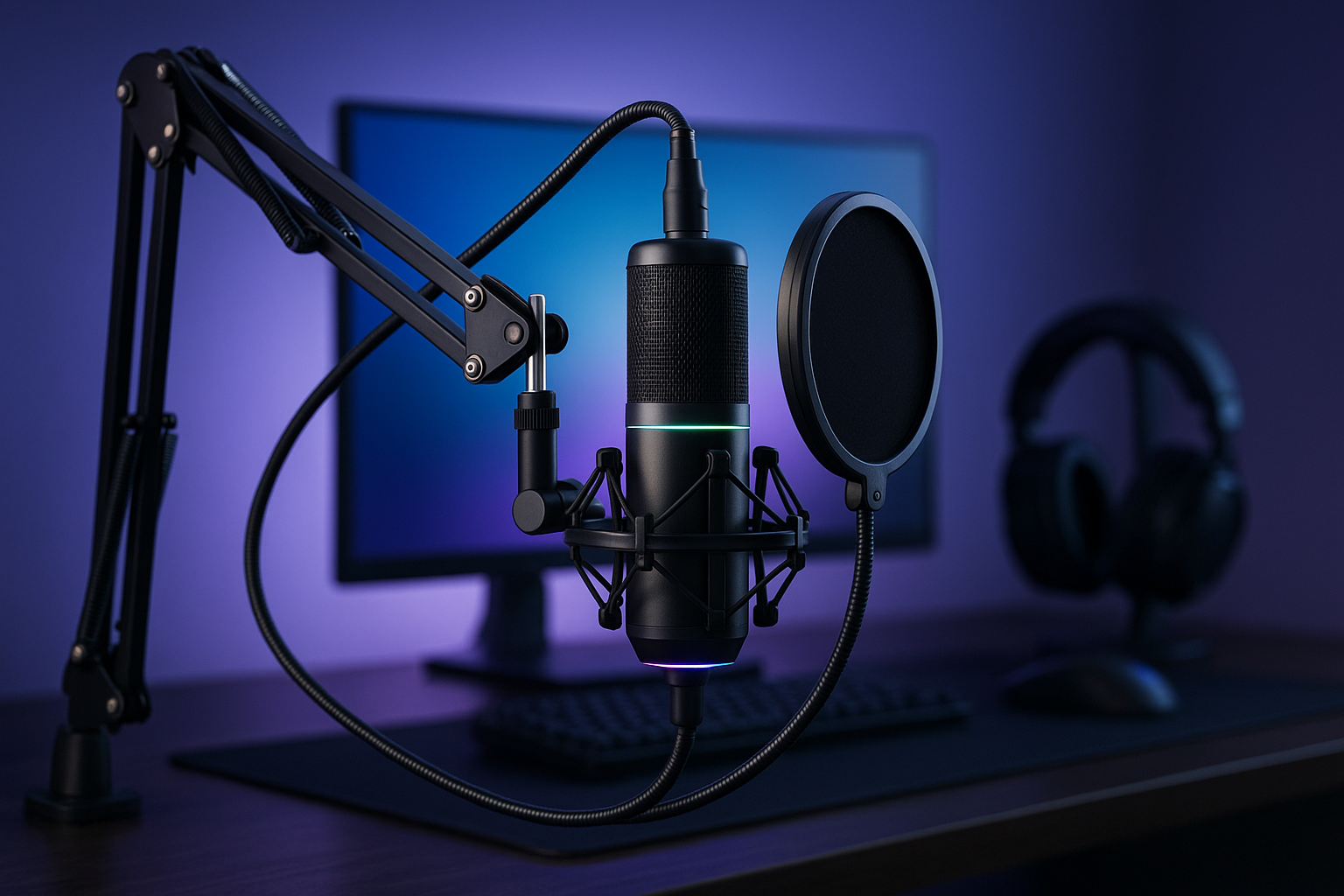
Product Overview: MAONO DGM20S Gaming Microphone
A $42.49 USB microphone can either be a sensible shortcut or a disappointing pile of accessories. The real question is whether the MAONO DGM20S microphone can give you clear team-chat audio without turning setup into another technical project. For PC gaming, Discord, calls, and a first streaming arrangement, it makes a persuasive case because the price includes the desk hardware most beginners would otherwise have to find separately.
The DGM20S is a USB condenser microphone built around focused voice pickup, physical controls, RGB lighting, and plug-and-play connectivity. The package contains the microphone, an adjustable metal boom arm, shock mount, removable pop filter, desktop clamp, USB/USB-C cable, and user manual. The listing is currently marked In Stock at $42.49, although prices can change during 2026.
That bundled approach is the central value proposition. You aren’t buying only a microphone capsule and then discovering that you still need a stand, vibration isolation, and a pop filter. The DGM20S is most compelling if you want desk-mounted controls and a ready-made arrangement at a modest price; someone who already owns a good stand may find the package less necessary.
Its intended experience is uncomplicated: place the microphone in front of you, connect it over USB, select it in your device settings, and use the gain, mute, monitoring, and noise-reduction controls from the desk. It isn’t presented as a professional studio microphone, and it shouldn’t be judged by that standard. It is a practical gaming and communication tool with a useful number of extras.

MAONO DGM20S Microphone Features and Controls
The MAONO DGM20S microphone uses a cardioid pickup pattern. In ordinary language, it gives priority to sound arriving from the front while helping reduce sound coming from the sides and rear. That suits a desk gamer who speaks toward the capsule rather than someone trying to capture a whole room.
There is also a one-click noise-reduction function built into the microphone’s control experience. It may help lessen keyboard sounds, nearby room activity, and general background distractions, but it cannot make a noisy room quiet by itself. A microphone positioned too far away will need more gain, and more gain can make unwanted sound easier to hear.
Windows users have an additional option: Maono noise-cancellation software supports more precise noise adjustment on Windows only. Mac and console users should therefore judge the hardware controls and their platform’s audio settings rather than assuming the same software controls will be available. That distinction matters if you want to tune noise suppression carefully.
The gain knob is one of the most useful physical controls. Instead of opening a game menu or system panel to change your voice level, you can make a gradual adjustment at the microphone. The one-touch mute control is similarly practical: during a team match, livestream, or call, muting your microphone should be a deliberate physical action, not a frantic search through software.
Before a live session, make a short recording and listen through headphones. First adjust gain, then test noise reduction, changing one control at a time. If the voice becomes thin, clipped, or unnatural, return to the previous setting and move the microphone closer rather than simply turning the gain higher.
Voice Monitoring, RGB Lighting, and Physical Design
The 3.5mm headphone jack provides zero-latency monitoring, allowing you to hear your voice directly through the microphone. That avoids the delay often introduced when your voice is routed through software. For gaming, this helps you check whether you are speaking too loudly, too softly, or too close to the capsule before teammates complain.
RGB lighting is a visual customization feature, not a sound-quality feature. The DGM20S lets you choose colors and lighting modes, or switch the lights off for a less noticeable desk setup. If you care about a coordinated gaming station, the controls add personality; if you care only about voice communication, they should have little influence on your buying decision.
The physical arrangement is more significant. The adjustable metal boom arm, desktop clamp, shock mount, and removable pop filter form a complete desk arrangement rather than leaving you to improvise with a small stand. A boom arm can bring the microphone closer to your mouth while keeping it away from the middle of your screen, and it can reduce the clutter created by placing equipment directly on the desk.
Set it up in this order:
- Secure the clamp to a firm part of the desk.
- Attach the boom arm and check that its joints hold the selected position.
- Fit the shock mount and install the microphone.
- Place the pop filter between your mouth and the microphone.
- Position the capsule in front of you, close enough to capture a strong voice signal without speaking directly into it at an uncomfortable distance.
The pop filter is removable, so you can take it off when it obstructs your preferred position. Keeping it installed is generally the sensible starting point for speech because it adds a barrier between your breath and the microphone.
Setup, Compatibility, and Everyday Use
Basic setup is intended to be quick, but the order still matters. Attach the desktop clamp, fit the boom arm, install the shock mount and microphone, connect the supplied USB or USB-C cable, and then select the DGM20S as the input device in your computer or console audio settings. A short test recording is worth making before you join a competitive match or start a stream.
The microphone is designed for PC, Mac, laptops, PS5, and PS4. No drivers are required for basic plug-and-play use, which makes it suitable for Discord voice chat, online multiplayer, livestreaming, video calls, and general communication. The clear platform limitation is Xbox compatibility: the DGM20S is not compatible with Xbox.
Software support is narrower than the hardware compatibility list. Maono noise-cancellation software supports Windows only, so Mac, PS4, and PS5 users should rely on the microphone’s physical controls and whatever audio adjustments their platform provides. If detailed software tuning is a priority, check that requirement before purchasing rather than treating the USB connection as a guarantee of identical functionality on every device.
If the sound is low or distorted, work through the problem methodically:
- Confirm that the DGM20S is selected as the active input.
- Check that the microphone has not been muted.
- Raise or lower the gain gradually instead of making a large change.
- Use headphone monitoring to listen for clipping, excessive room noise, or an overly quiet voice.
- Reconnect the USB cable if the device is not recognized, then reselect it in the audio settings.
This sequence separates configuration problems from gain problems. It also prevents you from trying to fix a wrong input selection by turning the microphone level unnecessarily high.
What Customers Are Saying About the MAONO DGM20S
The supplied product information does not include a displayed star rating or review count, so a responsible review cannot claim that the DGM20S is rated a particular number out of five or that it has a specific volume of buyer feedback. That information should be checked on the current listing before purchase, alongside the $42.49 price and In Stock status. Without those figures, the consistency of long-term customer experiences cannot be established from the provided record.
What can be assessed is the pattern of expectations created by the design. Buyers who want Discord or game chat will likely value the cardioid pickup, hardware mute, gain knob, and direct headphone monitoring more than RGB effects. The included arm and shock mount also reduce the number of separate setup decisions, which is useful when you are building a desk from nothing.
Noise reduction deserves a measured interpretation. The product description says the one-click function helps reduce unwanted background distractions, while Windows software allows more precise adjustment. That supports a reasonable expectation of assistance with ordinary room noise, but not complete removal of keyboard sounds, voices, or a loud environment. Repeated comments about noise performance, if present on the live listing, should be read alongside each buyer’s room, placement, and platform.
The same rule applies to complaints about arm stability, cable reach, sensitivity, mounting hardware, RGB controls, and monitoring. A repeated issue from verified buyers is more meaningful than one isolated complaint, but platform-specific feedback matters most when it matches your own setup. A PS5 user should prioritize PS5 connection reports; a Windows streamer should look for comments about software adjustment and streaming use.
Before ordering, sort the current reviews into two groups: repeated praise for clarity, setup, controls, and mounting, and repeated criticism involving your particular platform or use case. If the listing still lacks enough detailed feedback to reveal those patterns, treat the DGM20S as a promising specification-led budget package rather than a product with a fully established customer track record.

MAONO DGM20S Microphone Compared With Alternatives
The FIFINE AM8 is a natural alternative for shoppers comparing USB gaming microphones, but current prices, ratings, and exact package contents should be checked on its live listing rather than assumed. The useful comparison is practical: determine whether it includes the mounting equipment you need, how its physical controls are arranged, whether it offers headphone monitoring, and whether its lighting and connectivity suit your desk.
The MAONO DGM20S microphone is designed as a bundle with a boom arm, shock mount, pop filter, clamp, and cable. That can make its total setup cost more attractive when you are starting from scratch. If the FIFINE AM8 listing offers a package that better matches your existing stand or preferred controls, however, buying the rival may avoid paying for equipment you won’t use.
The HyperX SoloCast is the simpler alternative to investigate. It is commonly considered in the standalone-microphone category, so the key questions are whether the current bundle includes a boom arm, what mute and gain controls it provides, whether direct monitoring is available, and how easily it can be positioned on your desk. A smaller microphone arrangement may suit you if screen space is tight or you already own mounting hardware.
There is no universal winner here. Choose the MAONO when physical gain and mute controls, direct monitoring, RGB customization, and a complete arm-based setup matter more than minimizing parts. Choose a competitor when you already have a stand, prefer a smaller footprint, need different console support, or find that the current rating and review history better match your expectations.
Compare the total setup cost, not just the microphone price. Check voice clarity reports, background-noise behavior, platform compatibility, desk space, monitoring, and the accessories included in each current listing. The cheapest microphone-only option may not remain cheapest after you add the hardware required to place it properly.
Who Should Buy the MAONO DGM20S Microphone?
The strongest match is a PC gamer who spends time in Discord and wants teammates to hear a focused voice without buying a separate desk setup. The DGM20S also suits a first-time streamer or frequent caller who wants a dedicated microphone with a physical mute button and gain control instead of relying entirely on software menus.
The bundled boom arm, shock mount, and pop filter are especially useful if you are starting from scratch. They let you arrange the microphone beside the screen and keep the desk clearer than a microphone sitting in front of the keyboard. That convenience is more meaningful than RGB if your priority is getting a usable communication setup assembled in one purchase.
PS4 and PS5 users can consider it for plug-and-play USB communication, provided the current platform behavior meets their needs. Xbox owners should skip it because the product is explicitly not compatible with Xbox. Likewise, Mac and console users who require advanced noise-cancellation software should look elsewhere, since the more precise Maono software adjustment is limited to Windows.
You may prefer another option if you want wireless operation, professional studio recording, or extensive software control outside Windows. The $42.49 price is a budget boundary, not evidence that the microphone delivers the refinement of a dedicated studio system.
Use this quick decision process:
- Identify your platform and eliminate Xbox if that is your console.
- Decide whether you need the included boom arm and mounting accessories.
- Decide whether zero-latency headphone monitoring matters to you.
- Compare the complete cost with a standalone microphone plus the accessories you actually need.
Price, Included Accessories, and Overall Value
At $42.49, the MAONO DGM20S is easiest to justify as an all-in-one gaming and communication package. You receive a USB condenser microphone, adjustable metal boom arm, shock mount, removable pop filter, desktop clamp, USB/USB-C cable, and manual. That is a more useful comparison than treating the price as the cost of the microphone alone.
The bundled accessories may save you from separately sourcing a boom arm, vibration mount, pop filter, and mounting hardware. The actual saving depends on what you already own and which alternatives you are considering, so compare the total price of a complete arrangement rather than adding imaginary accessory costs to every competing product.
The trade-off is convenience versus refinement. An all-in-one gaming package can get you speaking in Discord or joining a call quickly, but you should still judge the current listing’s review consistency, arm stability, build quality, and software support before expecting studio-level recording. Its feature set is broad; that does not make it a professional recording chain.
The listing is currently marked In Stock, and the displayed price should be checked immediately before purchase because retail pricing can move. At the stated price, the buying takeaway is straightforward: this is a sensible choice when you need physical controls and a complete boom-arm setup, less so when you already own the supporting hardware or need Xbox, wireless, or advanced non-Windows software compatibility.
Pros and Cons
Pros
- Complete starter package with a USB condenser microphone, adjustable metal boom arm, shock mount, pop filter, clamp, and cable.
- Physical gain control, one-touch mute, noise-reduction control, and zero-latency headphone monitoring make everyday operation convenient.
- Cardioid pickup and included pop filter are well suited to Discord, gaming chat, calls, and entry-level streaming.
- RGB lighting can be customized or switched off.
- Basic plug-and-play support covers PC, Mac, laptops, PS5, and PS4 without requiring drivers.
Cons
- Not compatible with Xbox consoles.
- Maono noise-cancellation software is available only on Windows, leaving Mac and console users with fewer adjustment options.
- Customer-review counts, ratings, and recurring buyer feedback were not included in the supplied listing data, so long-term consistency cannot be verified here.
- The bundled boom-arm setup is convenient, but buyers expecting studio-level recording refinement may need a more specialized microphone.
Final Verdict
Key Takeaways
- At $42.49 and currently marked In Stock, the MAONO DGM20S is priced as a complete USB gaming setup rather than a bare microphone.
- Its strongest practical features are the included boom arm, physical gain and mute controls, cardioid pickup, one-touch noise reduction, and zero-latency headphone monitoring.
- PC, Mac, PS5, and PS4 users can use basic plug-and-play connectivity, but Xbox owners should choose another microphone.
- Windows users get the most adjustment potential because Maono noise-cancellation software is not offered for Mac or consoles.
- The package makes sense for a first gaming or communication setup, provided you want convenience more than professional studio recording.
Frequently Asked Questions
Is the MAONO DGM20S microphone compatible with PS5 and PS4?
Yes. The microphone is designed for plug-and-play use with PC, Mac, laptops, PS5, and PS4, and basic operation does not require drivers. You connect it, choose it as the audio input, and test the gain and mute controls. Xbox is specifically excluded.
Does the MAONO DGM20S microphone reduce keyboard and background noise?
The microphone includes a one-click hardware noise-reduction control, which is intended to limit background distractions. More precise Maono noise-cancellation adjustment is available through software on Windows only. Noise reduction works best when the microphone is positioned close to you in a reasonably quiet room.
Can you monitor your voice through the microphone?
Yes. The 3.5mm headphone jack provides zero-latency monitoring, so you can hear your voice directly rather than relying on delayed software monitoring. This is useful for checking your level during gaming, calls, and streaming.
What comes with the MAONO DGM20S?
The package includes the microphone, adjustable metal boom arm, shock mount, removable pop filter, desktop clamp, USB/USB-C cable, and manual. That makes it more of a starter desk setup than a microphone-only purchase.
Who should buy the MAONO DGM20S microphone?
It is a good fit if you want a straightforward USB setup with physical gain and mute controls, RGB lighting, direct monitoring, and an included boom arm. It is less suitable for Xbox, wireless use, advanced Mac or console noise-control software, or professional studio recording.
Disclosure: As an Amazon Associate, I earn from qualifying purchases.