

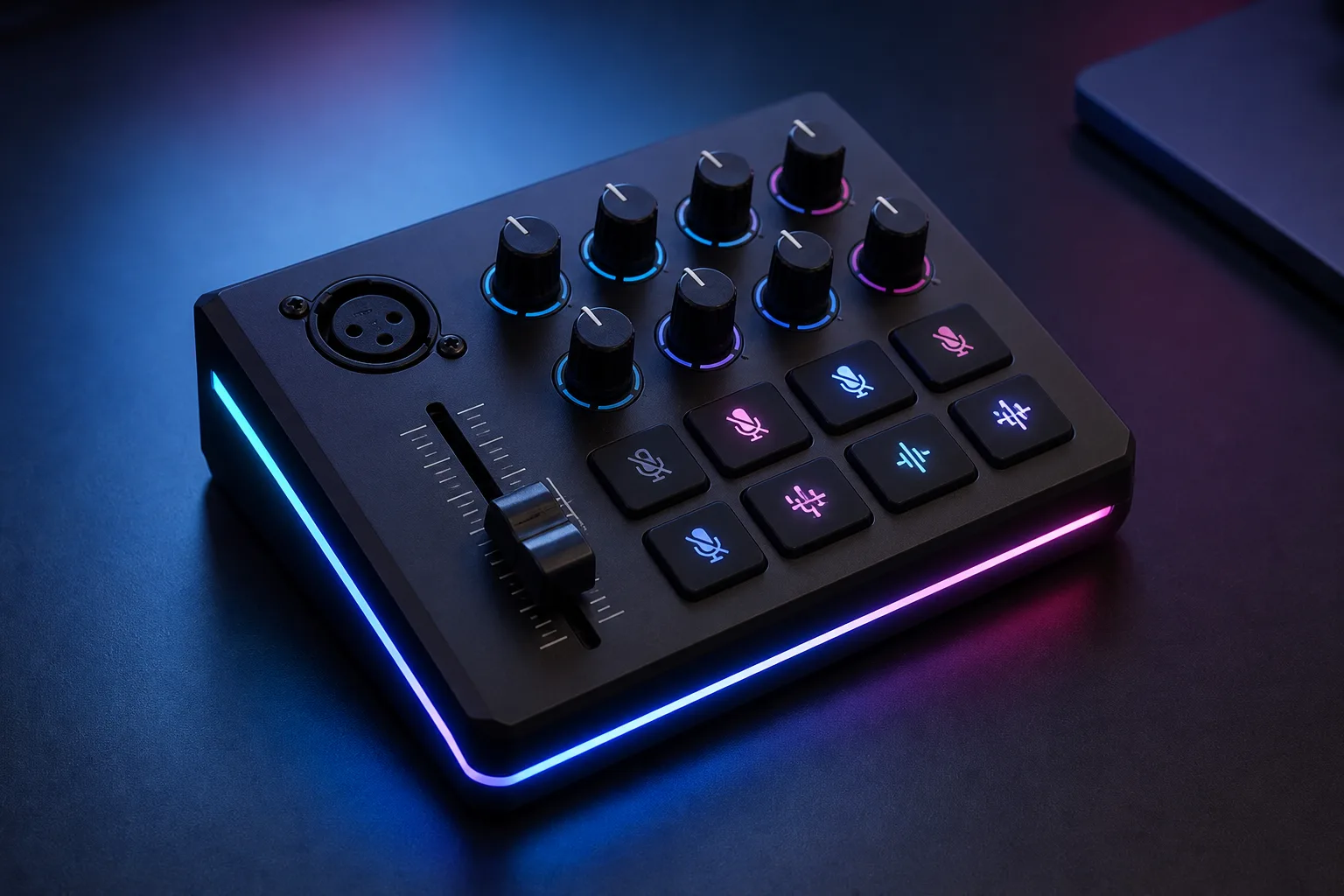
FIFINE SC3 Gaming Audio Mixer: Features and First Impressions
Can a small mixer with XLR connectivity, physical controls, RGB lighting, and voice effects make your stream easier to manage for $52.99? The FIFINE Gaming Audio Mixer makes a credible case, particularly if you are moving from a simple headset or software-only setup to one XLR microphone.
The listed product is a one-microphone USB audio mixer for gaming, streaming, podcasting, recording, online chat, vocal use, and game voice. It is shown as In Stock at $52.99 at the time of this review; prices can change, so treat that figure as a current snapshot rather than a promise.
In 2026, the practical question is less whether the RGB looks good on camera and more whether the controls simplify your sessions. This mixer offers an unusually wide feature set for the price, but the single XLR input, USB-microphone restriction, and missing XLR cable narrow its audience. If you already use, or intend to buy, one XLR microphone, it deserves attention. If you own a USB microphone or need several microphone inputs, the fit is poor from the start.

Product overview and core specifications
The control surface is built around one XLR microphone input and a set of physical controls intended to keep common adjustments in reach. You get a microphone volume fader, LINE IN control, headphone control, and LINE OUT control, along with front mute and monitor buttons, sound-effect buttons, and RGB controls.
The listed input interfaces are Mic, LINE IN, and Headset. The listed outputs are Headphones, LINE OUT, and Headset. That distinction matters because the headset interface is not automatically identical to using separate microphone and headphone connections; your headset wiring and the device connection still need to match the intended port.
The mixer connects to a computer through USB-C. The supplied guidance supports a USB-C-to-USB-A/C connection between the mixer and computer, and the stated computer platforms are Mac OS and Windows. The product is intended for OBS, Twitch, YouTube, TikTok creation, online chat, and game voice.
For a phone or tablet connected through LINE IN, the guidance calls for a 3.5mm-to-3.5mm audio cable. The supplied product information does not confirm every accessory in the box beyond that connection guidance, so do not assume an XLR cable or every required adapter is included.
FIFINE Gaming Audio Mixer features in everyday use
The strongest everyday feature is the four-channel control arrangement. You can adjust the microphone, LINE IN, headphones, and LINE OUT levels separately on the mixer instead of relying entirely on game menus, keyboard shortcuts, or streaming software sliders.
During a live session, that means you can lower music, raise your microphone, or change your monitoring volume without leaving a game or opening OBS. The smooth volume fader also gives you a tactile adjustment method: your hand can make a small change while your attention remains on the broadcast. The product information does not establish a particular fader travel length, audio resolution, or durability-test standard, so those should not be treated as confirmed benefits.
The front mute button has an obvious use. Press it when you cough, need to answer someone nearby, or have a private interruption, rather than hunting through software for the correct microphone control. The monitor function is described as providing real-time feedback between speaking and hearing, but that description alone does not establish a specific latency figure. Customer reports using the same microphone and software are the most useful way to judge whether monitoring feels immediate in practice.
For a first setup, follow this order:
- Connect the mixer to the computer.
- Connect the XLR microphone.
- Plug headphones into the appropriate output.
- Select the mixer as the computer’s input and output device.
- Test microphone and playback levels in the streaming software you plan to use.
XLR microphone support and 48V phantom power
The single XLR input is intended for an XLR microphone, and the built-in 48V phantom power expands compatibility with suitable condenser microphones. That makes the FIFINE Gaming Audio Mixer an interface as well as a control surface for a basic one-speaker or one-host setup.
There is a firm compatibility boundary: USB microphones are not supported through the XLR input. You cannot use this mixer as a USB-microphone adapter or assume that buying it creates an upgrade path for a USB-only microphone. Check the connector and power requirements of your microphone before ordering.
An XLR cable is not included. Cable length, shielding, and connector condition can influence audio quality, so a properly shielded cable with sound connectors is a sensible purchase. It is not a guaranteed cure for every noise problem, but it removes one avoidable variable from the setup.
Connect the microphone and cable first, check whether the microphone requires phantom power, and enable 48V only when appropriate. Then speak at normal volume while listening for clipping or unwanted noise. Because there is one XLR input, this is primarily a solo-streamer and single-speaker mixer; a two-microphone show needs a different design with at least two microphone inputs.
RGB lighting, voice effects, and customization
RGB lighting is controllable, with the product description referring to flowing or frozen colour rotation and describing the illumination as vibrant without being harsh. That may suit a desk visible on camera or a creator who coordinates lighting across a streaming setup. It does not improve microphone fidelity, reduce latency, or add recording capability.
The creative controls are more distinctive. Four pre-recorded sound-effect buttons can be customized and activated by pressing them, making them suitable for short reactions, recurring cues, introductions, or production clips. The mixer also lists six voice-changing modes and auto-tune changes. Those numbers describe the available creative options, not the naturalness, accuracy, or studio quality of the processing.
Before using an effect during a public broadcast, record a short sample. Check whether the effect appears in the monitor feed, listen for a sudden volume increase, and confirm that the output remains below clipping. Try each sound button at normal speaking volume rather than judging it only through the room speakers.
Customer feedback would be needed to separate entertaining effects from distracting or unreliable ones. The supplied product data gives no verified testing result, star rating, review count, or measured assessment of the effects, so the RGB and processing should be treated as optional creative features rather than proven audio advantages.
Two-PC and connected-device setup
The advertised two-PC arrangement uses the line connections to balance music, game audio, microphone audio, or another source physically. A practical beginner arrangement is to connect your XLR microphone to the mixer, headphones to the headphone output, and the primary computer through USB-C. A second computer or analogue source can then use the appropriate line connection.
For a phone or tablet, the stated method is a 3.5mm-to-3.5mm cable into LINE IN. Check that the device has an analogue audio port or obtain the correct adapter before trying to build the setup. A digital-only port cannot be treated as an analogue line connection without suitable conversion hardware.
Add devices gradually. First confirm that one computer and the microphone work, then connect the second source and monitor the result. Listen for duplicated monitoring, feedback loops, or an excessively loud line-level signal before opening a live broadcast.
This arrangement is relevant to OBS, Twitch, YouTube, TikTok, Discord-style chat, and game voice workflows. The supplied description discusses Mac OS and Windows and line-connected devices, but it does not confirm console compatibility, so console buyers should not infer support from the two-PC wording.

What customers are saying about the FIFINE Gaming Audio Mixer
The product information supplied for this review does not include a verified customer star rating or review count. That means it would be misleading to write that buyers rate the mixer highly, or to attach a numerical consensus to setup, clarity, construction, or monitoring behaviour.
There is also no supplied review evidence confirming how many customers praise the XLR upgrade path, independent controls, front mute button, plug-and-play operation, or $52.99 price. Likewise, no verified customer pattern was provided for USB-microphone incompatibility, the missing XLR cable, cable-related noise, unclear instructions, effect quality, monitoring behaviour, or balancing two devices.
When those reviews are available at publication, assess them by separating the buyer’s system from the mixer. A complaint about noise may involve the XLR cable, microphone, port, or power arrangement; a monitoring complaint may depend on whether the person used hardware monitoring or software monitoring; and an operating-system problem may be a device-selection or routing issue.
Give the most weight to reports that match your intended setup. A review using one condenser microphone on Windows is more relevant to you than one describing two computers and a different microphone. Look for repeated descriptions of the same behaviour, not a single dramatic comment, and verify the rating and review count on the live listing before publication or purchase.
Who should buy this mixer?
The strongest match is a solo streamer, gamer, podcaster, vocalist, or beginner creator who uses one XLR microphone and wants physical control over several audio channels. The four independent controls make sense if you frequently adjust speech, incoming line audio, headphone monitoring, and outgoing line audio while broadcasting.
The front mute button is especially useful for people who cannot afford to search through software during a live session. Built-in 48V phantom power also gives owners of a compatible condenser microphone a direct way to supply the required power without buying a separate basic interface.
RGB lighting, sound buttons, voice-changing modes, and auto-tune changes add appeal if you will actually use them. They are less persuasive if you want a plain interface whose only job is clean capture and monitoring.
Look elsewhere if you own a USB-only microphone, require two or more XLR microphones, need extensive musical routing or recording functions, or dislike gaming-oriented effects. Your decision test is simple: choose the FIFINE Gaming Audio Mixer if you need one XLR microphone, tactile channel controls, headset monitoring, and playful effects. Skip it if any of those requirements conflicts with your equipment.
FIFINE Gaming Audio Mixer versus competing options
The Behringer Xenyx 302USB is the more conventional compact-mixer comparison. The FIFINE model is explicitly organised around gaming controls, RGB lighting, sound effects, and voice changes, while a conventional mixer may suit a buyer who wants a less entertainment-focused operating style. The product data supplied here does not verify current specifications or price for the Behringer model, so a direct value ranking would be unreliable.
The Elgato Wave XLR is another relevant comparison for a creator focused on one microphone and streaming software. Before making a price or feature claim, check its current listing for input count, phantom-power support, included controls, computer connection, software support, and current price. Those details can change, and none were supplied for this review.
| Model | Intended user | XLR inputs | Phantom power | Controls and creative features | Computer connection | Current price |
|---|---|---|---|---|---|---|
| FIFINE Gaming Audio Mixer | Solo gaming, streaming, podcasting, vocal use | 1 | 48V listed | Independent levels, RGB, sound buttons, voice effects, auto-tune changes | USB-C to computer | $52.99 |
| Behringer Xenyx 302USB | Check current listing | Verify before purchase | Verify before purchase | Conventional mixer-style workflow; verify details | Verify before purchase | Verify current price |
| Elgato Wave XLR | Check current streaming workflow | Verify before purchase | Verify before purchase | Streaming-focused controls and software; verify details | Verify before purchase | Verify current price |
The comparison is therefore about priorities rather than declaring a winner. The FIFINE model’s $52.99 price and built-in creative controls are central strengths, while its one XLR input and USB-microphone restriction are central limits.
Is the FIFINE Gaming Audio Mixer good value at $52.99?
At $52.99, the value comes from the combination rather than from any single control. You get one XLR microphone input, listed 48V phantom power, four independently adjustable channels, headphone monitoring, line connections, RGB control, four sound-effect buttons, six voice-changing modes, and auto-tune changes.
Separate the everyday hardware from the novelty features. The XLR input, mute button, monitoring, and independent faders can affect how quickly you manage a live session. RGB lighting and voice effects matter mainly if they are part of your on-camera style or you will use them repeatedly.
Budget for the missing XLR cable. You may also need a 3.5mm cable or an adapter for a phone, tablet, or second device. Before ordering, verify your microphone type, number of speakers, computer operating system, available ports, preferred monitoring method, and whether your streaming software recognises the mixer correctly.
With those checks complete, the FIFINE Gaming Audio Mixer is positioned as an accessible stepping stone into a one-microphone streaming setup. It is a reasonable $52.99 proposition for the right buyer, but the price does not erase the connection and compatibility limits.
How to set up the mixer without avoidable audio problems
A careful first setup prevents many problems that can otherwise look like a defective mixer. Start with a compatible, properly shielded XLR cable, then work through the connections in a controlled order.
- Connect the XLR cable to the microphone and mixer.
- Connect headphones to the intended headphone output.
- Connect the mixer to the computer through USB-C using the suitable USB-A or USB-C computer connection.
- Select the mixer as both the input and output device where appropriate.
- Set microphone and channel levels gradually while speaking at normal volume.
- Add music, game audio, or effects only after the microphone is clean and free from distortion.
- Enable 48V phantom power only when the connected microphone requires it and is compatible with it.
- Test the mute button, monitor function, line input, line output, RGB controls, and every sound-effect button.
- Make a short local recording in OBS or your chosen application.
- Listen for clipping, echo, duplicated monitoring, cable hum, and effect volume that is too high.
If something sounds wrong, check the cable, selected port, operating-system device settings, and software routing before assuming the mixer has failed. Change one setting at a time; that makes it much easier to identify whether the problem comes from the microphone, cable, computer, or application.
Pros and Cons
Pros
- One XLR microphone input with built-in 48V phantom power.
- Four independent controls for microphone, LINE IN, headphones, and LINE OUT.
- Front-facing mute and monitor buttons for live adjustments.
- RGB lighting, four customizable sound-effect buttons, six voice-changing modes, and auto-tune changes.
- USB-C computer connection with stated Mac OS and Windows support.
- Low listed price of $52.99 for a feature-heavy solo streaming mixer.
Cons
- Only one XLR microphone can be connected at a time.
- USB microphones are not supported through the XLR input.
- An XLR cable is not included, so you will need to budget for a compatible shielded cable.
- The product data does not verify customer rating, review count, effect quality, latency, or current competitor pricing.
- More advanced musicians and multi-speaker productions may need a mixer with greater routing flexibility.
Final Verdict
Key Takeaways
- At $52.99, the mixer combines one XLR microphone input, 48V phantom power, four independent level controls, monitoring, RGB lighting, and creative effects.
- It is best suited to a solo streamer, podcaster, vocalist, or gamer using an XLR microphone rather than a USB microphone.
- The front mute button and physical controls are more practically useful than the RGB lighting or voice effects for most live sessions.
- You must supply an XLR cable, and buyers should confirm their microphone type, available ports, and intended single-PC or two-PC arrangement before ordering.
- The supplied product data does not include a verified star rating, review count, latency testing, or current competitor pricing, so those factors should be checked at publication.
Frequently Asked Questions
Can the FIFINE Gaming Audio Mixer use a USB microphone?
Yes, the mixer includes one XLR microphone input and built-in 48V phantom power for compatible condenser microphones. It does not support USB microphones through that input.
How many microphones can it connect?
The mixer is designed for one XLR microphone. A second audio source can be connected through LINE IN, but that is not the same as having a second independent XLR microphone channel.
How much does the mixer cost?
The listed price is $52.99 and the product is shown as In Stock at the time of this review. Prices and availability can change.
Is the FIFINE Gaming Audio Mixer easy to set up?
Connect the mixer to a Mac or Windows computer through its USB-C connection, attach the XLR microphone, connect headphones, select the mixer as the computer’s input and output device, and then test levels in your streaming software.
What cables do you need?
An XLR cable is not included. You may also need a 3.5mm-to-3.5mm cable or an adapter when connecting a phone, tablet, or other analogue device through LINE IN.
Disclosure: As an Amazon Associate, I earn from qualifying purchases.