

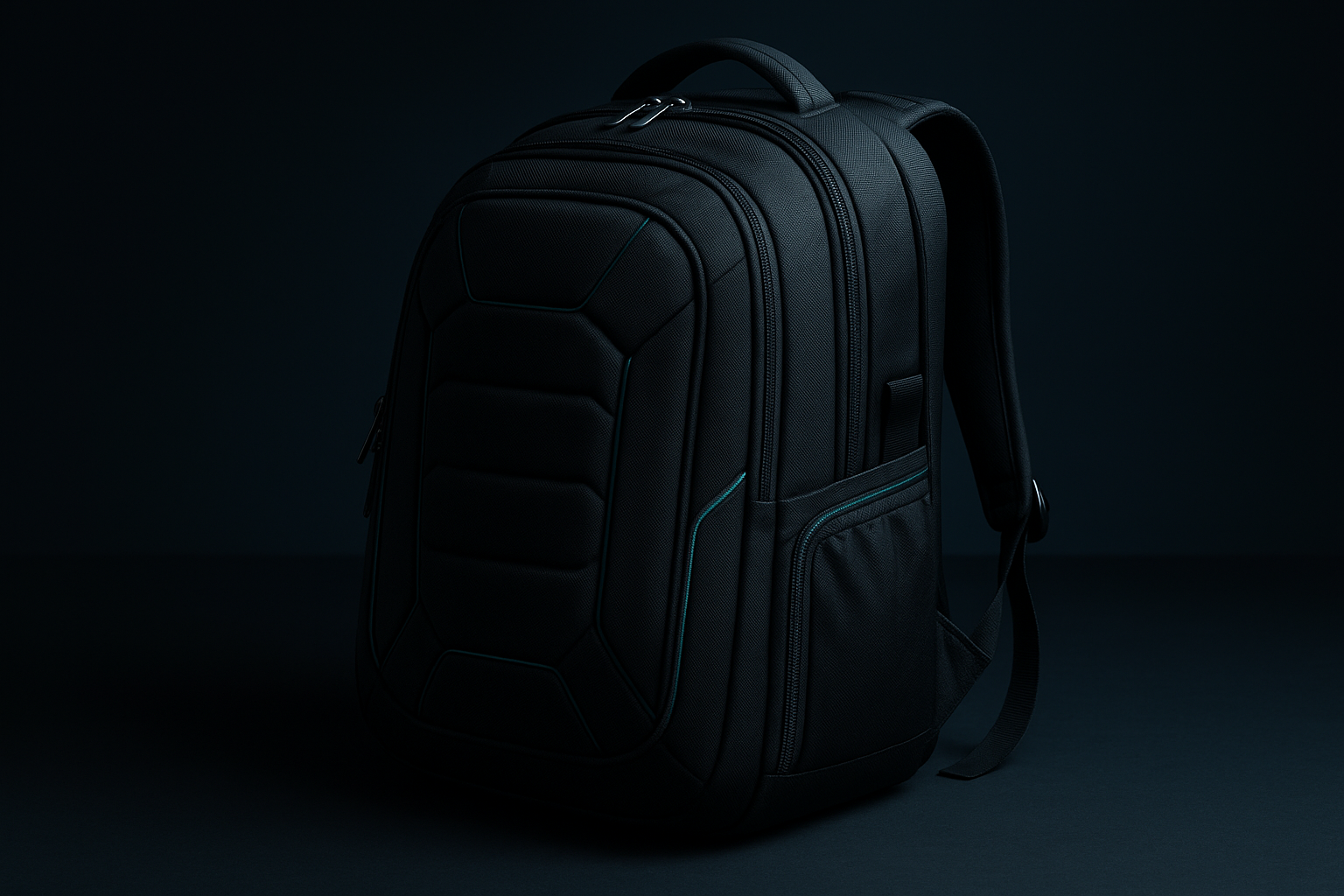
Acer PBG591 Predator Utility Gaming Backpack, Water Resistant and Tear Proof Travel Backpack Fits and Protects Up to 17.3" Predator Gaming Laptop, Black with Teal Accents
A large gaming laptop is awkward to transport because the computer is expensive, the charger is often nearly as bulky as a small tablet, and ordinary laptop bags tend to assume a thinner 15- or 16-inch machine. Add rain, airport handling, loose cables, and a long walk between buildings, and a basic sleeve inside a daypack begins to feel like a compromise.
The Acer Predator gaming backpack is built for that particular problem. The Acer PBG591 Predator Utility Gaming Backpack is specified for laptops up to 17.3 inches and uses a black exterior with teal accents. Its listed features include a water-repellent coating, tear-resistant construction, a cushioned ventilated back panel, an interior headset strap, a bottom pocket for a power-adapter brick and personal belongings, and a luggage handle pass-through.
The listed price is $179.99, and the item is shown as In Stock at the time of this review. That makes the central question fairly straightforward: do the protective and travel-focused details justify paying a premium over an ordinary laptop backpack?
This review examines construction, storage, comfort, weather protection, airport usability, available customer-feedback evidence, alternatives, and practical value. It sticks to the features actually supplied by the manufacturer and listing; where a measurement or performance test is missing, that uncertainty is part of the buying advice.

Product overview: what the Acer Predator gaming backpack is designed to do
The Acer PBG591 is primarily a protective travel carrier for a large Predator gaming laptop, not an ultralight school bag or a minimalist commuter daypack. That distinction matters because gaming equipment creates a different packing problem: a thick laptop, power brick, cables, headset, mouse, and personal items need to travel together without pressing against the computer.
The stated construction combines a water-repellent coating with a tear-proof construction claim. It also includes protective zippers and a luggage handle pass-through, so the design is aimed at commuting, airport transfers, and other situations where the bag may be placed on the floor, under a seat, or on top of rolling luggage.
Inside, the description identifies a cushioned mesh back panel designed for airflow, an interior headset strap, and a bottom pocket intended for the power adapter brick and personal belongings. Those are specific solutions to familiar gaming-bag annoyances: headphones sliding around, the charger occupying the laptop area, and a heavy load becoming uncomfortable against your back.
Several useful specifications are not supplied. The listing does not establish total capacity, empty weight, external dimensions, padding thickness, waterproof certification, or the number of compartments. You should therefore judge it on the confirmed feature set: laptop fit, protection claims, organization, weather resistance, carrying comfort, airport usability, and whether those benefits make $179.99 reasonable.
Key features of the Acer Predator gaming backpack
The feature list is short but purposeful. Rather than promising RGB lighting, charging ports, or a particular number of pockets, the Acer Predator gaming backpack focuses on carrying the computer safely and making a loaded journey less inconvenient. That narrower approach can be a strength if your main problem is transporting a large gaming system rather than maximizing every inch of storage.
Protection comes from the stated laptop compatibility, cushioned construction, protective zippers, water-repellent coating, and tear-resistant design claim. Organization comes from the headset strap and bottom charger pocket. Travel practicality comes from the luggage pass-through, while the ventilated back panel addresses the heat that can build up during a long walk.
There is a useful limit to what can be inferred. A water-repellent coating is not the same as a waterproof rating, and a tear-proof claim is not a published laboratory durability result. Likewise, a listed laptop size does not tell you the compartment’s exact internal dimensions or whether a thick sleeve will fit.
For daily use, the sensible approach is to treat the confirmed features as tools rather than guarantees. Pack the computer first, keep the charger in its intended lower pocket, secure the headset, and avoid filling unknown spaces with hard objects that could press into the laptop.
17.3-inch laptop protection in the Acer Predator gaming backpack
The stated laptop limit is up to 17.3 inches, which makes the Acer Predator gaming backpack particularly relevant to owners of large gaming notebooks that cannot comfortably fit standard laptop backpacks. A 17.3-inch Predator model is the obvious match, but similarly sized machines may also be candidates if their chassis dimensions are compatible.
Screen size is only one part of fit. Two laptops with the same diagonal display can differ in depth, thickness, corner shape, hinge design, and bezel size. A protective sleeve adds another layer of bulk, and forcing a zipper around an overfilled compartment is a good way to create unnecessary stress on both the bag and the computer.
Before ordering, compare your laptop’s complete physical measurements with the seller’s internal-compartment measurements. This is especially important for unusually thick Predator models or any computer with a pronounced rear hinge. If the listing does not provide those internal measurements, contact the seller or manufacturer rather than relying on the diagonal-screen description alone.
At home, test the fit without forcing the zipper. Place the laptop in the compartment, check that it cannot move excessively, and then add the accessories you normally carry. Make sure the headset, cable, or charger does not press against the screen or create a hard ridge behind the computer.
The protection wording is encouraging but limited. The backpack is described as built to fit and protect a 17.3-inch Predator gaming laptop, yet the supplied information includes no drop-test result, protection rating, or exact padding thickness. Consider it protective storage, not independently certified impact equipment.
Water-repellent coating and tear-resistant travel construction
The bag’s water-repellent coating should help rain and splashes bead on the surface instead of soaking in immediately. That is useful when crossing a campus or walking from a train station to an office, but it is materially different from full waterproofing. The listing provides no waterproof certification, immersion test, or stated time limit for exposure to heavy rain.
The same caution applies to the tear-proof construction claim. It suggests that the fabric is intended to tolerate repeated commuting, airport handling, and regular loading better than a delicate fashion backpack. It does not mean the bag is impossible to rip, particularly if a zipper is overfilled or the backpack is dragged against a sharp surface.
Use the weather protection sensibly. Close the zippers before leaving the house, wipe the exterior clean after a wet journey, and let the backpack dry fully before storing it. Unless the manufacturer confirms stronger protection, use a separate rain cover or choose another bag for prolonged exposure to heavy rain.
Customer feedback would be most useful here if it described regular conditions rather than a single drizzle. Look for repeated comments about whether the coating sheds rain, whether seams remain intact, and whether zippers snag after months of use. Weather protection matters more when the bag carries a high-value computer and a separate power brick, since replacing or repairing either is more costly than dealing with a damp schoolbook.
Ventilated cushioned back panel and carrying comfort
The cushioned mesh back panel is advertised as ventilated, or designed to promote airflow between your back and the bag. That can make a difference during campus walks, commutes, and airport transfers, especially when a thick gaming laptop and charger create a dense load close to your body.
Ventilation should not be confused with a complete ergonomic system. The available description does not provide shoulder-strap dimensions, sternum-strap details, hip-belt support, a load rating, or back-panel geometry. Those omissions mean you cannot predict comfort from the word “cushioned” alone.
Test the backpack with a realistic load rather than empty. Include your laptop, power adapter, headset, mouse, cables, and the personal items you normally carry, then walk for to minutes. Pay attention to shoulder pressure, heat buildup, balance, zipper access, and whether the bag pulls backward as the charger settles toward the bottom.
A large gaming laptop and its power adapter usually create a heavier setup than a thin productivity notebook. Comfort will depend on both the padding and how the weight is distributed. If you routinely carry books, a controller, or clothing as well, the bag’s unknown overall capacity and load behavior become just as relevant as the mesh panel.

Storage layout: headset strap and bottom power-adapter pocket
The interior headset strap is a small feature with a clear purpose: it gives your headphones a fixed place instead of leaving them loose in the main compartment, where they can slide, become tangled, or get crushed beneath other equipment. It is particularly useful if you move between gaming, classes, and work without wanting a separate audio case.
The bottom pocket is intended for a power-adapter brick and personal belongings. Separating the charger from the laptop compartment can make packing more orderly and reduce the chance that a heavy brick will sit directly against the computer. It may also make the main area easier to access when you need to remove the laptop at security.
What is not confirmed is equally relevant. The description does not establish dedicated pockets for a gaming mouse, controller, tablet, water bottle, documents, or individual cables. It also does not say whether a particularly large gaming charger fits comfortably or whether the lower pocket makes a fully loaded bag feel bottom-heavy.
Use a deliberate packing order: place the laptop in its protective section, secure the headset to the interior strap, put the power brick and cable in the bottom pocket, and then add lighter personal items where they cannot press into the computer. If your daily kit includes several hard accessories, inspect the actual compartment arrangement before assuming the listed pockets will cover everything.
Luggage handle pass-through for airports and travel
The luggage handle pass-through lets you slide the backpack over the telescoping handle of a rolling suitcase. Instead of carrying the entire computer load through a terminal, you can stack the backpack on your suitcase while walking between check-in, security, the gate, and a hotel.
That feature also makes sense for train travel, business trips, and hybrid work. A gaming laptop may be part of a larger load even when the trip is not gaming-related, and keeping the backpack attached to luggage can reduce the number of loose pieces you have to manage.
The listing does not provide the pass-through’s width or describe its stitching strength. It also does not confirm how stable the backpack is on different suitcase handles or whether it swings when the suitcase turns. Those details matter more when the computer is heavy and the suitcase is being rolled over uneven flooring.
Before a major trip, load the bag as you normally would, slide it over the suitcase handle, tilt the suitcase carefully, and check whether the backpack remains upright and closed. The pass-through improves transport convenience, but it does not replace a padded laptop compartment or careful handling when removing the computer at security screening.
What customers are saying about the Acer Predator gaming backpack
No Amazon rating, review count, or individual customer comments were included in the supplied product data. That means a responsible review cannot claim that buyers praise the stitching, report comfortable shoulder straps, or confirm that a 17.3-inch Predator fits in practice. It also cannot invent a verified-buyer quotation or assign a satisfaction score.
For this product, the most useful customer evidence would address fit with specific Predator models, the amount of padding, zipper quality, seam durability, rain performance, headset-strap usefulness, charger-pocket capacity, and comfort under a full load. Repeated observations across recent reviews would deserve more weight than a single complaint or a one-line five-star rating.
Read size complaints carefully. A reviewer who says the bag is too small may be describing limited accessory room rather than a failed laptop fit; another may own a particularly deep chassis. Similarly, “not waterproof” could mean the bag leaked during prolonged heavy rain, or simply that the reviewer expected waterproofing that the listing never promised.
When review history becomes available, sort recent reviews by rating and search within them for “17.3,” “charger,” “rain,” “zipper,” and “comfortable.” Compare those reports with your own equipment list and the laptop’s physical measurements. Until then, confidence in long-term durability and real-world comfort remains more limited than the feature description alone might suggest.
How the Acer Predator gaming backpack compares with alternatives
The Acer Predator gaming backpack occupies a specialized position: it is aimed at large gaming laptops and travel rather than at the lightest possible daily carry. Two named alternatives are the Targus Drifter II Backpack and the Lenovo Legion Active Gaming Backpack. Their suitability depends on current specifications and listing details, which were not included in the supplied data.
| Feature | Acer PBG591 | Targus Drifter II Backpack | Lenovo Legion Active Gaming Backpack |
|---|---|---|---|
| Maximum laptop size | Up to 17.3 inches | Verify current listing | Verify current listing |
| Weather-resistance wording | Water-repellent coating | Verify current listing | Verify current listing |
| Travel pass-through | Listed | Verify current listing | Verify current listing |
| Headset storage | Interior strap listed | Verify current listing | Verify current listing |
| Charger storage | Bottom pocket listed | Verify current listing | Verify current listing |
| Price, rating, and review count | $179.99; rating and count not supplied | Check current listing | Check current listing |
The Acer’s clearest case is its stated 17.3-inch Predator focus combined with weather resistance, ventilation, dedicated headset storage, a charger pocket, and suitcase compatibility. The Targus Drifter II may be worth checking if its current organization or price better suits a broader everyday load. The Lenovo Legion Active Gaming Backpack may appeal if its current gaming-device compatibility, comfort features, or price align more closely with your equipment.
Do not assume either alternative is lighter, roomier, cheaper, or more protective without checking its live specifications. Compare the actual laptop compartment, weather wording, travel feature, current price, rating, and review count at publication time. The right choice is the one whose confirmed layout matches what you carry, not the one with the most familiar gaming branding.
Who should buy the Acer Predator gaming backpack?
The best match is a person carrying a large gaming laptop, particularly a Predator model within the stated 17.3-inch limit, several times a week. If you commute to college, travel to LAN parties, work in a hybrid arrangement, or pass through airports with a gaming setup, the combination of laptop protection and travel handling is more relevant than it would be for an occasional user.
The dedicated headset strap and bottom charger pocket address two pieces of equipment that are often poorly accommodated by ordinary laptop bags. The ventilated back panel may also be useful during longer walks, while the suitcase pass-through can turn a heavy terminal transfer into a rolling-luggage problem instead of a shoulder-carry problem.
You should be more cautious if your load includes a controller, camera, several books, clothing, or multiple large accessories. Because total capacity and the number of compartments are not supplied, you need to verify that the layout can handle those items before committing to the price.
Compact-laptop owners, ultralight travelers, and shoppers seeking a fully waterproof technical pack may find the design mismatched to their priorities. Use this decision process: measure your computer, list the equipment you carry daily, estimate the loaded weight, and decide how often you will use the weather and luggage features. If those features solve a weekly problem, the specialized design has a stronger argument than it does for occasional short trips.
Price and value assessment at $179.99
The current listed price is $179.99, with the product shown as In Stock when this review was prepared. Online pricing and availability can change, so treat that figure as a publication-time reference rather than a permanent promise.
At this price, you are paying for a complete carrying system rather than a plain sleeve and fabric shell. The package of stated benefits includes compatibility with large gaming laptops, a cushioned ventilated back panel, water-repellent coating, tear-resistant construction claim, protective zippers, an interior headset strap, a bottom charger pocket, and a luggage handle pass-through.
The premium is easier to justify if you carry a large Predator several times a week, bring a charger-heavy setup, and travel by airport or train. It is harder to justify if you carry a small laptop, rarely use the bag, or need room for an extensive collection of controllers, clothing, books, and camera equipment.
Buyer satisfaction cannot be used as a firm counterweight here because the supplied listing contains no rating or review count. Likewise, current prices for the Targus Drifter II Backpack and Lenovo Legion Active Gaming Backpack were not provided, so a precise price ranking would be speculative. Check those figures alongside their current laptop limits and storage details before deciding that one offers better value.
Acer PBG591 Predator Utility Gaming Backpack offers its strongest value to frequent travelers and commuters who need purpose-built protection for a large gaming laptop, a bulky power adapter, and a few essential accessories. At $179.99, it is a considered purchase, but its listed travel and weather features give it a clearer purpose than an ordinary laptop backpack—provided your computer fits and you do not mistake water repellency for full waterproofing.
Pros and Cons
Pros
- Designed to fit and protect gaming laptops up to 17.3 inches.
- Water-repellent coating and protective zippers offer useful light-weather protection.
- Tear-resistant construction claim suits regular commuting and travel handling.
- Cushioned mesh back panel is designed to improve airflow while carrying a heavy gaming setup.
- Interior headset strap and bottom power-adapter pocket address two common gaming-gear organization problems.
- Luggage handle pass-through is practical for airports, train stations, and hotel transfers.
Cons
- The supplied listing does not provide total capacity, empty weight, external dimensions, padding thickness, or a waterproof certification.
- A 17.3-inch screen-size claim does not guarantee compatibility with every bulky gaming-laptop chassis or protective sleeve.
- At $179.99, the backpack is expensive for a shopper carrying a small laptop on occasional short trips.
- The listing does not establish a drop-test result, load rating, sternum strap, hip belt, or the number of internal compartments.
Final Verdict
Key Takeaways
- The Acer PBG591 is designed around large gaming laptops up to 17.3 inches, with a water-repellent coating, tear-resistant construction claim, ventilated cushioned back panel, headset strap, charger pocket, and luggage handle pass-through.
- Its strongest advantage is the combination of large-laptop protection and travel features rather than a confirmed large overall capacity.
- The product description does not provide an external-size chart, empty weight, padding thickness, waterproof certification, or drop-test result, so buyers should avoid assuming more than the listing states.
- At $179.99 and listed as In Stock, it is easiest to justify for frequent commuters and travelers carrying a large Predator laptop and bulky power adapter.
- The lack of supplied rating, review-count, and competitor-price data limits how confidently its premium can be judged against alternatives.
Frequently Asked Questions
Will the Acer PBG591 fit every 17.3-inch gaming laptop?
The listing states that it fits and protects laptops up to 17.3 inches, including Predator gaming laptops. However, screen size alone is not enough to confirm compatibility. Compare your computer’s full length, width, and thickness with the seller’s internal-compartment measurements before ordering, especially if you use a sleeve.
Is the Acer Predator backpack waterproof?
It has a water-repellent coating and protective zippers, so it should be treated as suitable for light rain and splashes. The supplied information does not include a waterproof rating or immersion testing, so it should not be treated as fully waterproof during prolonged heavy rain.
Can it hold a gaming charger and headset?
The backpack includes a bottom pocket intended for a power-adapter brick and personal belongings, plus an interior headset strap. The available description does not confirm dedicated storage for a mouse, controller, tablet, water bottle, or documents.
Is the Acer PBG591 worth $179.99?
It is most compelling for someone carrying a large Predator laptop, a substantial charger, and travel accessories several times a week. At $179.99, the value is less convincing if you carry a compact laptop only occasionally or need a fully waterproof technical pack.
Disclosure: As an Amazon Associate, I earn from qualifying purchases.
