

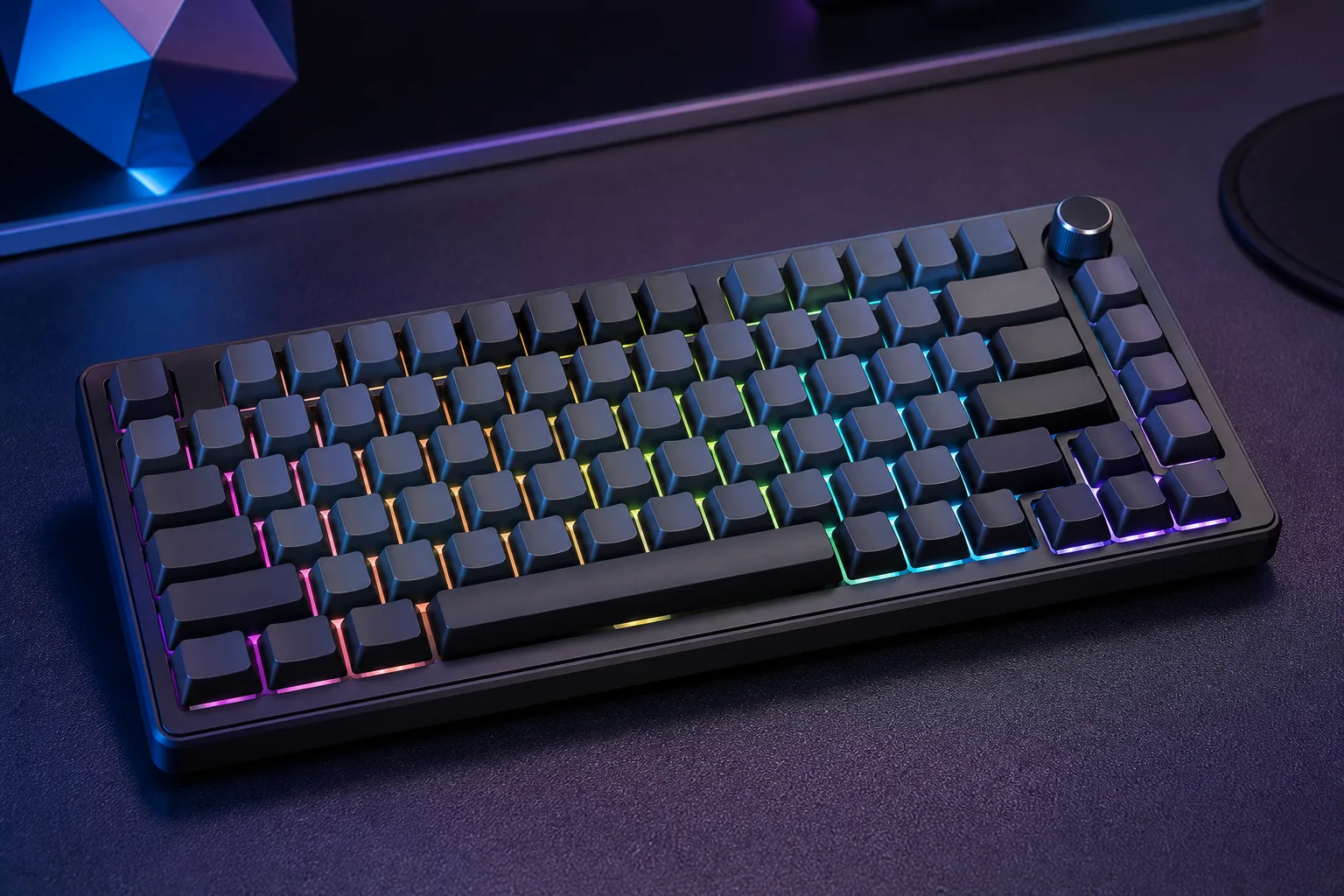
AULA F75 Pro Wireless Mechanical Keyboard: Features and First Impressions
A compact keyboard usually asks you to give something up: arrow keys, wireless freedom, customisation, or a proper control knob. The AULA F75 Pro keyboard tries to avoid that bargain with an 81-key, 75% layout that keeps the arrow cluster while adding RGB lighting, hot-swap sockets, and three ways to connect.
For shoppers, the appeal is straightforward. You get a pre-built enthusiast-style keyboard rather than a kit that expects you to begin with a soldering iron, yet you still have room to change switches later. Bluetooth 5.0, 2.4GHz wireless, and USB-C wired operation make it suitable for more than one desk.
The listed price is $69.99, reduced from $79.99, and the product is shown as in stock. That is enough feature density to make the board worth investigating, but the real question is whether the ownership experience, software, wireless behaviour, and finish match the specification sheet.

AULA F75 Pro Keyboard Overview: Layout, Connections, and Core Specifications
The 75% arrangement is the practical middle ground here. With keys, it is more compact than a full-size keyboard but does not remove the dedicated arrow keys that make spreadsheets, document editing, and many games less awkward. A 60% board can save more space, but you would usually reach for function-layer shortcuts or a separate navigation solution.
Connectivity is the other major attraction. You can use Bluetooth 5.0, a 2.4GHz wireless connection, or USB-C wired mode. The listing says the keyboard can connect with up to five devices and switch using shortcut keys or a side button. That means stored pairings or selectable connections, not five simultaneously active computers.
Listed compatibility includes PCs, laptops, tablets, mobile phones, PlayStation systems, and Xbox systems. Console support can depend on the individual console and game, so check your particular setup rather than treating the broad compatibility statement as a guarantee.
A rechargeable 4000mAh battery is specified, but no exact hours-per-charge figure is given. Other headline features include LEOBOG Reaper switches, pre-lubricated stabilizers, side-printed PBT keycaps, RGB backlighting, programmable macros, N-key rollover, and a Windows-key lock.
AULA F75 Pro Keyboard Typing Feel and Customization
The hot-swap base supports both 3-pin and 5-pin switches. For a beginner, that matters more than it might sound: you can change the typing character without desoldering the original switches or learning a repair process first. You can begin with the supplied configuration and experiment one switch at a time.
The installed LEOBOG Reaper switches are described as pre-lubricated, smooth, fast responding, and capable of a creamy mechanical sound. Those are product-description claims rather than measurements, so your result will depend on the switch batch, keycap fit, room acoustics, and how much sound you personally enjoy.
Pre-lubricated stabilizers should help the larger spacebar, Enter, Shift, and Backspace keys feel less dry and less rattly. They cannot promise a perfectly silent or perfectly uniform board; stabilizer tolerances vary, and the spacebar is often the first key that reveals a keyboard’s weaknesses.
If you plan to customise it, confirm that replacement switches are compatible with 3-pin or 5-pin hot-swap sockets. Also check the intended plate and PCB design, since electrical compatibility alone does not guarantee that every switch will fit cleanly.
Build, Sound, and Internal Dampening
The internal design is built around an extended integrated silicone pad, PCB single-key slotting, and five layers of filling between the PCB, positioning plate, and switches. These parts are intended to improve resilience, reduce empty cavity noise, and make the keystroke feel softer and more elastic than a bare, rigid assembly.
The description calls the result solid and thocky. Treat that as a target, not a guarantee. Dampening can lower the pitch and reduce hollowness, but it can also make the acoustic character less crisp for someone who prefers a bright, sharply defined mechanical sound.
When you test the board, start with the spacebar and modifier keys rather than tapping only the letter keys. Listen for spring ping, stabilizer rattle, or an uneven return. Then compare USB-C and wireless use if you notice a change in perceived responsiveness or sound; the product information does not provide polling-rate or latency figures.
RGB Lighting, Knob Controls, and Software Functions
The RGB system offers a stated 16.8 million colours, preset lighting effects, adjustable brightness and speed, single-colour choices, and the option to turn the backlight off. That gives you a fairly broad range of desk lighting, from restrained single-colour illumination to more animated gaming effects.
The driver adds music-rhythm lighting effects. These depend on the software rather than being separate, independent hardware effects, so you should not assume they will work identically on every operating system.
The multifunction knob has two modes. In gaming mode, rotation changes brightness and a press changes lighting effects; in office mode, rotation adjusts volume and a press controls play or pause. Hold it for approximately five seconds to switch modes.
The F75 driver also handles macros and custom single-key or key-combination functions. Test the software on your operating system before relying on a macro during competitive play. N-key rollover and Windows-key lock are useful gaming controls, but the supplied specifications do not establish polling rate, wireless latency, or onboard memory.
Side-Printed PBT Keycaps and Everyday Usability
The side-printed PBT keycaps are a visual departure from conventional top legends. Their characters are positioned on the sides so the RGB light can shine through the lettering from the edges, giving the gradient-black board a cleaner top surface and a more deliberate gaming appearance.
The listing describes double-injection moulding and heat sublimation, along with resistance to fading and sweat and a softer feel than traditional keycaps. PBT is generally chosen for durability and texture, but the exact feel still depends on the keycap profile and finish.
There is a small usability cost. If you frequently look down while typing, side legends may take longer to read, and a family member or colleague unfamiliar with the layout may need an adjustment period. Before ordering replacement caps, check the included profile and spacing, as stem type, profile, and nonstandard key sizes can affect aftermarket fit.

AULA F75 Pro Keyboard: Wireless Performance, Battery Expectations, and Device Switching
Each connection mode has a sensible role. Use 2.4GHz for a desktop or gaming setup where you want wireless convenience, Bluetooth 5.0 for a tablet or phone, and USB-C when you want a direct connection or need to charge the board. A mixed-device household can benefit from moving between a gaming PC, work laptop, and mobile device without keeping three keyboards on the desk.
The five-device claim should still be checked against the manual and driver behaviour. Pairing several devices is not the same as switching instantly every time, and the product information does not explain the exact battery indicator, charge time, or runtime with RGB enabled versus disabled.
Set it up methodically:
- Charge the keyboard fully before judging battery performance.
- Pair your primary device and confirm that shortcuts behave as expected.
- For 2.4GHz, place the receiver in a clear USB port rather than behind a crowded metal chassis.
- Record connection stability over a normal work or gaming session before depending on wireless mode.
If you need a wired-only tournament arrangement, assess the USB-C mode on its own merits. Wireless convenience is not proof that every connection mode has identical performance.
What Customers Are Saying About the AULA F75 Pro Keyboard
The supplied product information does not include the live Amazon star rating, total review count, or a confirmed publication-date snapshot. Because those figures are absent, it would be misleading to claim that buyers rate the AULA F75 Pro keyboard at a particular score or to present an unverified pattern as established customer evidence.
That limitation matters because the most useful ownership questions are not answered by the specification sheet alone: whether the spacebar rattles, whether the receiver stays connected, whether Bluetooth pairing is straightforward, whether the battery indicator is trustworthy, and whether the driver works reliably on your operating system. The available data also does not confirm the number of reviews mentioning key chatter, loose keycaps, inconsistent lighting, or difficult device switching.
Before purchasing, inspect the live listing on the day you order. Prioritise recent verified-purchase comments with photographs or videos, then compare one-star complaints with the repeated themes in four- and five-star reviews. A single pairing anecdote is less persuasive than several recent reports describing the same receiver problem, especially if they come from the same revision or seller listing.
If the review record is thin or mixed, use the return terms as part of your decision. Test the larger keys, all connection modes, the knob, lighting controls, and software during the return window rather than assuming the advertised feature list describes every unit’s practical behaviour.
How the AULA F75 Pro Keyboard Compares With Alternatives
The Royal Kludge RK84 is the closest kind of alternative to investigate if you want a compact wireless mechanical board with a similar enthusiast-friendly purpose. Your comparison should focus on the exact current version: layout, included switches, connection modes, hot-swap implementation, software quality, and the live street price. RK84 specifications and customer feedback can vary by revision, so do not assume one listing represents every version.
The Keychron V1 takes a different route. It is a wired-focused 75% enthusiast platform, so it may be more attractive if firmware support, a larger customisation community, or a direct desktop connection matters more to you than Bluetooth and 2.4GHz freedom. It is not a like-for-like wireless substitute.
Current competitor prices and ratings were not supplied with this brief, so they should be checked on the live listings rather than invented here. The buying decision is clearer than a superficial scorecard: choose the AULA if you prioritise tri-mode flexibility, the stated 4000mAh battery, included switches, RGB controls, and the knob; choose an alternative if its software ecosystem, firmware support, or established community better matches how you plan to customise.
Who Should Buy the AULA F75 Pro Keyboard?
This keyboard is strongest for someone who wants an 81-key 75% board, three connection modes, a dedicated control knob, RGB, and hot-swap capability in one compact package. It is also a sensible entry point for a first custom-style keyboard because the switches and stabilizers arrive installed, while the socket design leaves room for gradual experimentation.
For gaming, the retained arrow keys are useful, and N-key rollover, Windows-key lock, programmable macros, and adjustable lighting cover the everyday controls many players want. None of those features establishes tournament-grade latency, so highly competitive users should test wired performance and look for independently confirmed connection specifications.
It also suits a mixed office setup if you regularly move between a desktop, laptop, tablet, and phone. It is less suitable if you require a full-size number pad, a documented battery runtime, advanced firmware customisation, a genuinely silent board, or a proven professional esports connection profile.
Use this short decision process: confirm that a 75% layout suits your work, decide whether wireless convenience matters more than a wired enthusiast platform, review the current customer comments, and verify driver and console compatibility for your devices before ordering.
Is the AULA F75 Pro Good Value at $69.99?
At $69.99, the keyboard is listed $10 below its stated original price of $79.99. That reduction may change, so treat it as the current listing position rather than a permanent saving. The useful question is not whether the board is automatically the cheapest option, but how much practical hardware is included for the money.
You are paying for tri-mode connectivity, a rechargeable 4000mAh battery, hot-swap sockets, LEOBOG Reaper switches, PBT keycaps, RGB lighting, layered dampening, and a control knob. Wireless flexibility is the main value argument for someone sharing a keyboard between devices; hot-swap support matters more to a hobbyist; and the knob plus compact layout may appeal to a desk-focused gamer or office user.
Before placing an order, check the current price, seller, return terms, live rating and review count, and whether the wireless receiver is included in the box. Confirm that the driver is available for your operating system and that your intended computer, phone, tablet, or console is supported.
On the confirmed specifications alone, the feature concentration is attractive. The missing runtime details and unavailable review snapshot prevent a stronger claim about long-term value, so the sensible conclusion is conditional: it is a promising, well-equipped entry point if its wireless and software behaviour meet your needs, but you should validate those two areas during the return period.
Pros and Cons
Pros
- 81-key 75% layout retains arrow keys in a compact footprint.
- Bluetooth 5.0, 2.4GHz wireless, and USB-C wired connectivity offer flexible setup choices.
- Hot-swap support for 3-pin and 5-pin switches avoids soldering.
- Includes pre-lubricated LEOBOG Reaper switches and stabilizers.
- 4000mAh rechargeable battery, RGB lighting, programmable macros, and a multifunction knob provide a strong feature set.
- Side-printed PBT keycaps and layered internal dampening give the board a distinctive design and typing character.
Cons
- The listing does not provide an exact battery-runtime estimate, charging time, or detailed battery indicator information.
- Software support and macro reliability may vary by operating system, and the product data does not establish advanced firmware features or onboard memory.
- Side-printed legends can take time to read, while replacement keycap compatibility may be limited by profile and nonstandard key sizes.
- There is no confirmed review rating or review count in the supplied product data, so long-term reliability cannot be independently assessed here.
- The keyboard is not suitable if you need a number pad, a guaranteed silent typing experience, or a documented professional esports connection profile.
Final Verdict
Key Takeaways
- The 81-key 75% layout keeps arrow keys while saving desk space, and the board adds a knob, RGB, hot-swap sockets, and three connection modes.
- Pre-installed LEOBOG Reaper switches, lubricated stabilizers, and layered dampening make it approachable for a first custom-style keyboard.
- The 4000mAh battery is a useful headline feature, but no precise runtime, charging-time, or RGB endurance figure is supplied.
- At the listed price, the feature concentration is appealing, but you should confirm live reviews, software support, receiver inclusion, and device compatibility before ordering.
Frequently Asked Questions
Is the AULA F75 Pro keyboard worth buying?
Yes, if you want a compact board with arrow keys, wireless flexibility, RGB, a knob, and switch replacement without soldering. The missing runtime specification and unconfirmed customer-review record mean you should check the live listing carefully before ordering.
What connection modes does the AULA F75 Pro keyboard support?
It uses Bluetooth 5.0, 2.4GHz wireless, and USB-C wired connectivity. The listing says it can connect with up to five devices and switch between them, although that should not be interpreted as five devices being actively controlled at the same time.
Can you change the switches on this keyboard?
Yes. Its hot-swap base is described as supporting both 3-pin and 5-pin switches, so you can replace compatible switches without soldering. Check the replacement switch, plate, and PCB specifications before buying.
Does the AULA F75 Pro work with consoles?
The listing states that the board works with PCs, laptops, tablets, mobile phones, PlayStation systems, and Xbox systems. Console compatibility can depend on the console, game, connection mode, and adapter, so verify your particular setup before relying on it.
Disclosure: As an Amazon Associate, I earn from qualifying purchases.