

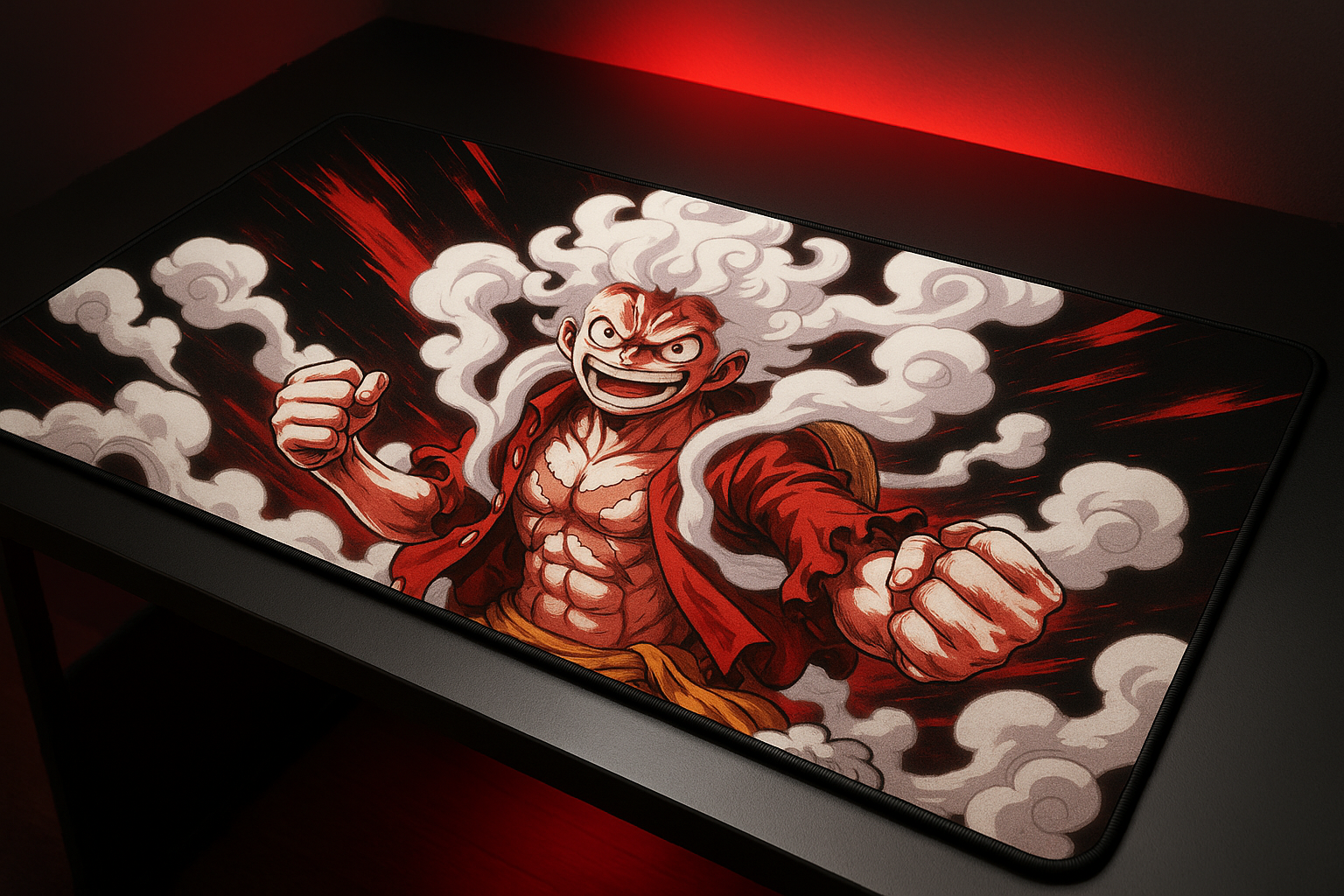
Product Overview: Head Case Designs Luffy Gear Desk Mat
A small mouse pad can leave your keyboard half on the desk and your mouse drifting into whatever happens to be beside it. The Luffy Gear desk mat addresses that awkward arrangement by turning the active part of your workstation into one broad surface, while adding a graphic that looks more like part of a gaming setup than an afterthought.
The exact product is the Head Case Designs Officially Licensed One Piece Luffy Gear Poster Graphic Art XL Gaming Office Desk PC Keyboard Mouse Mat Pad. The listing identifies it as officially licensed, Made in the USA, and intended for gaming desks, home offices, and professional workspaces. It is also marketed as a desk protector and organisational surface, not merely as a place for a mouse.
The practical proposition is clear: you are paying for generous coverage, One Piece artwork, a low-friction surface, spill and scratch protection, and a rubber underside. That is a different purchase from a basic black mouse pad. In 2026, this model is most relevant if you want your desk accessory to show some personality. If you want RGB lighting, pronounced cushioning, or an unobtrusive neutral finish, another type of desk mat will probably suit you better.

Size, Layout, and Desk Coverage
The mat’s listed footprint is 37.4 by 15.75 inches, equivalent to 900 by mm. In practical terms, that is a wide horizontal work area for a gaming laptop, wireless keyboard, wireless mouse, and a few everyday items. It should make a compact keyboard-and-mouse arrangement feel less cramped than a conventional mouse pad, especially when you prefer broad arm movement.
Its listed thickness is 0.16 inches. That profile should sit relatively discreetly beneath a keyboard and avoid creating a dramatic ledge at the front of a desk. It should also be easier to slide into a drawer or store when not needed, but you should not expect the yielding wrist support associated with a much thicker desk pad.
One continuous surface has a small organisational advantage: the keyboard and mouse no longer sit across a narrow gap between two separate accessories. The mat also creates a defined boundary for the active workstation, while shielding the desk beneath from ordinary wear.
- Clear the intended area completely.
- Check the available width and front-to-back clearance, including monitor stands and the desk edge.
- Place the mat so the whole keyboard-and-mouse zone sits on it rather than straddling the edge.
This is not a full desk cover. Surrounding desk space will remain visible, and a shallow desk may not leave enough front-to-back room for comfortable placement.
Surface Performance of the Luffy Gear Desk Mat
Head Case Designs describes the surface as low-friction and easy-gliding. In use, that should translate to smoother cursor travel, fewer abrupt stops, and enough room for wide mouse movements during games, editing, or ordinary office work. A keyboard, laptop, and mouse can share the same visual and physical plane, which often feels tidier than a separate mouse pad placed beside a keyboard.
There is a limit to what the supplied information proves. No tested speed or control rating, sensor-compatibility list, independent tracking result, or measured glide comparison is provided. So the sensible reading is that the surface is designed for smooth movement, not that it has been proven superior for a particular mouse sensor or competitive game.
The same surface has to serve different habits. A casual player may value the uninterrupted space and Luffy artwork more than minute differences in stopping control. A competitive player who makes rapid, precise corrections may prefer a specialist pad whose balance between glide and control has been measured or widely documented. Neither preference makes the other wrong; they simply assign weight to different features.
After installation, test the mat in four ways: make ordinary cursor movements, perform slow precision work, sweep the mouse broadly, and type normally while the keyboard is positioned on the surface. Give each task enough time to reveal whether the glide feels too fast, too resistant, or comfortable for your routine.
Non-Slip Rubber Base and Desk Stability
The durable non-slip rubber base is intended to keep the mat in position during heavy typing and active gaming. That matters more on a large mat than on a small mouse pad: if the underside grips poorly, movement can become noticeable across a much wider area, and the keyboard may shift along with it.
Still, “non-slip” should not be read as an absolute guarantee of immobility. Desk material, dust, crumbs, moisture, folds, and the force of your mouse or keyboard movements all affect contact. A clean, smooth desktop gives the underside a better chance of doing what it is designed to do.
- Wipe the desk before placing the mat.
- Remove dust and debris from the underside.
- Lay it flat without folds or trapped objects.
- Avoid wet surfaces and unusually rough or heavily textured desks.
- Place the keyboard centrally, then test typing and mouse movement before arranging the rest of the setup.
The slim construction should also reduce the sensation of climbing onto a thick platform at the desk edge. The trade-off is comfort: a thinner mat generally feels less padded under the wrists than a deeply cushioned alternative.
Heat Resistance, Spill Protection, and Cleaning
The listing calls the construction heat resistant and presents it as suitable for placing ordinary coffee or tea nearby. That should help reduce the chance of heat rings and everyday surface damage to the desk. It does not establish safe contact with extremely hot cookware, heaters, open flames, or other intense heat sources; those should remain well away from the mat.
The more useful protection is probably everyday protection. The mat is intended to help shield the desktop from scratches, minor spills, and general wear while giving your keyboard and mouse a defined area. It may preserve the desk beneath, but it should not be treated as a sealed barrier against every quantity or type of liquid.
Cleaning instructions are simple: the description says to wipe the mat with a damp cloth. That supports routine spot cleaning, not an assumption that it is machine washable or completely waterproof.
- Move or unplug nearby electronics.
- Lift the item that caused the spill.
- Blot liquid instead of spreading it across the graphic.
- Wipe the affected area with a lightly damp cloth.
- Allow the surface to dry fully before returning equipment.
When reading current buyer comments, look for evidence about repeated wiping rather than one successful clean-up. The useful questions are whether the artwork remains attractive, whether edges curl after unpacking, and whether liquid appears to reach the desk underneath.
Official One Piece Artwork and Build Quality
The officially licensed One Piece Luffy Gear graphic is the reason this mat stands apart from a plain black or grey desk surface. For a fan, the artwork can make the workstation feel deliberate: the accessory contributes to the room’s identity instead of disappearing beneath the keyboard. For a neutral office, however, that same prominence may be more visual commitment than you want.
The product description also states Made in the USA. That is a manufacturing detail, not automatic proof of superior longevity. The factors that will determine long-term satisfaction are the material itself, print sharpness, colour stability, edge finish, and how securely the top and rubber layers remain bonded.
Because the graphic spans a wide rectangle, compare it with the rest of your setup before buying. Consider the colour of your keyboard, the monitor frame, desk finish, lighting, and any other anime or gaming accessories. A strong character design can look excellent as a focal point, but it can also compete with a crowded desk.
The supplied details do not confirm whether the edges are stitched, sealed, or finished by another method. You should therefore avoid assuming a particular edge construction. Current customer photographs and comments are more useful here, particularly reports about scratches, fading, colour accuracy, differences from the listing image, or peeling around the perimeter.

What Customers Are Saying About the Luffy Gear Desk Mat
A responsible review cannot manufacture a star rating or pretend to have seen a review count that was not supplied. The product information available for this review does not include a displayed rating, the number of verified purchases, or a confirmed body of customer comments. That means there is no defensible numerical buyer-consensus claim to report for this listing at publication.
Before treating the Luffy Gear desk mat as a settled recommendation, open the current listing and sort comments by recent purchases where possible. Look for repeated observations about print likeness, desk coverage, mouse glide, keyboard stability, rubber grip, edge behaviour, packaging, and cleaning. One enthusiastic unboxing photograph can establish that a buyer liked the design; it cannot establish how the mat behaves after months of use.
Give greater weight to detailed comments that describe time in service. Reports about fading, curling, rubber odour, peeling, surface wear, or difficulty flattening are more informative than a short “looks great” review. Also watch for negative patterns: a slippery underside, insufficient thickness, cramped placement, inconsistent printing, or an unpacking smell that persists.
Review volume and recency matter in 2026. A high score backed by only a few brief comments offers less confidence than a similar score supported by numerous detailed and recent purchases. If the listing still lacks meaningful feedback, fans may accept that uncertainty for the artwork, while competitive players should wait for clearer comments about tracking, glide, and movement.
How the Luffy Gear Desk Mat Compares With Large Gaming Mats
The most obvious comparison is the SteelSeries QcK Gaming Mouse Pad – XXL Thick Cloth – Sized to Cover Desks. It belongs to a specialist gaming-mat family with a long-standing performance reputation, whereas the Head Case Designs model leads with licensed character artwork and mixed-use desk coverage. You should compare surface feel, overall footprint, thickness, edge treatment, and current price rather than assuming that either is automatically better.
The Logitech Desk Mat is another useful reference point. Its appeal is generally more understated and office-friendly, which may work better if you want the desk accessory to blend into a professional room. The Head Case Designs option is the more expressive choice: the Luffy Gear image is a feature, not background decoration.
Exact competitor specifications, ratings, and prices should be checked on their live listings at the time of purchase. They vary by size, finish, seller, and promotion, so assigning unverified figures here would create false precision. Pay particular attention to whether an alternative offers a thicker cushion, stitched borders, different dimensions, or clearer performance information.
The decision is fairly simple. Choose the Head Case Designs mat for official One Piece artwork and a broad keyboard-and-mouse workspace. Choose a specialist option such as the QcK when competitive play and established surface characteristics matter more than licensed graphics. Choose the Logitech Desk Mat when you want a quieter office appearance and a less character-led visual style.
Who Should Buy This Desk Mat?
This mat makes the most sense for One Piece fans who want the desk itself to carry the theme. It also suits anime-focused gaming rooms, streamers, students, and home-office users who prefer a single keyboard-and-mouse surface rather than two separate accessories. The graphic can add personality without requiring another wall decoration or a larger room makeover.
It is particularly practical for a wireless keyboard and wireless mouse used alongside a laptop or desktop. Keeping those devices together can make a workstation feel more unified, while the protective surface gives a finished desk some separation from everyday handling. The value is partly functional and partly decorative.
You should be cautious if your desk is very shallow, if RGB lighting is a requirement, or if you want a thick pad that cushions your wrists. Competitive players should also be cautious because the supplied details offer no laboratory-tested glide or tracking measurements. A minimalist buyer may simply dislike having a large character graphic dominate the workspace.
Use this decision process:
- Check the available desk area and the position of stands and edges.
- Decide whether the artwork suits the room.
- Consider whether the slim profile gives enough comfort.
- Read current buyer comments for print quality, grip, and flatness.
- Compare the listed price with plain and performance-focused alternatives.
Price, Availability, and Overall Value at $36.95
The supplied listing shows a price of $36.95 and availability as In Stock. For that amount, you receive the licensed Luffy Gear desk accessory described as having a low-friction surface, rubber base, heat resistance, damp-cloth cleaning, and protection against everyday desk scratches and minor spills.
Whether that is good value depends on what you want the purchase to accomplish. If you need only the cheapest possible mouse surface, a plain mat may cost less. If you want specialist gaming measurements, thicker cushioning, or a different edge treatment, another product may make more sense. But if you want a functional wide desk mat and officially licensed One Piece artwork in the same item, the price is easier to justify.
That distinction matters because part of the purchase is decorative or collectible value. You are not paying solely for mouse movement. You are also paying for a character design that can make a gaming corner or office feel personal, and that premium will be meaningful to a committed fan but not to someone who prefers equipment to disappear into the background.
Before publication or checkout, confirm that the displayed $36.95 remains current, check whether shipping and taxes change the total, and compare any temporary discounts on alternatives. On the information available, this product merits consideration for a One Piece fan seeking a unified keyboard-and-mouse workspace. The final decision should depend on current buyer evidence for print quality, rubber grip, and long-term flatness.
Pros and Cons
Pros
- Officially licensed One Piece Luffy Gear artwork gives the mat a distinctive anime-focused appearance.
- Large continuous surface accommodates keyboard-and-mouse setups and helps protect the desk from scratches and minor spills.
- Low-friction surface is designed for easy mouse movement across a broad area.
- Non-slip rubber base is intended to improve stability during typing and gaming.
- Made in the USA is stated as part of the product description.
- Damp-cloth cleaning is straightforward for routine spot maintenance.
Cons
- The available product details do not provide an independent tracking test, speed/control rating, or sensor-compatibility list.
- The slim profile may feel less cushioned than thicker gaming mats or wrist-supporting desk pads.
- The listing does not confirm whether the edges are stitched or otherwise sealed.
- The current product information supplied here includes no verified star rating or review count, so long-term buyer confidence is difficult to assess.
- The graphic styling may be too prominent for a minimalist office or neutral desk setup.
Final Verdict
Key Takeaways
- The main attraction is the combination of officially licensed One Piece artwork and a broad keyboard-and-mouse workspace.
- The low-friction surface and rubber underside should suit general gaming and office work, but there are no supplied independent performance measurements.
- Its slim construction is practical for ordinary desks, though it will not provide the cushioning of a thick wrist-supporting pad.
- The available listing information does not include a verified rating or review count, so you should inspect current buyer comments for print quality, flattening, grip, and durability.
- At $36.95, the value depends heavily on how much you want the Luffy Gear design rather than a plain performance-focused mat.
Frequently Asked Questions
Will the Luffy Gear desk mat fit a keyboard and mouse together?
The mat is intended to hold a keyboard, mouse, laptop, and other desk essentials on one continuous surface. Its listed footprint is broad horizontally, but it is not a full desk cover, so you should confirm that your available depth is sufficient before ordering.
Is this desk mat suitable for competitive gaming?
The description says the surface is low-friction and easy-gliding, which suggests smooth everyday cursor movement. However, no independent glide, control, tracking, or sensor-compatibility measurements are supplied, so competitive players should treat the performance claim as descriptive rather than laboratory-tested.
Can you machine-wash the Luffy Gear desk mat?
Routine cleaning is described as wiping the surface with a damp cloth. That supports spot cleaning, but the supplied details do not establish that the mat is machine washable or fully waterproof.
How much does the Head Case Designs Luffy Gear desk mat cost?
It is listed at $36.95 and shown as In Stock in the supplied product information. Checkout shipping, tax, and later price changes should still be checked before purchase.
Disclosure: As an Amazon Associate, I earn from qualifying purchases.
