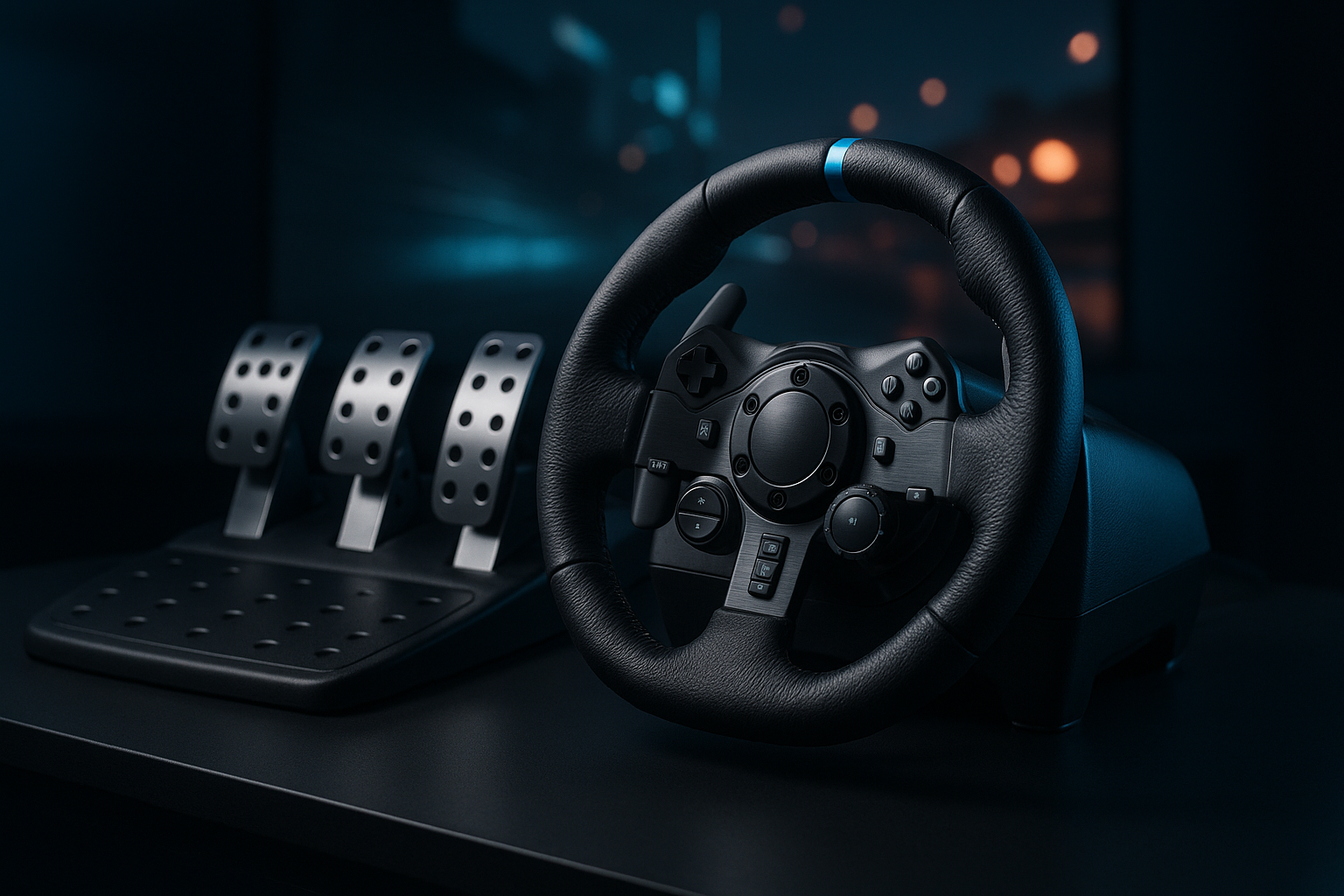
Logitech G920 Racing Wheel and Pedals: Quick Overview
A controller is convenient until you try to hold a long corner with a thumbstick and realise how much of driving has become guesswork. The Logitech G920 asks whether a $199.99 racing wheel, reduced from $299.99, is worth the extra hardware and setup in 2026. Based on the listed specifications, it is a serious step up in physical control for Xbox and PC players, though not an effortless plug-in replacement for every kind of racing game.
The product is listed as the Logitech G920 Racing Wheel and Pedals for Xbox X|S/Xbox One/PC, with availability shown as In Stock. Its proposition is straightforward: force feedback, a hand-stitched leather wheel cover, 900-degree rotation, and pressure-sensitive pedals in one driving setup.
That platform detail comes first because it can save you an expensive mistake. The G920 is optimized for Xbox X|S, Xbox One, and PC; it is not designed for reliable PlayStation-console use. If you play on Xbox or PC and want more physical feedback than a gamepad offers without stepping into a higher-priced enthusiast arrangement, the listed feature set makes the G920 worth investigating.

What You Get and How the Logitech G920 Is Built
The core package is the racing wheel and its pedal unit. The product description does not say that the Driving Force Shifter is included, so treat that accessory as optional rather than quietly adding it to your expected setup. Desk or rig mounts are also described as accessories, not confirmed inclusions in the basic package.
The wheel has a hand-stitched leather cover. That is a materials and tactile detail, not proof of a particular long-term comfort or wear outcome, but it does distinguish the contact surface from a basic plastic wheel. The pedal unit is described as sturdy, with adjustable pedal faces and pressure-sensitive nonlinear brake behaviour. Those features matter more when you intend to practise controlled braking than when you mainly play short arcade races.
Another specific materials detail is that 52% of the plastic parts in the G920 use certified post-consumer recycled plastic. That figure should be read as a construction fact, not as evidence of stronger force feedback or better racing performance.
Before buying, answer three practical questions. Where will the wheel sit? What will stop the pedal base from moving? And do you actually want the optional shifter, with the extra space and cost it brings? A wheel can be excellent on paper and still become an unused object if setting it up feels like rearranging the room every time.
Logitech G920 Key Features Explained
The Logitech G920’s features are easiest to judge by the driving problems they address. Rotation range affects how you turn, force feedback affects what you feel through the rim, and the pedal unit affects how precisely you slow the car. Platform support determines whether any of those features are useful on the system you own.
The supplied description confirms the major controls but does not provide a motor strength figure, torque measurement, dimensions, connection details, or a supported-game list. Those omissions matter when you compare listings. Do not convert a marketing description into a specification that was never supplied.
For a buyer, the sensible order is simple: confirm that your platform and games support wheel input, establish a stable mounting plan, then evaluate how much of the G920’s physical control you will use. The product is more persuasive for simulation-style driving than for someone who wants to launch a game and steer immediately with no calibration.
900-Degree Rotation and Helical-Gear Steering
The wheel rotates 900 degrees lock-to-lock, which equals two and a half turns. That gives you enough range for hand-over-hand steering through broad corners, closer to the movement you associate with a road car than the small thumb movements of a controller. It can be particularly useful when you are balancing a car through a long bend or correcting a slide gradually rather than snapping from one direction to another.
The trade-off is speed of response. A wide rotation range can feel natural in road-car and simulation games, but it may seem slower in an arcade racer designed around quick steering. That is not a defect; it is a mismatch between control design and game style.
Logitech describes the steering system as using helical gearing for smoother, quieter steering than a rougher gear feel. That is a design claim, not a measured noise rating, so customer feedback is the right place to investigate how the wheel sounds in an actual room.
For setup, begin with the game’s default steering calibration. Turn the wheel slowly from side to side and confirm that the centre is recognised correctly before changing sensitivity or dead zones. If you adjust several settings at once, you won’t know whether the improvement came from the wheel’s calibration or from the game profile.
Force Feedback and Driving Feel
Force feedback is the feature that gives the wheel a physical conversation with the game. Instead of receiving steering information only from a thumbstick or buttons, you feel resistance and changes in the rim as the simulated car turns, loses grip, or responds to the road. That can make a corner easier to interpret, provided the game supports the feature properly.
The supplied information does not identify the motor type, torque figure, or effect library. It would be misleading to invent any of those details, and force feedback can feel different from one game to another even on the same hardware.
When you read current customer comments, look for repeated answers to four questions: does the feedback reveal useful detail, does the wheel return to centre reliably, is gear noise acceptable, and does the experience change significantly between games? One report of a faulty unit is not the same as a broad design criticism.
Use one familiar racing title as your first test. Start with moderate force-feedback strength, drive a few low-speed corners, and then increase or reduce the setting one step at a time. The strongest setting is not automatically the most informative; excessive resistance can make small corrections tiring and obscure the feel you are trying to learn.
Pressure-Sensitive Pedals and Adjustable Pedal Faces
The included pedal unit uses a pressure-sensitive nonlinear brake. In practical terms, the brake is intended to respond through increasing travel and pressure rather than behaving like an on/off switch. That gives you more scope to distinguish a gentle slowdown from a hard braking zone, especially once you stop relying on the controller’s automatic feel.
The pedal faces are adjustable, which gives you a way to refine foot position. It does not promise that every position will suit every driver, and adjustment is useful only if the base itself stays put.
For your first session, place the pedal base against a wall or secure it to a compatible surface. Calibrate the brake inside the game, then press it progressively at low speed. If the travel feels too sensitive or too long, change the game’s brake sensitivity only after confirming that the pedal is being detected consistently.
The description confirms an included pedal unit but does not provide enough detail here to make additional claims about its exact pedal count or layout. That restraint is useful: check the current listing photographs and package contents if a particular clutch or manual-shifting arrangement is essential to you.
Xbox, PC, and PlayStation Compatibility
The supported platforms are Xbox X|S, Xbox One, and PC. The G920 is optimised for those systems and is not intended for reliable PlayStation-console use. This is not a minor compatibility footnote; it should be the first filter in your buying decision.
PC support still requires a game-by-game check. Wheel input, force-feedback behaviour, calibration menus, and control assignments can differ between titles. A wheel that is suitable for one PC racing game may need additional configuration in another, so avoid assuming that the platform label guarantees identical behaviour everywhere.
Use this pre-purchase sequence:
- Identify the console or PC on which you will play.
- Write down the racing games you actually intend to use.
- Confirm wheel and force-feedback support for each game.
- Decide where both the wheel and pedal unit will be placed.
If you own a PlayStation, stop at the first step and choose a compatible alternative instead. The G920’s Xbox and PC positioning is clear, but it cannot compensate for the wrong console ecosystem.

What Customers Are Saying About the Logitech G920
The supplied listing information does not include a current star rating or review count, so a responsible review cannot claim that the Logitech G920 is rated a particular number out of five or that a specific number of buyers reported an issue. It also does not provide a live, verifiable sample of customer comments. That limits what can honestly be said about recurring praise or complaints.
The right way to read the live review record is to separate confirmed product attributes from user-dependent outcomes. Comments praising the leather-covered wheel, 900-degree rotation, or adjustable pedal faces relate directly to listed features. Reports about steering feel, brake calibration, gear noise, mounting stability, software behaviour, and long-term reliability need repeated evidence from buyers using the same Xbox or PC platform and similar games.
When you inspect the listing, prioritise recent verified-buyer comments and look for patterns rather than the most dramatic single story. A defective-unit report may point to quality control or shipping, but several independent reports describing the same behaviour are more useful for judging the design. Likewise, a complaint about a pedal moving on a smooth desk may describe a mounting problem rather than a defect in the pedal sensor.
Pay special attention to comments that name the game and platform. Simulation controls have a learning curve, and a buyer expecting controller-like instant response may judge the same 900-degree steering range differently from someone practising road-car driving. Until the live record supplies actual numbers and repeated themes, the safest conclusion is that customer sentiment remains an item to verify, not a statistic to manufacture.
Setting Up the Logitech G920 for Better Results
Give yourself a clear first-use sequence rather than changing every setting at once. The aim is to establish that the hardware is centred, detected, and physically stable before you judge the driving feel.
- Clear a stable mounting area and place the wheel where your hands can turn without striking nearby objects.
- Connect the wheel and pedal unit according to the supplied instructions.
- Install or open the relevant platform software if your system or game requires it.
- Open one supported racing game and confirm that the wheel centres correctly.
- Calibrate steering and pedals inside that game before touching advanced settings.
- Set force feedback to a moderate level, test braking at low speed, and change one setting at a time.
A desk setup is sensible if you want to put the wheel away between sessions, but the surface must resist movement. The pedal base needs comparable resistance against sliding. If you race frequently and leave the equipment assembled, a permanent rig may make more sense, although the product information does not specify the dimensions or mounting requirements you would need to plan one.
Only after the core setup works should you consider expansion. The Driving Force Shifter and desk or rig mounts can extend the arrangement, but they add cost, space requirements, and another decision to the setup.
Who Should Buy the Logitech G920?
The Logitech G920 is aimed at Xbox X|S, Xbox One, and PC players who want a more physical control method than a standard controller. Its familiar car-style wheel, force feedback, wide rotation range, and pressure-sensitive pedal control give a beginner room to improve without demanding that you start with a professional-grade cockpit.
It is best suited to road-car simulations and racing games that properly support wheel input. You are likely to appreciate it more if steering placement, cornering corrections, and controlled braking matter to you. In exchange, you must accept calibration and the time it takes to secure the equipment.
The poor-fit cases are just as clear. A PlayStation owner should not choose the G920, and a buyer with no stable place for the wheel and pedals may find the hardware frustrating. If you prefer arcade racing with minimal configuration and the immediate convenience of a controller, the added physicality may not justify the footprint.
Use this decision test: can you name the Xbox or PC games you will play, do you have a stable mounting plan, and do you care about realistic steering input? If the answer to all three is yes, the G920 is more likely to earn its place. If not, keep the controller or investigate a simpler arrangement before spending $199.99.
How the Logitech G920 Compares With Alternatives
The Thrustmaster TMX is the most direct alternative to investigate because it occupies a similar Xbox-and-PC buying conversation. Compare the two listings for current steering design, pedal configuration, included accessories, price, and recent reviews rather than assuming that a similar platform label means an identical experience. The live listing should decide any claim about its present features or value.
The PXN V9 is another name to investigate if you want a lower-cost entry point or a broader accessory-style package. Verify its actual Xbox, PC, and game compatibility for the titles you own; product families and regional listings can differ, and a wider package is not useful if your preferred games do not support its controls properly.
The G920 remains attractive because its listed feature set is easy to understand: 900-degree rotation, a leather-covered wheel, force feedback, pressure-sensitive nonlinear braking, and adjustable pedal faces, with explicit Xbox and PC positioning. That clarity can matter more than a long accessory list when you are choosing a first serious wheel.
Compare total ownership cost, not only the headline wheel price. Add the cost of a shifter if you want one, any mounting hardware, shipping, and the time required to configure each alternative. A cheaper wheel that needs accessories you would otherwise buy immediately may not remain cheaper.
Is the Logitech G920 Good Value at $199.99?
The listed price is $199.99, down from an original price of $299.99. That is a $100 reduction, or roughly one-third below the original listed price. The reduction is meaningful, but a discount alone does not make a racing wheel good value if you will rarely use it.
The better calculation is what you receive in the core setup: the wheel, force feedback, 900-degree steering, leather cover, and pressure-sensitive pedals. For an Xbox or PC player who would otherwise buy a wheel and pedals separately, that combination is more persuasive than the percentage saving by itself.
The sale price makes the strongest case when you already have compatible racing games, expect to play often, and can mount the equipment securely without buying a large amount of additional hardware. The calculation changes if you also need the Driving Force Shifter, desk or rig mounts, or a dedicated place to leave the setup assembled.
The supplied listing shows the G920 as In Stock at $199.99, but promotional prices and availability can change. Check the live listing immediately before purchase, then compare the complete total with the Thrustmaster TMX and PXN V9. The G920 is worthwhile when its driving feel will be used, not merely because the crossed-out price looks dramatic.
Final Buying Guidance for Xbox and PC Racers
The Logitech G920 Racing Wheel and Pedals for Xbox X|S/Xbox One/PC is worth serious consideration for Xbox and PC racers who want more realistic steering and braking at the listed $199.99 price. Its case depends less on novelty than on whether you will use a wheel often enough to benefit from physical feedback and progressive control.
Make the platform decision first. PlayStation shoppers should choose another model rather than hoping a workaround will provide a dependable experience. Xbox and PC buyers should then confirm that their specific games support wheel input and force feedback, because those details can shape the experience as much as the hardware.
Next, decide where the wheel and pedal unit will live, and be honest about how often you will assemble them. A secure location and willingness to calibrate are part of the ownership experience. If you can name compatible games, have a stable arrangement, and expect regular use, the G920’s move beyond controller gaming is easier to justify.
Before you commit, check your games, confirm the mounting location, compare the current total cost with the Thrustmaster TMX and PXN V9, and decide whether the richer driving feel is worth the additional setup. That is the real question behind the $199.99 price.
Pros and Cons
Pros
- 900-degree lock-to-lock rotation supports natural hand-over-hand steering on wide corners.
- Force feedback adds physical steering resistance and information about vehicle or road behavior.
- Hand-stitched leather cover offers a more substantial surface than a basic plastic wheel.
- Pressure-sensitive nonlinear brake and adjustable pedal faces provide scope for more controlled braking.
- Optimized for Xbox X|S, Xbox One, and PC.
- 52% of the plastic parts use certified post-consumer recycled plastic.
Cons
- Not designed for reliable PlayStation-console use, so platform choice is decisive.
- The wheel and pedals require a stable mounting arrangement and more setup than a controller.
- The optional Driving Force Shifter and desk or rig mounts increase the total cost and space required.
- The supplied product data does not include a motor torque figure, dimensions, supported-game list, or verified customer rating and review count.
Final Verdict
Key Takeaways
- The Logitech G920 is a $199.99 Xbox and PC racing setup with force feedback, 900-degree rotation, a hand-stitched leather-covered wheel, and pressure-sensitive pedals.
- Its strongest case is for players who want more physical steering and braking control than a gamepad provides without moving to a more advanced enthusiast setup.
- Platform compatibility must be checked first: the G920 is optimized for Xbox X|S, Xbox One, and PC, not PlayStation consoles.
- The sale price is more persuasive when you already have compatible games and a secure place for the wheel and pedal unit.
- Before ordering, confirm game support, mounting arrangements, optional-accessory costs, and the current listing price and stock status.
Frequently Asked Questions
Does the Logitech G920 work with PlayStation?
The Logitech G920 is optimized for Xbox X|S, Xbox One, and PC. It is not designed for reliable PlayStation-console use, so PlayStation owners should choose a wheel made for that platform instead.
How far does the Logitech G920 rotate?
Yes. The wheel rotates degrees lock-to-lock, equal to two and a half turns. That range supports hand-over-hand steering on wide corners and is better suited to road-car and simulation-style driving than a controller.
Does the Logitech G920 include a shifter?
The listed package includes the racing wheel and pedal unit. The Driving Force Shifter and desk or rig mounts are optional accessories, so check the listing carefully if you want a manual-shifting setup or permanent mounting.
Is the Logitech G920 worth $199.99?
At the listed price, it is most convincing for Xbox and PC players who will use wheel-supported racing games regularly, have somewhere secure to mount it, and want more realistic steering and braking than a controller provides. It is less suitable if you want instant plug-in convenience or have no stable mounting surface.
Disclosure: As an Amazon Associate, I earn from qualifying purchases.